Magic Heidi
 Die bexio Alternative für Schweizer Einzelfirmen
QR-Rechnungen, Belege, MWST und Bankabgleich in einer App, ohne Lohn-, Lager- und Team-Module, die du allein nie brauchst. Gratis starten, ohne Kreditkarte.
bexio ist für Teams gebaut.
Du arbeitest allein.
Eine Grafikerin in Winterthur, ein IT-Berater in Bern, ein Physiotherapeut in Luzern: Sie schreiben ein paar Rechnungen pro Monat, sammeln Belege und rechnen allenfalls die MWST ab. Dafür braucht es kein KMU-System mit Lohnläufen und Lagerverwaltung.
Weniger zahlen, weniger klicken
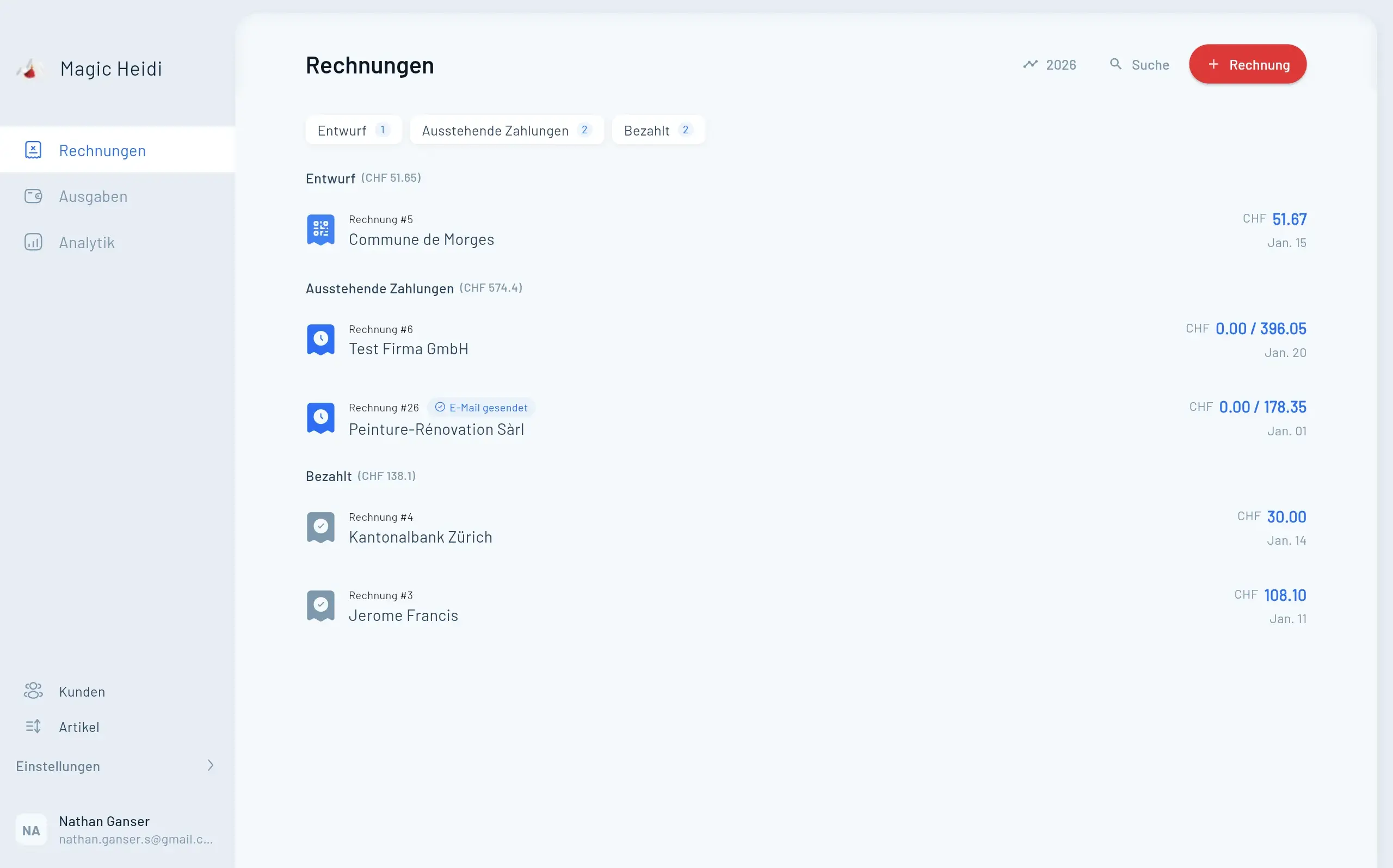
bexio ist eine gute Software für KMU mit Angestellten. Wenn du allein arbeitest, zahlst du dort für Lohnbuchhaltung, Lager und Mehrbenutzer-Rechte mit, die du nie öffnest. Magic Heidi deckt genau das ab, was eine Einzelfirma im Alltag braucht.
- 💸CHF 205 weniger pro Jahr
CHF 299 inkl. MWST statt CHF 504 zzgl. MWST für bexio Advanced im Jahresabo. Monatlich CHF 39 statt CHF 52.
- 📱Echte Apps für jedes Gerät
iPhone, Android, Mac, Windows und Web. Bei bexio gibt es nur bexio Go (Mobile) und Web.
- ⚡33 statt 69 Klicks
Onboarding, erste Rechnung und erster Beleg in unserem eigenen Test mit beiden Programmen.
Belege erfassen, ohne Monatslimit
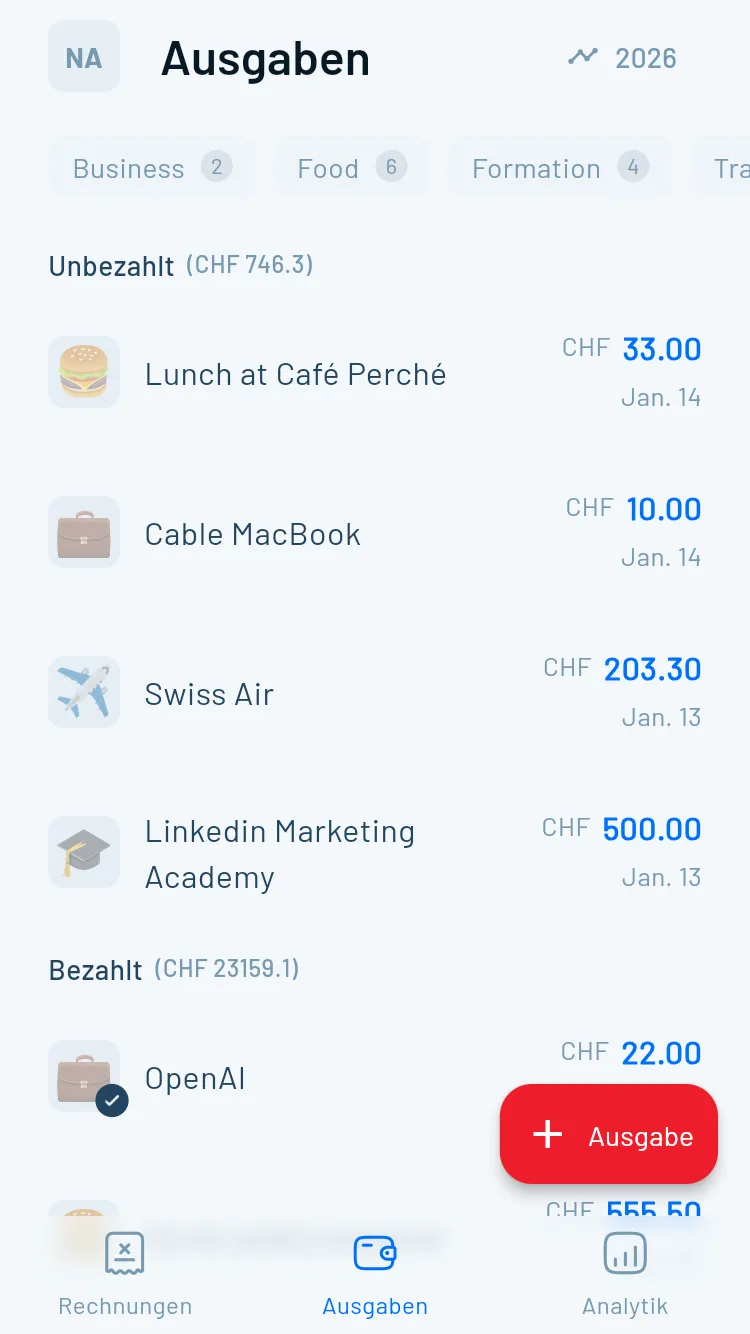
Bei bexio Advanced sind 50 KI-Scans pro Monat enthalten, bei Optima 100. In Magic Heidi fotografierst du jeden Beleg, so oft du willst (Fair Use). Die KI erkennt Betrag, Datum, MWST, Lieferant und Kategorie, auch bei Belegen in Euro.
Buchhaltung, ganz ohne Kontenplan
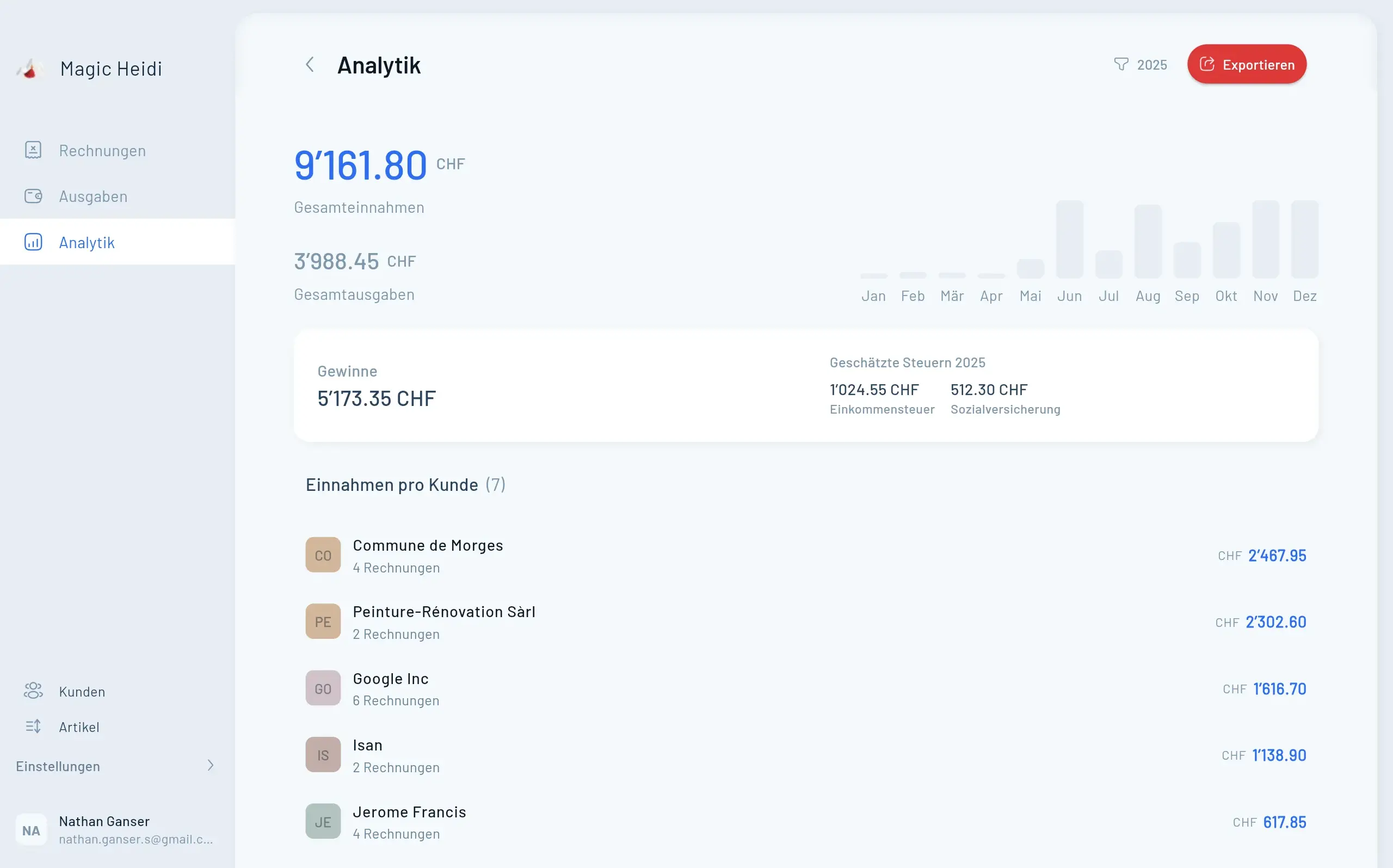
Keine Buchungssätze, kein Einrichtungsprojekt, kein Buchhaltungswissen nötig. Die Zahlen für MWST und Steuererklärung entstehen nebenbei.
Rechnung schreiben
QR-Rechnung mit deinem Logo, MWST korrekt ausgewiesen, per E-Mail direkt an den Kunden. Offerten werden mit einem Klick zur Rechnung.
Beleg fotografieren
SBB-Billett, Software-Abo, Geschäftsessen: Die KI liest Datum, Betrag, MWST und Lieferant aus. Belege kannst du auch per E-Mail weiterleiten.
Bank verbinden
Bankkonto direkt verbinden oder CSV aus dem E-Banking hochladen, bezahlte Rechnungen werden automatisch zugeordnet.
Zahlen übergeben
MWST-Summen pro Periode und ein Jahresexport als ZIP, CSV oder PDF für Steuererklärung und Treuhänder.
Was du für dein Geld tatsächlich bekommst
bexio Basic wirkt günstig, enthält aber keine Aufwendungen, kein E-Banking und keinen KI-Scan. Der faire Vergleich für Freelancer ist deshalb bexio Advanced. Quelle: bexio.com/pakete-preise, Stand: September 2026. bexio-Preise zzgl. MWST, Magic Heidi inkl. MWST.
| Funktion | Magic Heidi | bexio Basic | bexio Advanced |
|---|---|---|---|
| Preis im Jahresabo | CHF 299/Jahr (CHF 24.99/Mt.), inkl. MWST | CHF 420/Jahr (CHF 35/Mt.) | CHF 504/Jahr (CHF 42/Mt.) |
| Preis monatlich | CHF 39, jederzeit kündbar | CHF 45 | CHF 52 |
| Gratis-Version | ✓ 3 Rechnungen & 3 Belege (insgesamt), ohne Zeitlimit | ✗ 30 Tage Test | ✗ 30 Tage Test |
| QR-Rechnungen & Offerten | ✓ Enthalten | ✓ Enthalten | ✓ Enthalten |
| Ausgaben erfassen | ✓ Enthalten | ✗ Nicht enthalten | ✓ Enthalten |
| KI-Belegscan | ✓ Unbegrenzt (Fair Use) | ✗ Nicht enthalten | ⚠ 50 Scans/Monat |
| Artikel- bzw. Produktverwaltung | ✓ Enthalten | ✗ Nicht enthalten | ✓ Enthalten |
| Bankanbindung | ✓ Direkte Bankanbindung, plus CSV/Excel-Import | ✗ Nicht enthalten | ✓ E-Banking-Schnittstelle |
| Native Apps | ✓ iPhone, Android, Mac, Windows, Web | ⚠ bexio Go (Mobile) und Web | ⚠ bexio Go (Mobile) und Web |
| Buchhaltungsart | ⚠ Einnahmen-Ausgaben-Rechnung | ✓ Doppelte Buchhaltung | ✓ Doppelte Buchhaltung |
| Lohnbuchhaltung | ✗ Nicht enthalten | ✗ Nicht erhältlich | ⚠ + CHF 7/Mt. pro Mitarbeiter |
Die Fragen, die sich jeder bexio-Nutzer stellt
Ehrliche Antworten, bevor du deine Buchhaltung umstellst.
Reicht eine Einnahmen-Ausgaben-Rechnung?
Für Einzelfirmen mit weniger als CHF 500'000 Umsatz ja. Art. 957 OR verlangt dann nur Buch über Einnahmen, Ausgaben und Vermögenslage. Doppelte Buchhaltung ist erst darüber Pflicht.
Kommt mein Treuhänder damit klar?
Ja. Du gibst ihm einen eigenen Zugang oder exportierst Rechnungen, Belege und MWST-Zahlen als ZIP, CSV oder PDF. Dein Treuhänder erhält strukturierte Daten statt einer Schachtel Quittungen.
Wofür bleibt bexio besser?
Angestellte mit Lohnbuchhaltung, Lager, Projekte mit Zeiterfassung im Team und doppelte Buchhaltung. Brauchst du das, bleib bei bexio.
Wo liegen meine Daten?
Gespeichert auf Servern in Zürich, unter Schweizer Datenschutzrecht.
Und wenn ich MWST-pflichtig bin?
Mehrere MWST-Sätze pro Rechnung, MWST-Erfassung bei jedem Beleg und Summen pro Periode für die Abrechnung im ESTV-Portal.
Und wenn es nicht passt?
Gratis-Plan ohne Zeitlimit, monatlich kündbar, 30-Tage-Geld-zurück-Garantie und jederzeit ein vollständiger Datenexport als ZIP. Deine Daten gehören dir.
Von grossen Tools zu Magic Heidi gewechselt
Was Selbständige sagen, die vorher andere Programme genutzt oder getestet haben.
“Vieles probiert und schlussendlich bei Magic Heidi hängen geblieben. Überzeugt durchgehend und leicht und intuitiv zu bedienen. Sehr happy”
“Habe diverse vergleichbare Apps getestet bevor ich ein Abo gemacht habe. Habe mich dann klar für Magic Heidi entschieden. Sehr intuitiv nutzbar und reduziert auf das Wesentliche.”
“Ich habe früher mit anderer Buchhaltungssoftware gearbeitet, meist teurer und mit unendlich vielen Funktionen, die ich nicht brauchte. Magic Heidi ist wirklich auf Selbständige und Freelancer zugeschnitten, mit einer einfachen Oberfläche.”
“Bei jeder Frage bekam ich innert Minuten eine Antwort per Mail und Telefon, und ich werde nicht bedrängt wie bei den anderen grossen Buchhaltungsplattformen. Schweizer Effizienz!”
Die 6 besten bexio Alternativen in der Schweiz
Das hängt von deiner Firmengrösse ab. Für KMU mit Angestellten, Lohnbuchhaltung und Treuhänder-Mandat bleibt bexio oft die richtige Lösung. Für alle anderen gibt es sechs Schweizer Tools mit klaren Spezialgebieten.
Magic Heidi: Freelancer & Einzelfirmen →
Rechnungen, Belege, MWST und Bankabgleich in einer App, mit KI-Belegscan ohne Monatslimit (Fair Use).
KLARA: lokale Betriebe mit Kasse →
Buchhaltung, Kasse, Online-Shop und Terminbuchung aus einem Haus, stark für Coiffeur, Gastro und Detailhandel.
CashCtrl: Buchhaltungs-Profis →
Doppelte Buchhaltung in der Cloud, beliebt bei Treuhändern, setzt Wissen zu Kontenplan und Soll/Haben voraus.
AbaNinja: Gelegenheits-Rechnungen →
Teil von Swiss21 (Abacus-Umfeld), Gratis-Plan mit 1'000 Dokumenten pro Jahr, KI-Belegerkennung 10 pro Monat gratis, unbegrenzt ab Basic.
Banana: Buchhaltung mit Tabellen-Logik →
Doppelte Buchhaltung wie in einer Tabelle, an Schweizer Schulen verbreitet, Rechnungsstellung ist Nebensache.
Smallinvoice: Stunden & Projekte →
Web-Lösung mit Projektverwaltung und Zeiterfassung, Ausgaben erst ab dem Professional-Plan.
bexio Alternativen im Vergleich
Sechs Alternativen und bexio als Referenz, gemäss den offiziellen Preisseiten. Stand: September 2026. Magic Heidi und CashCtrl inkl. MWST, bexio und KLARA zzgl. MWST, bei den übrigen ohne MWST-Angabe.
| Tool | Am besten für | Preis | Gratis-Version | KI-Belegscan | Native Apps |
|---|---|---|---|---|---|
| Magic Heidi | Freelancer & Einzelfirmen | CHF 299/Jahr (CHF 24.99/Mt.), inkl. MWST | 3 Rechnungen & 3 Belege (insgesamt), alle Funktionen | ✓ Unbegrenzt (Fair Use) | iPhone, Android, Mac, Windows, Web |
| KLARA | Lokale Betriebe mit Kasse/Shop | ab CHF 55/Mt. (Jahresabo, zzgl. MWST) | ✗ Nur 30 Tage Test | ✓ In der myKLARA-App | Mobile App (myKLARA), Web |
| CashCtrl | Buchhaltungs-Profis mit Budget | PRO CHF 350/Jahr, inkl. MWST | ✓ Ja, grosszügig | ✗ Nicht angeboten | Browserbasiert |
| AbaNinja | Gelegenheits-Rechnungssteller | Basic CHF 21/Mt. | Starter: 1'000 Dokumente/Jahr | ⚠ 10/Mt. gratis, unbegrenzt ab Basic | Web, dazu AbaClik (mobil) |
| Banana | Buchhaltungs-Kenner | ab CHF 89/Jahr | Bis 70 Buchungen | – | Windows, Mac, Linux, iOS, Android, WebApp |
| Smallinvoice | Stundenabrechnung & Projekte | ab CHF 15/Mt. (Starter) | Bis CHF 70'000 Dokumentsumme, ohne QR-Rechnung | – | Web |
| bexio (Referenz) | KMU mit Angestellten | ab CHF 35/Mt. (Jahresabo, zzgl. MWST) | Nur 30 Tage Test | ⚠ Ab Advanced, 50 bis 100 Scans/Mt. | Mobile App, Web |
bexio Kosten, Erfahrungen und API
Was bexio wirklich kostet, was Nutzer berichten und wann die Integrationen den Unterschied machen.
bexio Kosten: Was du zahlst und was der Wechsel spart
Die bexio Listenpreise laut bexio.com, alle zzgl. MWST (Stand: September 2026):
| Paket | Pro Jahr | KI-Scans/Mt. |
|---|---|---|
| Basic | CHF 420 | keine |
| Advanced | CHF 504 | 50 |
| Optima | CHF 828 | 100 |
| Ultimate | CHF 1'428 | unbegrenzt* |
Preise im Jahresabo (CHF 35, 42, 69 bzw. 119 pro Monat). Bei monatlicher Zahlung kosten die Pakete CHF 45, 52, 79 bzw. 129 pro Monat. *Fair Use ca. 1'000 Scans pro Monat.
Dazu kommen je nach Bedarf Zusatzmodule: Lohnbuchhaltung ab CHF 7/Mt. für einen Mitarbeiter (ab Advanced), bexio Pay CHF 14/Mt. bexio gewährt Neukunden immer wieder befristete Rabatte im ersten Jahr. Ab dem zweiten Jahr gelten die Listenpreise.
Gegenüber bexio Advanced sparst du mit Magic Heidi im Jahresabo CHF 205 pro Jahr (CHF 504 zzgl. MWST zu CHF 299 inkl. MWST), gegenüber Optima CHF 529. Mit der MWST auf den bexio-Preisen ist der Unterschied noch grösser. Die vollständige Aufschlüsselung findest du in unserer Analyse bexio Preise 2026.
bexio Erfahrungen: Was Nutzer berichten
| Plattform | Bewertung | Anzahl |
|---|---|---|
| App Store CH (bexio Go) | 4.5 / 5 | 3'609 |
| Trustpilot | 2.8 / 5 | 321 |
| Capterra CH | 2.2 / 5 | 21 |
Abgerufen: App Store am 23. September 2026, Trustpilot (bexio AG) und Capterra Schweiz am 12. August 2026.
Die App selbst schneidet gut ab, die kritischen Bewertungen drehen sich weniger um die Software als um das Drumherum. Zum Vergleich: Magic Heidi steht im Schweizer App Store bei 4.8 von 5, mit 98 Bewertungen (Stand: September 2026).
Was Nutzer an bexio loben: die direkten E-Banking-Schnittstellen zu Schweizer Banken, den Treuhänder-Zugriff und das grosse Ökosystem an Marktplatz-Integrationen. Als Marktführer mit über 100'000 Kunden geniesst bexio viel Vertrauen.
Was wiederkehrend kritisiert wird: die Preisentwicklung, telefonischer Verkaufsdruck und ein mühsamer Kündigungsprozess laut mehreren Trustpilot-Rezensenten, lange Reaktionszeiten im Support und ein Funktionsumfang, der für Ein-Personen-Betriebe oft grösser ist als nötig.
bexio API & Integrationen
Die bexio API ist eine öffentliche REST-Schnittstelle (developer.bexio.com) und die Basis des bexio Marketplace mit über 100 Drittanbieter-Apps. Ist dein Betrieb um ein Branchentool mit fertiger bexio-Anbindung gebaut, bleibst du besser bei bexio.
Magic Heidi bietet ebenfalls eine öffentliche REST API und Webhooks, dazu fertige Integrationen mit Stripe, SumUp, Shopify, Revolut Business und Zapier.
Transparenz: Magic Heidi ist unser eigenes Produkt. Die Preise stammen von den offiziellen Preisseiten der Anbieter, und wir nennen bei jedem Tool, für wen es die bessere Wahl ist.
Von bexio zu Magic Heidi in vier Schritten
Du musst nicht bei null anfangen und nicht alles auf einmal umstellen. Die Schritt-für-Schritt-Anleitung mit Video und PDF-Checkliste zeigt jeden Schritt, und im kostenlosen 30-Minuten-Onboarding-Gespräch schauen wir deinen Wechsel gemeinsam an.
1. Stichtag wählen
Zum Beispiel den Monatsbeginn. Bist du MWST-pflichtig, idealerweise den Beginn einer Abrechnungsperiode.
2. Aus bexio exportieren
Kontakte als CSV oder Excel exportieren, Rechnungen, Belege und Buchungsjournal als Archiv sichern.
3. Importieren und prüfen
Erst einige Kunden testweise importieren, Felder kontrollieren, dann die ganze Liste.
4. bexio auslaufen lassen
Neue Rechnungen in Magic Heidi stellen. bexio kündigen, wenn die letzte offene Rechnung bezahlt ist.
Ein Preis. Alle Funktionen.
Keine Pakete, keine Scan-Limiten, keine Zusatzmodule. Alle Preise inkl. MWST, CHF 205 pro Jahr günstiger als bexio Advanced (zzgl. MWST).
Gratis
- 3 Rechnungen (insgesamt)
- 3 Belege (insgesamt)
- Alle Funktionen freigeschaltet
- Keine Kreditkarte nötig
Jährlich
- Unbegrenzte Rechnungen
- Unbegrenzte Belege
- Unbegrenzter KI-Belegscan (Fair Use)
- iPhone, Android, Mac, Windows, Web
- Direkte Bankanbindung & Kontoauszug-Import
- Schweizer MWST-Verwaltung
- Prioritäts-Support
Monatlich
- Unbegrenzte Rechnungen
- Unbegrenzte Belege
- Unbegrenzter KI-Belegscan (Fair Use)
- Alle Plattformen inklusive
- Direkte Bankanbindung & Kontoauszug-Import
- Schweizer MWST-Verwaltung
30-Tage-Geld-zurück-Garantie. Teste ohne Risiko.
Häufige Fragen zu bexio Alternativen
Was ist die beste bexio Alternative?
Das hängt von deiner Firmengrösse ab. Für Freelancer und Einzelfirmen ohne Angestellte ist Magic Heidi die fokussierteste Wahl, für lokale Betriebe mit Kasse KLARA, für buchhaltungsaffine Sparer CashCtrl oder Banana, für gelegentliche Rechnungen AbaNinja und für Stundenabrechnung mit Projekten Smallinvoice.
Gibt es eine kostenlose bexio Alternative?
Ja, mit unterschiedlicher Logik: CashCtrl bietet eine grosszügige Gratis-Buchhaltung, AbaNinja im Starter-Plan 1'000 Dokumente pro Jahr, Banana ist gratis bis 70 Buchungen, und Magic Heidi ist gratis für insgesamt 3 Rechnungen und 3 Belege, dafür mit sämtlichen Funktionen inklusive KI-Belegscan, ohne Zeitlimit und ohne Kreditkarte. bexio selbst hat keine dauerhafte Gratis-Version, nur 30 Tage Test.
Was kostet bexio pro Jahr?
Im Jahresabo kostet bexio zwischen CHF 420 (Basic) und CHF 1'428 (Ultimate) pro Jahr, jeweils zzgl. MWST (Stand September 2026). Das günstigste Paket mit Aufwendungen, E-Banking und KI-Belegscan ist Advanced für CHF 504 pro Jahr. Magic Heidi kostet CHF 299 pro Jahr oder CHF 39 monatlich, inkl. MWST.
Ist bexio für Einzelfirmen und Freelancer geeignet?
Es funktioniert, aber du zahlst für KMU-Umfang: ein System mit Lohn-, Lager- und Team-Funktionen, die eine Einzelfirma ohne Angestellte selten braucht. Für Einzelfirmen unter CHF 500'000 Umsatz reicht nach Art. 957 OR eine Einnahmen-Ausgaben-Rechnung. Tools für Freelancer kosten weniger und sind schneller eingerichtet.
Warum vergleicht ihr mit bexio Advanced und nicht mit Basic?
bexio Basic enthält Kontakte, Offerten, Rechnungen und Buchhaltung, aber laut bexio-Preisseite keine Aufwendungen, kein E-Banking, keine Produktverwaltung und keinen KI-Belegscan. Diese Funktionen beginnen bei Advanced für CHF 42/Monat im Jahresabo oder CHF 52 monatlich (zzgl. MWST). Brauchst du nur Rechnungen, kann Basic passen. Für Belege und Zahlungsabgleich ist Advanced der faire Vergleich.
Hat bexio nicht auch einen KI-Scan?
Ja. bexio bietet KI-Belegverbuchung via bexio Go, die Anzahl hängt vom Paket ab: Basic hat keinen Scan, Advanced 50 Scans pro Monat, Optima 100, Ultimate unbegrenzt mit Fair Use von ca. 1'000 pro Monat. Magic Heidi enthält den unbegrenzten KI-Belegscan (Fair Use) in jedem bezahlten Plan.
Lohnt sich der Wechsel von bexio mitten im Jahr?
Ja, wenn du den Stichtag klug wählst. Bist du MWST-pflichtig, wechselst du auf den Beginn einer Abrechnungsperiode, dann bleibt jede MWST-Abrechnung in einem System. Ohne MWST-Pflicht kannst du jederzeit wechseln: Kontakte importieren, neue Rechnungen im neuen Tool stellen, offene bexio-Rechnungen auslaufen lassen. Kündige bexio erst, wenn die letzte offene Rechnung bezahlt ist. Im kostenlosen 30-Minuten-Onboarding-Gespräch planen wir den Wechsel gerne mit dir.
Kann ich meine Kundendaten von bexio importieren?
Ja. Exportiere deine Kontakte aus bexio als CSV oder Excel und importiere sie im Bereich Kunden in Magic Heidi. Teste zuerst einige Kontakte. Wie lange der ganze Wechsel dauert, hängt davon ab, welche Historie du mitnehmen willst. Die Anleitung «Von bexio zu Magic Heidi wechseln» beschreibt jeden Schritt.
Kann mein Treuhänder mit Magic Heidi arbeiten?
Ja. Du kannst deinem Treuhänder einen eigenen Zugang zu deinem Konto geben oder Rechnungen, Belege und MWST-Zahlen als ZIP, CSV oder PDF exportieren. Auch eine zweite Person, zum Beispiel eine Geschäftspartnerin, kann mitarbeiten. Führt dein Treuhänder deine Buchhaltung direkt in bexio, klär den Wechsel vorher mit ihm ab.
Funktioniert Magic Heidi mit meiner Schweizer Bank?
Ja. Die QR-Rechnungen funktionieren mit allen Schweizer Banken und Banking-Apps, etwa UBS, PostFinance, Raiffeisen und den Kantonalbanken. Für den Zahlungsabgleich verbindest du dein Bankkonto direkt oder lädst deinen Kontoauszug als CSV oder Excel hoch, bezahlte Rechnungen werden automatisch zugeordnet.
Welche Funktionen hat bexio, die Magic Heidi nicht hat?
Lohnbuchhaltung (Zusatzmodul ab Advanced, bei Ultimate inklusive), Lagerverwaltung, Projekte mit Zeiterfassung und GeBüV-konformes Dokumenten-Archiv (ab Optima), telefonische Rechtsauskunft (ab Optima), doppelte Buchhaltung, Benutzerrollen für bis zu 25 Personen und einen Marketplace mit über 100 Integrationen. Brauchst du als Einzelfirma nichts davon, deckt Magic Heidi das Nötige günstiger ab.
Hat bexio eine Mobile-App?
Ja. bexio Go deckt in Basic Kontakte, Dokumentenzugriff und Rechnungen ab. Ab Advanced kommt die KI-Verbuchung von QR-Rechnungen und Belegen dazu, ab Optima die mobile Zeiterfassung. Magic Heidi bietet native Apps für iPhone, Android, Mac und Windows sowie eine Web-App, mit einem Login und Synchronisation über alle Geräte.
Hat bexio eine API?
Ja. bexio bietet eine öffentliche REST-API (developer.bexio.com), die Basis für den bexio Marketplace. Magic Heidi bietet ebenfalls eine öffentliche REST API und Webhooks sowie fertige Integrationen mit Stripe, SumUp, Shopify, Revolut Business und Zapier.
Ist Magic Heidi wirklich einfacher als bexio?
Magic Heidi ist für Selbständige ohne Buchhaltungskenntnisse gebaut, ohne Kontenplan und Buchungssätze. In unserem eigenen Test brauchten Onboarding, erste Rechnung und erster Beleg in bexio 69 Klicks, in Magic Heidi 33. bexio ist eine umfassendere Plattform für KMU mit bis zu 25 Benutzern, entsprechend gibt es mehr Menüs und Einstellungen.
Sind meine Daten sicher?
Ja. Alle Daten werden verschlüsselt auf Servern in Zürich gespeichert, unter Schweizer Datenschutzrecht. Die KI-Belegerkennung verarbeitet ein spezialisierter Anbieter in den USA. Mehr dazu auf unserer Seite zur Datensicherheit.
Was passiert, wenn ich kündigen möchte?
Du kannst dein Abo jederzeit in deinem Konto kündigen. Vorher exportierst du alle Rechnungen, Belege und Kundendaten als ZIP-Datei mit allen Originaldokumenten, für deine gesetzliche Aufbewahrung.
Deine nächste Rechnung ohne bexio
Teste Magic Heidi mit deinen nächsten drei Rechnungen. Gratis, ohne Kreditkarte, ohne Zeitlimit.