
5 / 5
I tried bexio first. It felt like I needed a certification to use it. Magic Heidi just works.
Anna K.
Translator, Lugano
Stop paying for features you don't need. Magic Heidi is a top bexio alternative built exclusively for Swiss freelancers. Simpler. Cheaper. AI-powered.
bexio is a solid product for a 15-person SME that needs payroll, warehouse management, and a fiduciary portal. If you're a solo freelancer, you're paying for modules you'll never open. Payroll for a team of one. Inventory tracking when you sell time, not products. Magic Heidi gives you what you actually use, and nothing else.
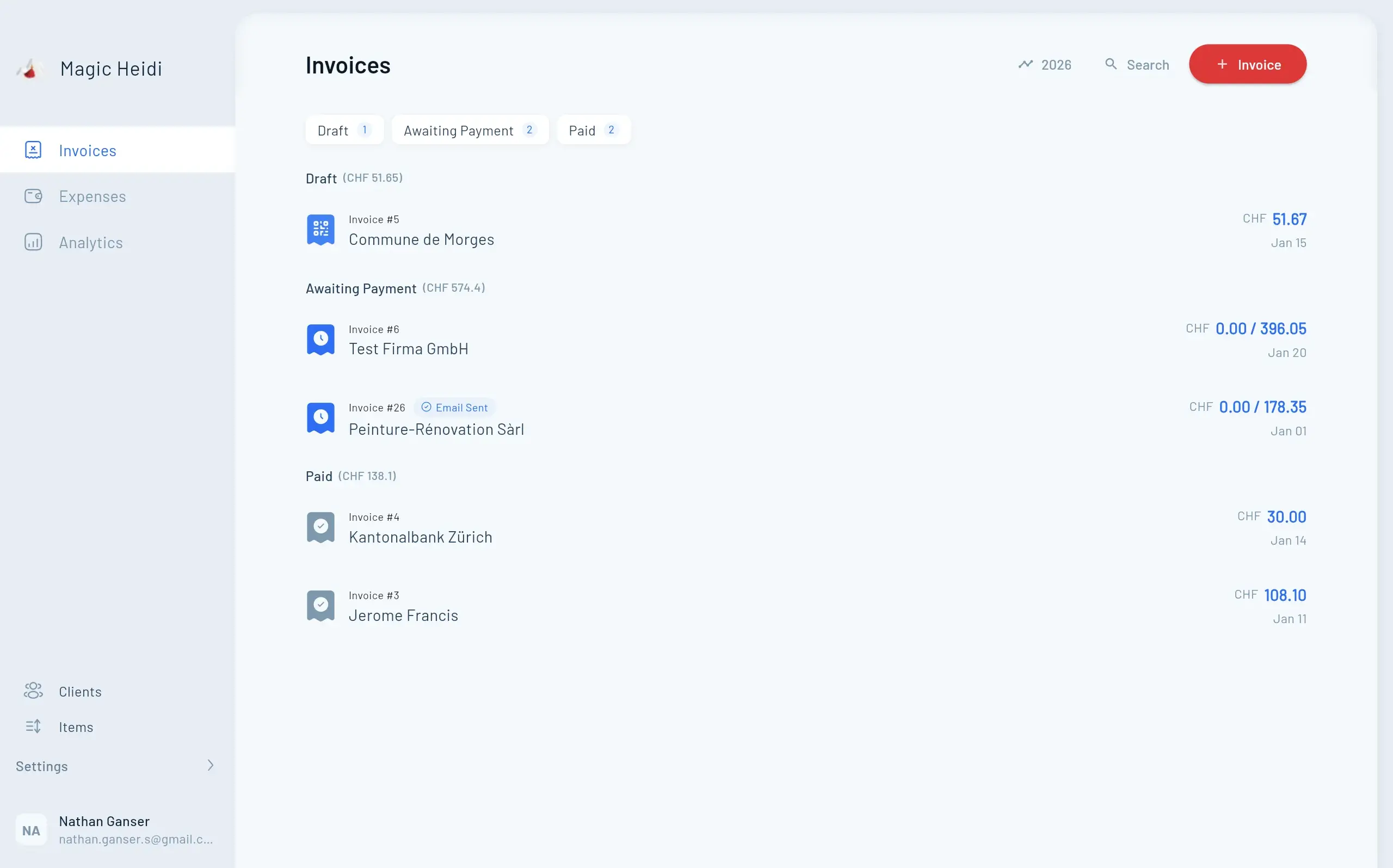
Most invoicing software makes you fill in a profile, configure settings, pick a template, and sit through an onboarding video. Magic Heidi is different. Sign up, enter your client's name and the service you provided, and your first Swiss QR invoice is ready. No setup wizard. No configuration screens. No onboarding course required.
Use these three filters to avoid feature overload and pick the right tool.
Budget or simple tools work best. You don't need advanced workflows yet.
Balanced feature sets. Invoicing, expenses, and VAT covered cleanly.
Deeper workflows and automation start to pay off at this level.
Simplicity first. Magic Heidi is built exactly for you.
Collaboration starts to matter. Consider whether you need shared access.
Team workflows become critical. bexio or similar SME tools may fit better.
A quick comparison of common Swiss options before you commit.
| Software | Magic Heidi | bexio | Banana | CashCtrl |
|---|---|---|---|---|
| Best For | Solo freelancers | SMEs and teams | Desktop bookkeeping | Budget web bookkeeping |
| Monthly Price | CHF 39/mo | From CHF 45/mo | Low annual fee | Free to low monthly |
| Mobile Experience | ✓ Full feature parity | ⚠ Companion app only | ✗ Desktop only | ✗ Desktop only |
| AI Expense Scans | ✓ Unlimited | ⚠ 0–100/mo by plan | ✗ No | ✗ No |
| Swiss QR + VAT | ✓ Yes | ✓ Yes | ✓ Yes | ✓ Yes |
bexio's Basic plan (from March 2026) costs CHF 35/month on annual billing. That looks reasonable, until you check what's been removed. No expense management. No e-banking. No AI scanning. No bank reconciliation. To get those back, you need Advanced at CHF 42–52/month.
No bank interfaces. No automatic reconciliation. No ISO 20022 support.
No supplier invoices. No expense posting. No creditor management.
Zero AI extractions. No QR invoice scanning via bexio Go.
No product management. Can't import from Excel or link to contacts.
No credit card required. 30-day money-back guarantee.
Three options compared so you can see exactly where your money goes.
| Feature | Magic Heidi CHF 39/mo | bexio Basic CHF 45/mo | bexio Advanced CHF 52/mo |
|---|---|---|---|
| E-Banking Interfaces | ✓ Bank statement import | ✗ Not included | ✓ 40+ banks |
| Bank Reconciliation | ✓ Included | ✗ Not included | ✓ Included |
| Expense Management | ✓ Included | ✗ Not included | ✓ Included |
| AI Receipt Scanning | ✓ Unlimited | ✗ Not included | ⚠ 50/month |
| QR Invoice Scanning | ✓ Included | ✗ Not included | ✓ Included |
| Product Management | ✓ Included | ✗ Not included | ✓ Included |
| Swiss QR Invoices | ✓ Yes | ✓ Yes | ✓ Yes |
| VAT Support | ✓ All rates | ✓ All rates | ✓ All rates |
| Accounting + Balance Sheet | ✓ Included | ✓ Included | ✓ Included |
bexio can do a lot. But every feature it has for teams that you don't need is one more menu to navigate, one more reason your simple invoice takes three minutes instead of thirty seconds. Magic Heidi was designed by a Swiss freelancer who got tired of software built for companies.
First invoice in 3 clicks. Swiss QR code generated automatically.
SIX-compliant standard built in from day one. Every rate, every format.
100% feature parity on iOS, Android, Mac, and Windows.
Snap a receipt. AI extracts date, amount, vendor, VAT, and category. No monthly caps.
Three things that make freelance admin frictionless.
No complex setup. No learning curve. Enter your client's details, add the service, and send.
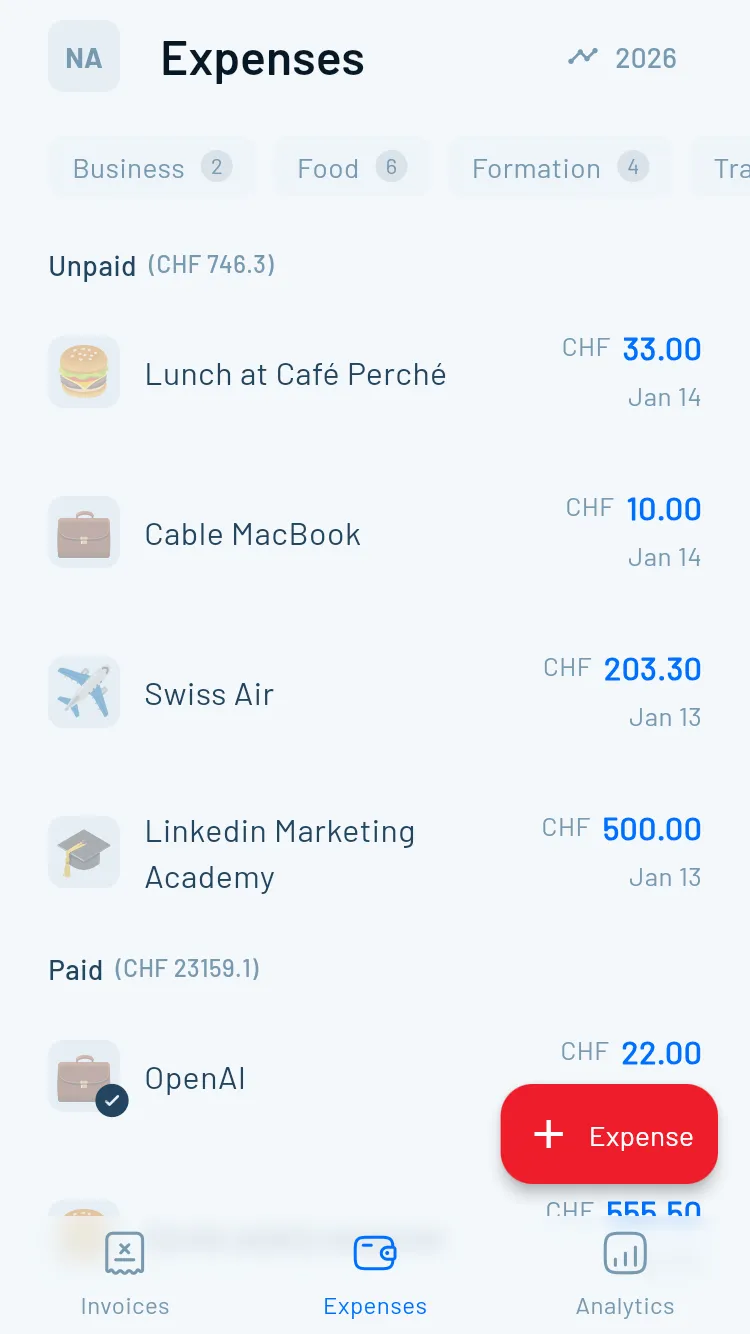
Snap a photo of any receipt — restaurant, train, equipment, co-working space. Magic Heidi's AI extracts the amount, date, vendor, and category automatically.
Every feature available on desktop works identically on iOS, Android, Mac, and Windows. bexio Go's functionality varies by plan tier.
Paper receipts are the enemy of freelancers. Lost. Faded. Forgotten until it's tax season. Snap a photo and Magic Heidi's AI extracts the date, amount, VAT, category, and vendor automatically. No manual entry. No shoebox of receipts to reconstruct in April.
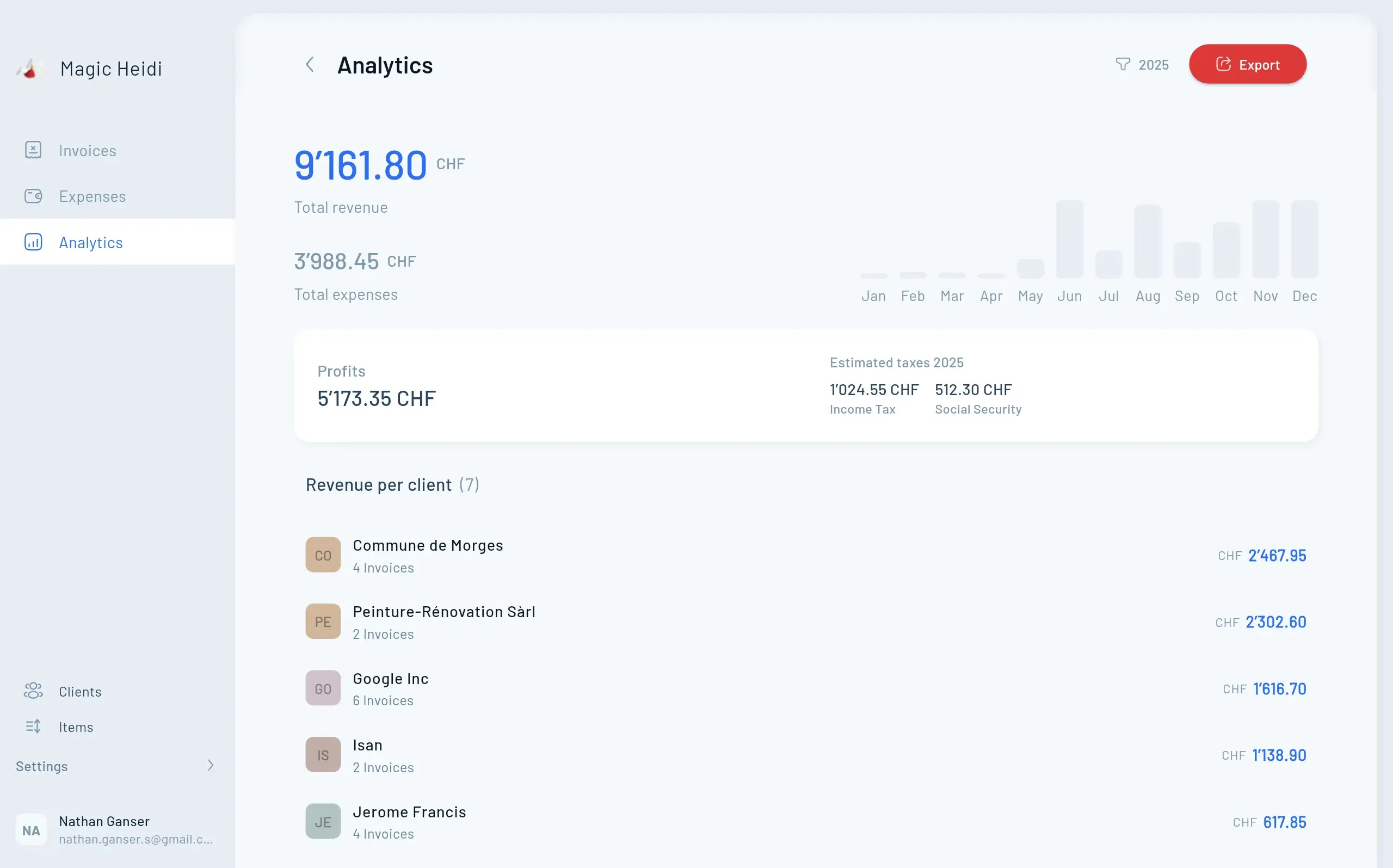
Revenue, expenses, tax obligations — all in one clean dashboard. Know exactly where you stand without needing to build a spreadsheet or call your Treuhänder. Magic Heidi gives you a real-time overview of your freelance business: which invoices are paid, which aren't, how much VAT you owe, and how your year is tracking.
No payroll modules. No warehouse management. Just the tools you use every day.
Swiss QR invoices in 30 seconds. Professional templates included.
Snap receipts. AI does the rest. Unlimited.
Balance sheet, income statement, and tax-ready reports.
All Swiss VAT rates. Both filing methods. Settlement-ready exports.
Import statements from any Swiss bank. Match payments automatically.
Professional offers. Convert to invoice in one click.
Contact management. Import from CSV.
Data hosted in Zürich. Swiss privacy standards.
A lot of invoicing software was built for the US or Germany and retrofitted for Switzerland. The VAT rates are an afterthought. The QR-bill format was added later. Magic Heidi was built from the first line of code for Swiss freelancers.
SIX-compliant invoices. Not a format we added later.
8.1%, 2.6%, and 3.8% — because those are the rates you use.
UBS, PostFinance, Raiffeisen, ZKB. That's where your money is.
DE, FR, IT, EN. Your clients or Treuhänder may speak any of them.
You don't need to start from zero. Three steps and you're running.
Download your customer list as CSV. Export your invoice history for your records.
Create your Magic Heidi account in 30 seconds. No credit card required.
Upload your customer CSV with one click. Start invoicing immediately.
Join 5,000+ self-employed professionals across every canton.
I tried bexio first. It felt like I needed a certification to use it. Magic Heidi just works.
Translator, Lugano
Clean, beautiful design — unusual for invoicing apps. I actually enjoy opening it.
Graphic Designer, Zürich
Finally, accounting software that doesn't make me feel stupid. Switched from bexio and never looked back.
IT Freelancer, Lausanne
As a freelance videographer in Switzerland, it's perfect. Incredibly easy to understand and use.
Freelance Videographer, Bern
Top-notch support. I had a question about bank imports on a Sunday evening and got a helpful reply within hours.
Marketing Freelancer, Basel
Simple, clear, and fast support. The invoices look great. Way better than bexio for solo work.
Consultant, Geneva
Compared to bexio Advanced — the cheapest bexio plan that includes expense management and e-banking. More if you're on Optima or Ultimate.
vs bexio Basic (annual): Save CHF 120/year (CHF 420 to CHF 300). Note: Basic lacks expense management and e-banking, so the comparison isn't fully like-for-like.
vs bexio Advanced (annual): Save CHF 204/year (CHF 504 to CHF 300). This is the comparable plan for freelancers who need full features.
vs bexio Optima (annual): Save CHF 528/year (CHF 828 to CHF 300).
All savings based on annual billing. bexio prices from bexio.com 2026 package page (last checked 27.01.2026). Magic Heidi annual plan: CHF 24.99/mo billed at CHF 300/year.
One plan. All features. 40% less than bexio Advanced — the cheapest bexio plan with expense management and bank integration.
Yes. Magic Heidi fully supports Swiss QR invoices (the Swiss payment standard), all Swiss VAT rates (8.1%, 2.6%, 3.8%), and generates all the documentation you need for your annual Steuererklärung.
Yes. Export your customer list from bexio as a CSV file and import it directly into Magic Heidi with one click. Your contacts will be ready immediately. Most freelancers complete the full migration in under 15 minutes.
Yes. Magic Heidi generates Swiss QR invoices compatible with all Swiss banks including UBS, PostFinance, Credit Suisse, Raiffeisen, ZKB, and cantonal banks. You can import bank statements to match payments to invoices automatically.
bexio's new Basic plan (from March 2026) doesn't include expense management, e-banking interfaces, or AI receipt scanning. For most freelancers who need to track expenses and reconcile bank payments, the cheapest suitable bexio plan is Advanced at CHF 42/month (annual) or CHF 52/month (monthly). That's the most honest comparison. If you only need invoicing and basic accounting, bexio Basic at CHF 35/month (annual) may also work, but Magic Heidi still includes those extra features at a lower price.
Yes. bexio offers AI-powered document scanning via bexio Go, but the number of scans depends on your plan: Basic has no scanning, Advanced allows 50 scans/month, Optima allows 100/month, and Ultimate offers unlimited (fair use around 1,000/month). Magic Heidi includes unlimited AI expense scans on every paid plan.
bexio offers features that Magic Heidi doesn't include: payroll accounting (optional on Advanced, included on Ultimate), stock and warehouse management (Optima+), project management with time tracking (Optima+), GeBüV-compliant document archiving (Optima+), legal advice by phone (Optima+), direct e-banking interfaces with 40+ Swiss banks (Advanced+), and a marketplace with 100+ third-party integrations. Magic Heidi supports bank statement import rather than direct bank interfaces. If you're a solo freelancer who doesn't need payroll, inventory, or project tracking, Magic Heidi covers everything you need at a lower price.
Yes. bexio Go covers contact management, document access, and invoice creation on Basic. On Advanced and up, it adds QR invoice scanning, AI receipt posting, and from Optima, mobile time tracking. Magic Heidi provides full feature parity on mobile — every feature available on desktop works identically on iOS and Android.
We designed Magic Heidi for freelancers with no accounting background. You can create your first invoice in 30 seconds. bexio is a more comprehensive platform aimed at SMEs with up to 25 users, which means more menus and more configuration. The right choice depends on what you actually need.
Yes. All data is hosted in Zürich, Switzerland. We follow Swiss privacy standards and never share your data with third parties.
Email us at hello@magicheidi.ch or call the founder directly. We'll guide you through the migration step by step. You can also visit our help centre or book a free onboarding call.
Cancel anytime with one click. No lock-in, no hidden fees, no complicated cancellation process. We keep your data securely stored for 10 years so you can always come back or export it later.
Try Magic Heidi free today — no credit card required.