 Magic Heidi
 PostFinance E-Banking für Freelancer: Ihr Schweizer Finanz-Setup Guide
Als Schweizer Freelancer jonglieren Sie mit Rechnungen, Ausgaben, MWST-Compliance und Zahlungstracking – und wollen sich eigentlich auf Ihre Arbeit konzentrieren. Das richtige Banking-Setup macht alles einfacher.

Warum Ihr Banking-Setup als Freelancer entscheidend ist
Schweizer Vorschriften verlangen von Selbständigen die Trennung von Geschäfts- und Privatfinanzen. Ab einem Jahresumsatz von CHF 100'000 wird die Handelsregistereintragung obligatorisch. Auch darunter erspart Ihnen eine saubere Buchhaltung Ärger bei der Steuererklärung.
4-6 Stunden monatlich
Durchschnittlicher Zeitaufwand für FinanzenZeit halbieren
Mit automatischem Bank-ImportCompliant bleiben
Schweizer Anforderungen erfüllenPostFinance für Freelancer: Was Sie wissen müssen
PostFinance betreut 2,4 Millionen Schweizer Kunden und bietet Geschäftskonten speziell für Selbständige (Einzelfirma).
Geschäftskonto-Features
Kostenstruktur:
- Geschäftskonto (CHF oder EUR): CHF 5/Monat
- Fremdwährungskonten: CHF 2/Monat
- Startup-Paket: Kostenloses Geschäftskonto für zwei Jahre für neu gegründete Firmen
Wichtigste Funktionen:
- 10 verschiedene Währungen elektronisch verwalten
- Zugang via E-Finance Web-Plattform oder PostFinance Mobile App
- QR-Rechnung scannen und Zahlungen verarbeiten
- Multi-Plattform-Zugang (Computer, Tablet, Smartphone)
- Zwei-Faktor-Authentifizierung für Sicherheit
Brauchen Sie ein Geschäftskonto?
Ja, wenn Sie als Selbständiger registriert sind. Ein Geschäftskonto ist die Grundvoraussetzung für unternehmensrelevante Dienste bei PostFinance. Es vereinfacht auch die Buchhaltung durch Trennung von Geschäfts- und Privattransaktionen.
Wichtiger Hinweis: Obwohl PostFinance die grösste Schweizer Retailbank ist, sind Kundenbewertungen rückläufig (1.2/5 Sterne auf Trustpilot). Ziehen Sie Alternativen wie Kantonalbanken in Betracht oder vergleichen Sie die Servicequalität vor der Entscheidung.
Schweizer Vorschriften für Freelancer 2025
Ihre Pflichten zu kennen, verhindert teure Fehler.
MWST-Registrierungsgrenzen
Sie müssen sich für die MWST registrieren, wenn der Jahresumsatz CHF 100'000 übersteigt, berechnet auf rollierender 12-Monats-Basis.
- Meldung an die Eidg. Steuerverwaltung innerhalb von 30 Tagen nach Überschreitung
- Unterlassene Registrierung führt zu rückwirkenden Steuerforderungen und Bussen
- Normalsatz: 8.1% | Reduzierter Satz: 2.6% | Beherbergung: 3.8%
- Schwelle gilt für weltweiten Umsatz bei ausländischen Unternehmen
QR-Rechnungs-Anforderungen (November 2025)
QR-Rechnungen sind seit 1. Oktober 2022 obligatorisch. Ab 21. November 2025: Nur noch strukturierte Adressen (AdrTp = 'S') sind in QR-Codes erlaubt.
- Rechnungssoftware muss strukturierte Adressformate generieren
- QR-Codes unterstützen jetzt erweiterte Zeichensätze inkl. Umlaute
- Standard-IBANs bleiben vollständig gültig – QR-IBAN optional
- Professionelle Freelancer sollten QR-Codes auf allen Rechnungen einfügen
Buchführungspflichten
Ihr Umsatzniveau bestimmt Ihre Buchhaltungsanforderungen.
- Unter CHF 500k: Einfache Einnahmen-Ausgaben-Rechnung genügt
- Alle Belege und Rechnungen organisiert aufbewahren
- Über CHF 500k: Doppelte Buchhaltung erforderlich
- Bilanz und Erfolgsrechnung müssen erstellt werden
PostFinance mit Ihrer Buchhaltungssoftware verbinden
Manuelle Dateneingabe verschwendet Zeit und verursacht Fehler. Magic Heidi löst das mit CSV- oder Excel-Imports aus PostFinance E-Finance – ohne ISO-20022-Komplexität, ohne CAMT-Dateien.
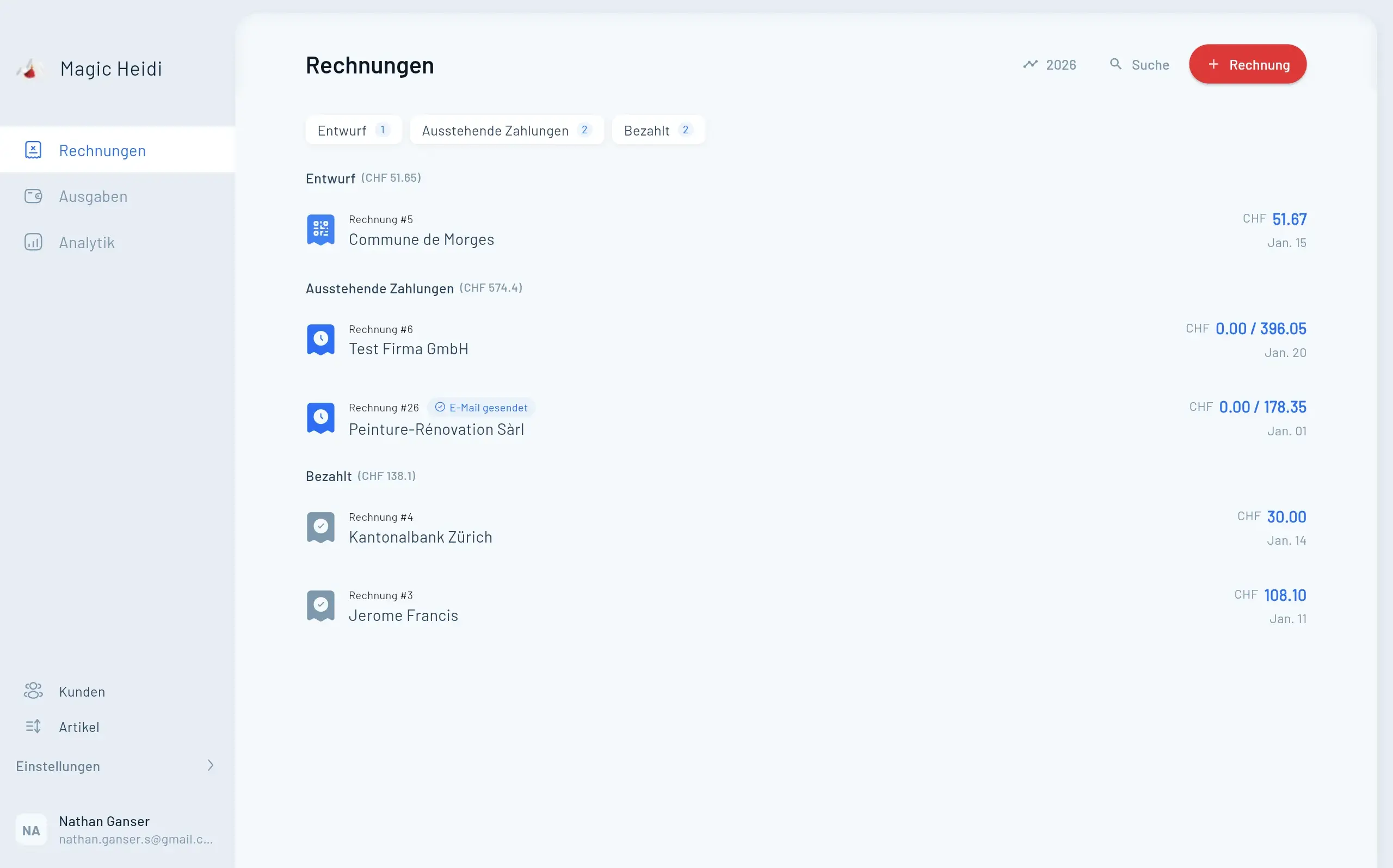
Die Magic Heidi Integration
Magic Heidi ist Buchhaltungssoftware speziell für Schweizer Freelancer. Sie deckt den gesamten Workflow ab – von der Rechnungsstellung über die Spesenerfassung bis zur Bankabstimmung.
- 🧾QR-Code Rechnungen
Konform mit den November 2025 Adressanforderungen
- 🤖KI-Spesenerfassung
Belege fotografieren, Daten automatisch extrahieren
- 🏦Kontoauszugs-Import
Von PostFinance und anderen Schweizer Banken
- 💳MWST & Mahnungen
Automatische Berechnung, Reporting und Zahlungserinnerungen
- Rechnung #3
Magic Heidi
CHF 500
Jan 29
- Rechnung #2
Webbiger LTD
CHF 2000
Jan 24
- Rechnung #1
John Doe
CHF 600
Jan 20
Komplettes Finanzmanagement: CHF 44/Monat
PostFinance Geschäftskonto (CHF 5) + Magic Heidi Software (CHF 39)
Gratis testen
- 3 Rechnungen insgesamt
- 3 Ausgaben insgesamt
- Alle Funktionen freigeschaltet
- Keine Kreditkarte nötig
- PostFinance-Integration testen
- QR-Rechnungen erstellen
Professional
- Unbegrenzte Rechnungen
- Unbegrenzte Ausgaben
- KI-gestützte Spesenerfassung
- Kontoauszugs-Import
- Automatische Zahlungserinnerungen
- Schweizer MWST-Verwaltung
- QR-Code Compliance
- Prioritäts-Support
PostFinance Konto
- Geschäftskonto (CHF oder EUR)
- E-Finance Webplattform-Zugang
- Mobile App inklusive
- QR-Rechnung scannen
- Zwei-Faktor-Authentifizierung
- Multi-Währungs-Support
30-Tage-Geld-zurück-Garantie. Testen Sie risikofrei.
Schritt für Schritt: Kontoauszugs-Import einrichten
- PostFinance Geschäftskonto eröffnen
- Online oder in einer PostFinance-Filiale beantragen
- Unterlagen zur Geschäftsregistrierung einreichen
- CHF-Konto wählen (die meisten Freelancer brauchen nur eine Währung)
- Mit Magic Heidi verbinden
- Magic Heidi Konto erstellen
- Zu Bank-Integration Einstellungen navigieren
- PostFinance als Bankverbindung hinzufügen
- Kontoauszug als CSV oder Excel aus PostFinance E-Finance exportieren
- Datei in Magic Heidi hochladen
- Automatische Zuordnungsregeln konfigurieren
- Regeln zur Kategorisierung wiederkehrender Transaktionen setzen
- Eingehende Zahlungen via QR-Referenz mit offenen Rechnungen verknüpfen
- Ausgabenkategorien für verschiedene Transaktionstypen definieren
- Prüfen und abstimmen
- Importierte Transaktionen wöchentlich überprüfen
- Automatische Kategorisierungen bestätigen
- Regeln basierend auf Ihren Geschäftsmustern anpassen
Zeitersparnis: Was früher 4-6 Stunden monatlich dauerte, schrumpft auf 1-2 Stunden mit automatisierten Imports und Kategorisierung.
Freelancer-Szenarien: Ihr ideales Setup
Sehen Sie, wie verschiedene Freelancer-Typen ihr PostFinance + Buchhaltungssoftware Setup optimieren.
Grafikdesigner
CHF 85k jährlich. Nicht MWST-pflichtig. 15-20 Rechnungen monatlich. PostFinance (CHF 5) + Magic Heidi Gratis-Plan zu Beginn.
IT-Berater
CHF 150k jährlich. MWST-pflichtig. Internationale Kunden. PostFinance + EUR-Konto + Magic Heidi Bezahl-Plan (CHF 39).
Marketing-Beraterin
CHF 550k jährlich. Hohes Transaktionsvolumen. Doppelte Buchhaltung erforderlich. Umfassendere Software wie bexio in Betracht ziehen.
Magic Heidi vs. Andere Lösungen
Buchhaltungssoftware-Optionen für Schweizer Freelancer im Vergleich.
| Feature | Magic Heidi | bexio | Banana | Milchbüechli |
|---|---|---|---|---|
| Monatliche Kosten | CHF 39 | CHF 45-129 | CHF 7+ (jährlich) | Gratis (Basic) |
| Zielgruppe | ✓ Freelancer | ⚠ KMU/Freelancer | ✓ Desktop-Nutzer | ✓ Einfache Erfassung |
| QR-Rechnung 2025 | ✓ Konform | ✓ Konform | ✓ Konform | ✗ Eingeschränkt |
| KI-Features | ✓ Spesenerfassung | ✗ Nein | ✗ Nein | ✗ Nein |
| Bank-Import | ✓ PostFinance+ | ✓ Mehrere Banken | ✓ CSV-Import | ✗ Nur manuell |
| Lernkurve | Minimal | Moderat | Moderat | Minimal |
Häufige Probleme und Lösungen
«Meine Kontoauszüge werden nicht korrekt importiert»
Lösung: Dateiformat prüfen. Magic Heidi liest CSV- und Excel-Exporte – keine CAMT-/XML-Dateien. Wechseln Sie in PostFinance E-Finance zu «Kontoauszüge» und wählen Sie den CSV- oder Excel-Export für die gewünschte Periode.
«Ich habe die CHF 100'000 MWST-Grenze mitten im Jahr überschritten»
Lösung: Eidg. Steuerverwaltung innerhalb von 30 Tagen benachrichtigen. Sofort für MWST registrieren. Ihre Buchhaltungssoftware sollte die geschuldete MWST rückwirkend ab dem Datum der Überschreitung berechnen.
«Kunden beschweren sich, dass meine QR-Rechnungen nicht scannen»
Lösung: Ab November 2025 sicherstellen, dass Ihre Rechnungssoftware strukturierte Adressen generiert (AdrTp = «S»). Magic Heidi auf neueste Version aktualisieren. QR-Codes mit PostFinance App testen, bevor Sie versenden.
«Die automatische Kategorisierung macht Fehler»
Lösung: Regeln monatlich überprüfen und anpassen. Mit der Zeit lernt das System Ihre Muster. Für ungewöhnliche Transaktionen bleibt manuelle Überprüfung nötig – die Automatisierung erledigt 80-90% der Routine-Transaktionen.
KI und Finanzautomatisierung
Schweizer Freelancer profitieren zunehmend von KI-gestützten Finanztools.
OCR-Beleg-Scanning
95%+ Genauigkeit mit automatischer Ausgabenkategorisierung basierend auf Lernmustern.
Predictive Analytics
Cashflow-Analyse und intelligente Zahlungserinnerungen mit optimiertem Timing.
Bald: KI-Steuerberater
Echtzeit-Optimierungsvorschläge, automatisierte MWST-Abrechnung und intelligente Vertragsanalyse.
Was Sie sich merken sollten
Die wichtigsten Punkte für Ihr Schweizer Freelance-Finanzmanagement.
CHF 5/Monat
PostFinance Geschäftskonten bieten solide E-Banking-Features für Freelancer.
50% Zeitersparnis
Automatische Kontoauszugs-Imports halbieren den Buchhaltungsaufwand oder mehr.
QR-Rechnungs-Updates
Strukturierte Adressanforderungen obligatorisch ab November 2025.
CHF 100k Grenze
MWST-Registrierung erforderlich bei Überschreitung dieses Jahresumsatzes.
CHF 39/Monat
Magic Heidi bietet Schweiz-spezifische Buchhaltung – einfacher und günstiger als Mitbewerber.
CHF 44 Total
Komplettes Finanzmanagement: PostFinance (CHF 5) + Magic Heidi (CHF 39).
Bereit, Ihre Schweizer Freelance-Finanzen zu vereinfachen?
Testen Sie Magic Heidi gratis mit insgesamt 3 Rechnungen und 3 Ausgaben. Keine Kreditkarte nötig. Testen Sie die PostFinance-Integration und QR-Rechnungserstellung, um zu sehen, wie viel Zeit Sie sparen.

Häufig gestellte Fragen
Brauche ich als Freelancer ein PostFinance Geschäftskonto?
Ja, sobald Sie als Selbständiger registriert sind. Schweizer Vorschriften verlangen die Trennung von Geschäfts- und Privatfinanzen. Das Geschäftskonto kostet CHF 5/Monat und ermöglicht Zugang zu unternehmensrelevanten Diensten.
Wie funktioniert der Kontoauszugs-Import mit Magic Heidi genau?
Sie exportieren Ihre Kontoauszüge als CSV oder Excel aus PostFinance E-Finance und laden diese in Magic Heidi hoch. Kein Umweg über CAMT- oder ISO-20022-Dateien. Die Software ordnet Transaktionen automatisch Rechnungen zu und kategorisiert Ausgaben basierend auf Ihren Regeln. Der Prozess dauert 2-3 Minuten wöchentlich.
Kann ich eine normale IBAN verwenden oder brauche ich eine QR-IBAN?
Normale IBANs funktionieren für die meisten Freelancer einwandfrei. QR-IBANs ermöglichen bessere automatische Zahlungszuordnung (besonders nützlich bei hohem Rechnungsvolumen), sind aber nicht obligatorisch. Das November 2025 Update betrifft nur die Adressformatierung, nicht IBAN-Typen.
Was passiert, wenn ich die CHF 100'000 MWST-Grenze überschreite?
Sie haben 30 Tage Zeit, die Eidg. Steuerverwaltung zu benachrichtigen und sich für die MWST zu registrieren. Ihre Buchhaltungssoftware sollte die MWST rückwirkend ab dem Überschreitungsdatum berechnen. Bei verspäteter Registrierung drohen Bussen.
Ist PostFinance besser als andere Schweizer Banken für Freelancer?
PostFinance bietet wettbewerbsfähige Preise (CHF 5/Monat) und funktioniert gut mit Buchhaltungssoftware. Allerdings ist die Kundenzufriedenheit zuletzt gesunken. Vergleichen Sie mit Kantonalbanken für potenziell besseren Service, oder ziehen Sie Neobanken in Betracht, wenn Sie nur Basisfunktionen brauchen.
Wie viel Zeit spart automatisierte Buchhaltung wirklich?
Die meisten Freelancer berichten, dass sich die Finanzverwaltung von 4-6 Stunden monatlich auf 1-2 Stunden reduziert – dank automatischer Bank-Imports und Kategorisierung. Die grösste Zeitersparnis kommt durch den Wegfall manueller Dateneingabe und automatische Rechnungs-Zahlungs-Zuordnung.
Kann Magic Heidi internationale Kunden und mehrere Währungen verwalten?
Ja. Für EU-Kunden berechnen Sie typischerweise keine Schweizer MWST (Reverse-Charge-Verfahren gilt). Für Nicht-EU-Kunden wie UK oder USA keine MWST berechnen, aber auf Rechnungen «Dienstleistung nicht in der Schweiz steuerbar» vermerken. Magic Heidi berücksichtigt diese Szenarien in den Rechnungsvorlagen. Für Währungsmanagement bietet PostFinance Fremdwährungskonten zu CHF 2/Monat pro Konto.