Magic Heidi
 Bankabgleich auf Autopilot
Verbinde dein Geschäftskonto oder importiere den Kontoauszug als CSV oder Excel. Magic Heidi erkennt, welcher Kunde bezahlt hat, und markiert die Rechnung als bezahlt.
Schluss mit Abhaken
Zeile für Zeile.
E-Banking öffnen, Gutschriften durchscrollen, Betrag und Referenz vergleichen, zurück ins Rechnungsprogramm, als bezahlt markieren. Und das für jede einzelne Rechnung, jeden Monat.
2 Minuten pro Rechnung
Bei 50 Rechnungen im Monat fast zwei StundenPeinliche Mahnungen
Du erinnerst einen Kunden, der längst bezahlt hatFalsche offene Posten
Du weisst nie genau, wie viel Geld noch kommtBank verbinden oder Kontoauszug importieren
Du wählst, wie deine Zahlungen zu Heidi kommen. Danach läuft es gleich: Jede Gutschrift wird automatisch mit deinen offenen Rechnungen verglichen.
Bank verbinden
Über SIX bLink, die Schweizer Open-Banking-Plattform. Neue Zahlungen kommen automatisch, mit reinem Lesezugriff.
Kontoauszug importieren
CSV oder Excel aus dem E-Banking exportieren und in Magic Heidi ziehen. Kein CAMT-Export nötig.
Automatisch zugeordnet
Heidi vergleicht Betrag, Referenz und weitere Angaben der Zahlung und markiert die passende Rechnung als bezahlt.
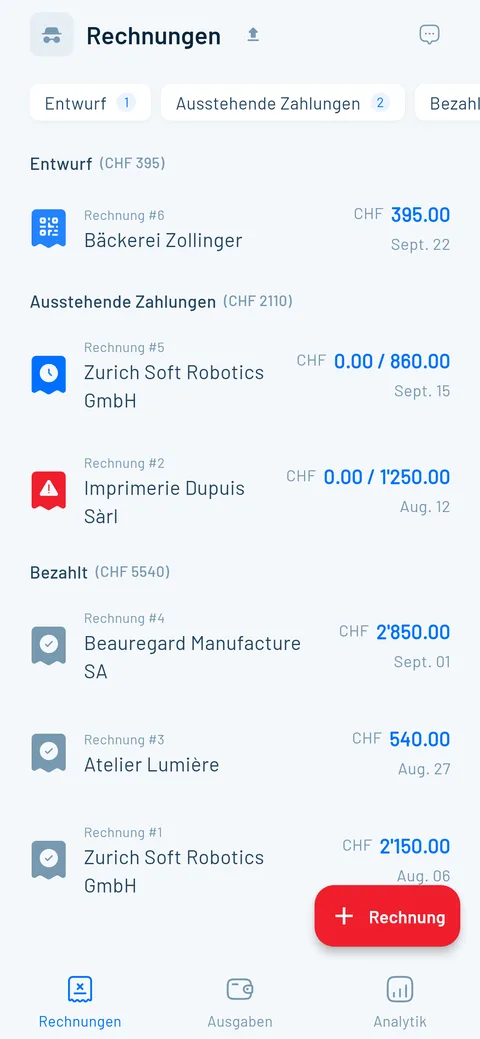
Offene Posten, immer aktuell
Der Abgleich spart dir nicht nur Zeit. Er sorgt dafür, dass deine Übersicht, deine Mahnungen und deine Zahlen stimmen.
Live-Übersicht
Bezahltes verschwindet aus der Liste. Übrig bleibt, was wirklich noch fehlt.
Richtig mahnen
Automatische Erinnerungen gehen nur an Kunden, die noch nicht bezahlt haben.
QR-Referenz
Zahlt dein Kunde per QR-Rechnung, stimmt die Referenz genau und Heidi findet die passende Rechnung.
Teilzahlungen
Du erfasst den erhaltenen Betrag, den offenen Rest rechnet Heidi aus.
Auch Ausgaben
Bank- oder Karten-CSV reinziehen: Die KI erfasst Datum, Betrag und Kategorie pro Zeile.
Läuft mit jeder Schweizer Bank
Den Kontoauszug als CSV oder Excel bietet jedes Schweizer E-Banking an. Die direkte Verbindung läuft über SIX bLink, bei allen Banken, die an bLink angeschlossen sind.
UBS und PostFinance
ZKB, BEKB, BCV, BCGE und alle anderen
Migros Bank und Regionalbanken
Alle Konten, eine Liste offener Posten
Mehr Zeit für Kunden, weniger fürs Büro
4.8 von 5 aus über 200 öffentlichen Bewertungen.
“…Die Oberfläche ist klar, intuitiv und perfekt auf die Schweizer Anforderungen zugeschnitten (MWST, Währungen, Adressen usw.). Die Funktionen zur Anpassung der Rechnungen, zur Zahlungsverfolgung und die automatischen Mahnungen sparen uns mehrere Stunden pro Woche.”
“Ein echtes Muss für alle Kleinunternehmer in der Schweiz. Ich hasse es, Rechnungen zu schreiben und zu verfolgen, was reinkommt, aber Magic Heidi macht es super einfach und richtig schnell. So habe ich mehr Zeit für meine Kunden und weniger für die Buchhaltung.”
“Nie mehr Stress mit Zettel und Belegen… Ich habe in sehr kurzer Zeit (was ich sonst gerne sehr lange vor mich her schiebe) meine Belege und Lohnauszahlungen von 1,5 Jahren in Magic Heidi eingelesen und bin hellbegeistert.”
Gratis testen, dann entscheiden
Der Bankabgleich ist in jedem Plan dabei. Alle Preise inkl. MWST, jederzeit kündbar.
Gratis
- 3 Rechnungen & 3 Belege (insgesamt)
- Alle Funktionen, auch der Bankabgleich
- Keine Kreditkarte nötig
Jährlich
- Bankverbindung & Kontoauszug-Import
- Unbegrenzte Rechnungen & Offerten
- Automatische Zahlungserinnerungen
- Unbegrenzter KI-Belegscan
- MWST inkl. Saldosteuersatz
- Support direkt vom Gründer
Monatlich
- Gleicher Funktionsumfang
- Unbegrenzte Rechnungen & Belege
- Jederzeit kündbar
30 Tage Geld-zurück-Garantie. Keine Vertragsbindung.
Fragen zum Bankabgleich
Wie importiere ich meinen Kontoauszug in Magic Heidi?
Öffne im E-Banking deine Kontobewegungen, wähl den Zeitraum und exportiere sie als CSV oder Excel. Dann ziehst du die Datei einfach in Magic Heidi, ein spezielles Import-Menü brauchst du nicht. Schritt für Schritt erklärt für PostFinance und UBS, oder im Video-Tutorial zum Bankabgleich. Wie oft du importierst, entscheidest du: jede Woche, am Monatsende oder vor der MWST-Abrechnung.
Funktioniert das mit meiner Bank?
Ja. Jedes Schweizer E-Banking bietet den Export als CSV oder Excel an, von UBS und PostFinance über Raiffeisen, ZKB und Migros Bank bis zu den Kantonalbanken. Einen CAMT.053-Export oder andere ISO-20022-Dateien brauchst du nicht, CSV, .xlsx oder .xls reichen. Die direkte Verbindung funktioniert mit allen Banken, die an SIX bLink angeschlossen sind.
Muss ich meine Bank verbinden?
Nein. Der Kontoauszug-Import funktioniert ganz ohne Bankverbindung: Du exportierst die Datei selbst und ziehst sie in Magic Heidi. Deine E-Banking-Zugangsdaten gibst du dabei nirgends ein. Die Verbindung über SIX bLink ist nur bequemer, weil neue Zahlungen automatisch kommen.
Wie funktioniert die direkte Bankverbindung?
Du startest die Verbindung in Magic Heidi, meldest dich direkt bei deiner Bank an und wählst, welche Konten du verbindest. Die Verbindung läuft über SIX bLink, die Schweizer Open-Banking-Plattform. Danach holt Heidi neue Transaktionen im Hintergrund ab und gleicht sie laufend mit deinen Rechnungen ab, ohne dass du etwas hochladen musst.
Ist die Bankverbindung sicher?
Ja. Der Zugriff ist nur lesend: Heidi sieht Kontostand und Transaktionen, kann aber keine Zahlungen auslösen. Dein E-Banking-Login gibst du nur bei deiner Bank ein, wir sehen und speichern ihn nie. Du kannst die Verbindung jederzeit in der App oder bei deiner Bank widerrufen. Mehr auf der Seite Sicherheit.
Wie erkennt Magic Heidi, welche Zahlung zu welcher Rechnung gehört?
Beim Bankabgleich vergleicht Heidi jede Gutschrift mit deinen offenen Rechnungen: Betrag, Referenz und weitere Angaben aus der Zahlung. Zahlt dein Kunde über den QR-Code deiner QR-Rechnung, passen diese Angaben in der Regel genau. Eine Rechnung wird nur als bezahlt markiert, wenn die Zahlung eindeutig dazu passt. Gutschriften ohne passende Rechnung, etwa private Überweisungen, bleiben unberührt.
Was passiert bei Teilzahlungen oder einer falschen Zuordnung?
Weicht der Betrag ab, zum Beispiel bei einer Teilzahlung, bleibt die Rechnung offen. Du erfasst den erhaltenen Betrag, den Rest rechnet Heidi aus und er bleibt in deinen offenen Posten. Hat Heidi einmal falsch zugeordnet, setzt du die Rechnung mit einem Klick wieder auf unbezahlt.
Kann ich denselben Kontoauszug zweimal importieren?
Ja. Du kannst dieselbe Datei oder überlappende Zeiträume so oft importieren, wie du willst. Magic Heidi markiert eine bereits abgeglichene Rechnung nicht doppelt. Du musst dir also nicht merken, welchen Zeitraum du schon hochgeladen hast.
Kann ich mehrere Bankkonten nutzen?
Ja. Du kannst mehrere Schweizer Bankkonten verbinden oder die Kontoauszüge jedes Kontos einzeln importieren. Heidi gleicht alle Zahlungen mit derselben Liste offener Rechnungen ab. Für TWINT-Auszahlungen, in denen viele Zahlungen und Gebühren stecken, hilft dir die TWINT-Anleitung mit Excel-Vorlage. Wie Bankverbindung und Buchhaltung zusammenspielen, zeigt der Leitfaden zur Bankintegration.
Was kostet der Bankabgleich?
Der Bankabgleich ist in jedem Plan enthalten. Du testest ihn gratis mit 3 Rechnungen und 3 Belegen, ohne Kreditkarte und mit allen Funktionen. Danach kostet Magic Heidi Pro CHF 24.99 pro Monat (CHF 299 jährlich) oder CHF 39 monatlich, jeweils inkl. MWST.
Nie mehr Zahlungen von Hand abhaken
Verbinde deine Bank oder zieh deinen nächsten Kontoauszug in Magic Heidi. Den Zahlungsabgleich erledigt Heidi. Gratis starten, ohne Kreditkarte.