Accounting software for freelancers in Switzerland
Send QR-bills, scan receipts with your iPhone and keep VAT clean — no accounting degree required.

When bookkeeping eats more time
than the actual client work.
Sunday night, 47 receipts spread across the kitchen table instead of you on the couch. Bookkeeping should just work — not run your weekends.
Lost receipts
Piling up in a shoebox or under the car seatWord invoices
Copy-pasting the same template every single timeVAT headaches
Excel and a calculator every quarter-endBookkeeping, invoicing and expenses in one app
The three tools you actually need every day — in one place, set up in five minutes.
Swiss QR-bill
SIX-compliant QR-bills — your clients pay with one scan in their e-banking app.
AI receipt scanning
Snap the restaurant receipt — Magic Heidi pulls the date, amount, VAT and supplier for you.
Automatic VAT
VAT is calculated correctly on every invoice and expense. At quarter-end, you just copy the numbers across.
Snap the receipt. Done.
Capture on the go, VAT mapped automatically, foreign currencies converted to CHF at the SNB daily rate. More on AI receipt scanning →
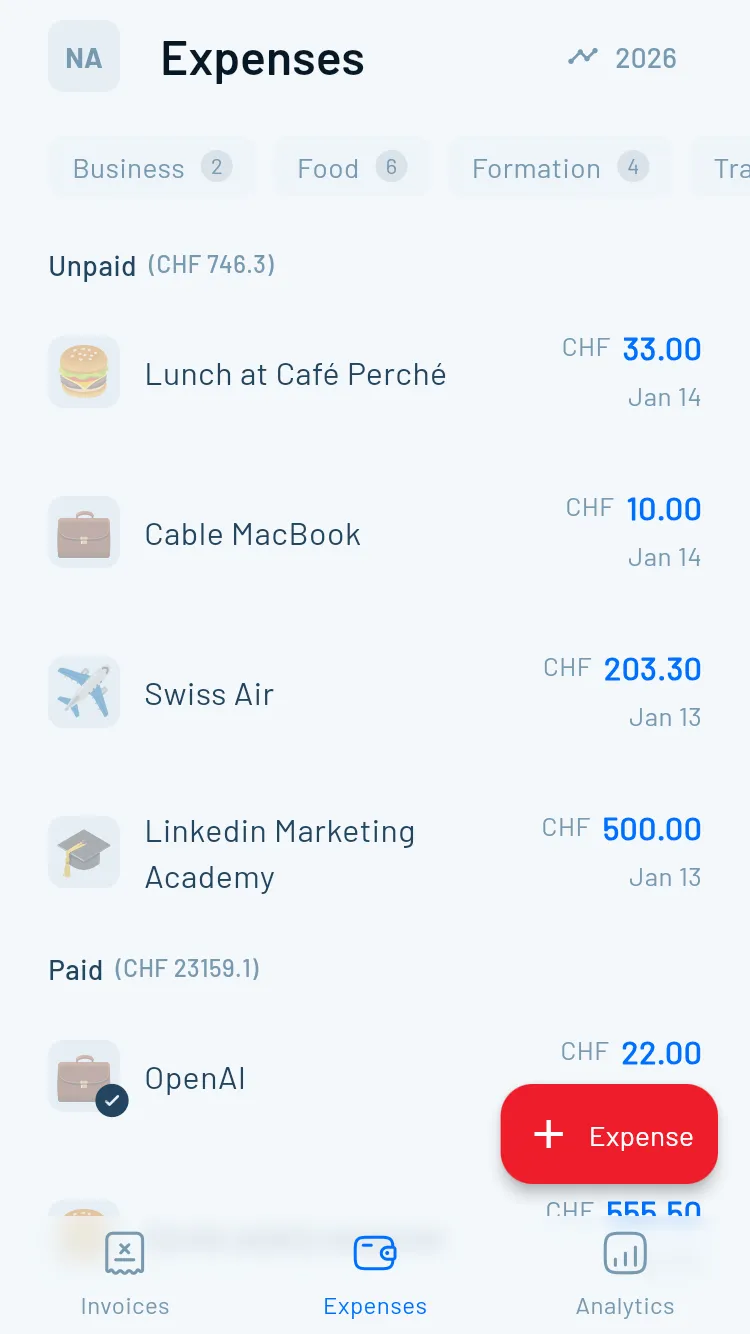
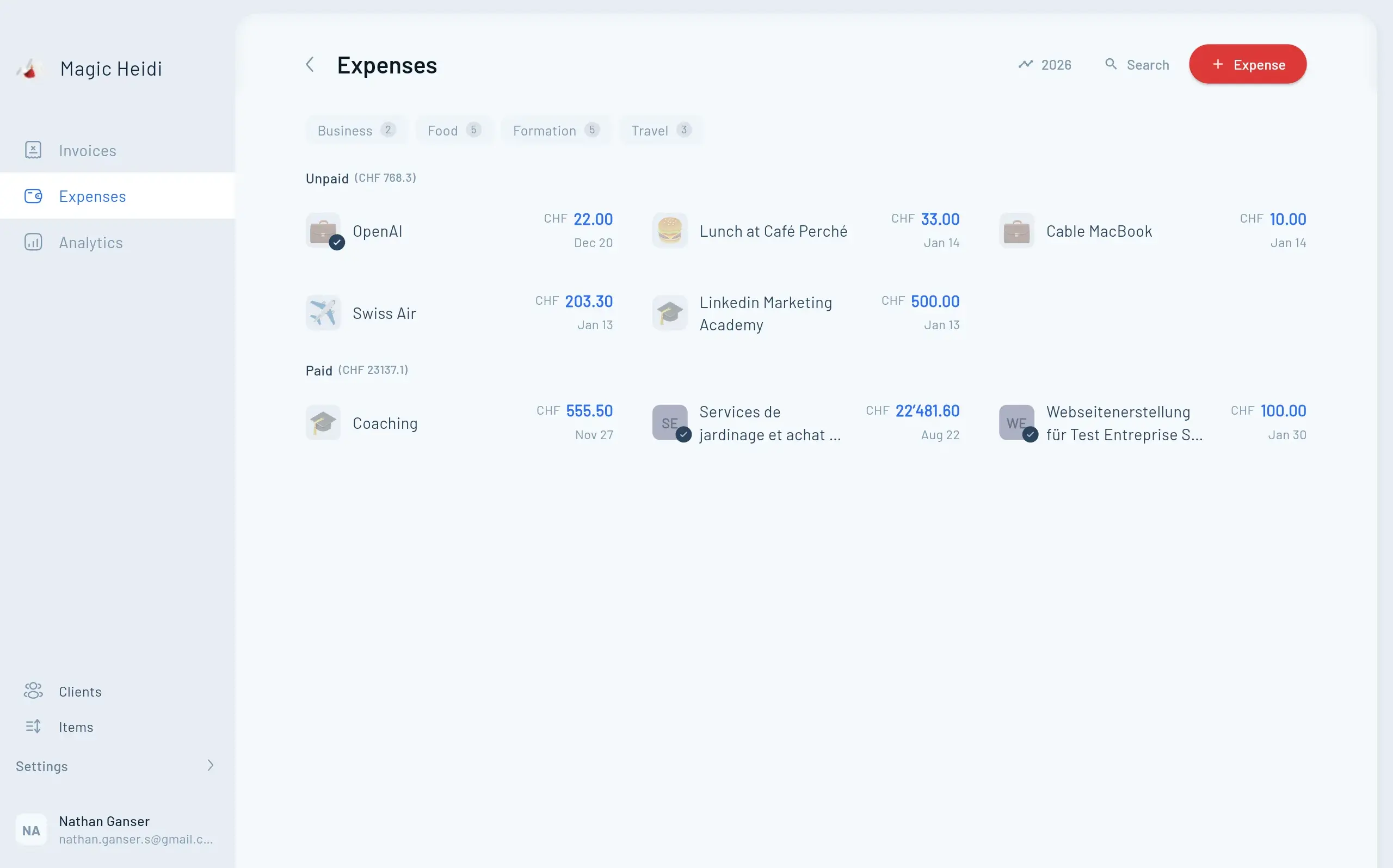
Every receipt under control, all in one view
Sorted, categorised and mapped to the right tax codes. Export as a list whenever you need it.
Everything Swiss freelancers need.
Nothing they don't.
Purpose-built for solo businesses in Switzerland. No payroll, no ERP modules, no clutter you'd only need with employees.
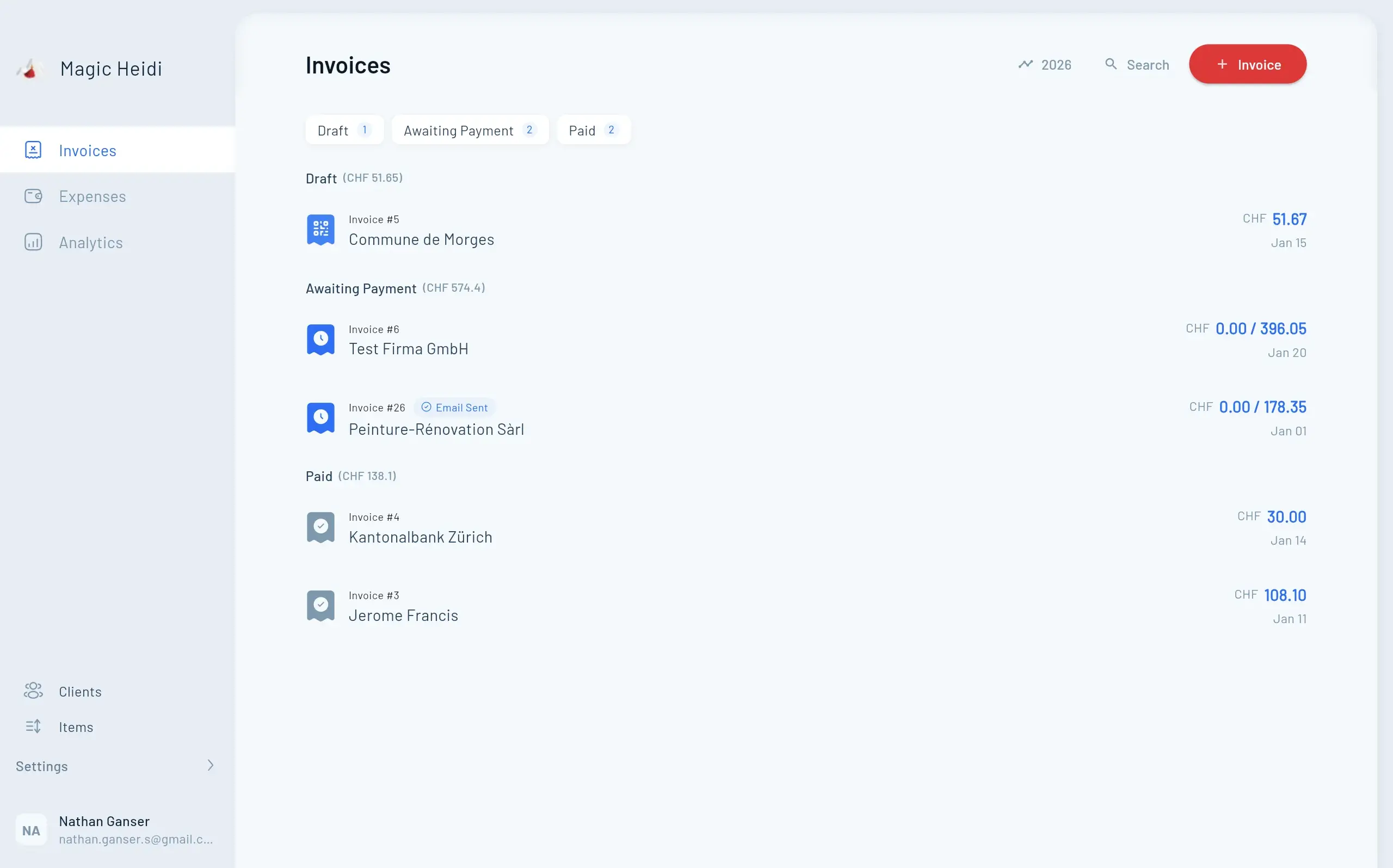
Invoices and quotes
Clean design, multilingual, out the door in under a minute.
- Swiss QR-bill v2.3, SIX-compliant
- Invoices in your client's language
- 50+ currencies with daily SNB rates
- Recurring invoices and auto-reminders
AI receipt scanning
Snap a receipt and Magic Heidi reads the data for you.
- Date, amount, VAT, supplier
- Photo, PDF or email forward
- Multi-currency with SNB conversion
- Recurring expenses and subscriptions
VAT and taxes
Effective method or net tax rate — Magic Heidi does the maths, you copy the numbers.
- All Swiss VAT rates pre-loaded
- Quarterly return ready to export
- Input tax deduction on expenses
- Year-end summary for your tax return
Swiss bank import
CSV from UBS, PostFinance, ZKB, Raiffeisen, Migros, Neon, Yuh and more.
- Automatic payment matching
- Match by amount, date or reference
- Multiple bank accounts in parallel
- Paid / open / overdue at a glance
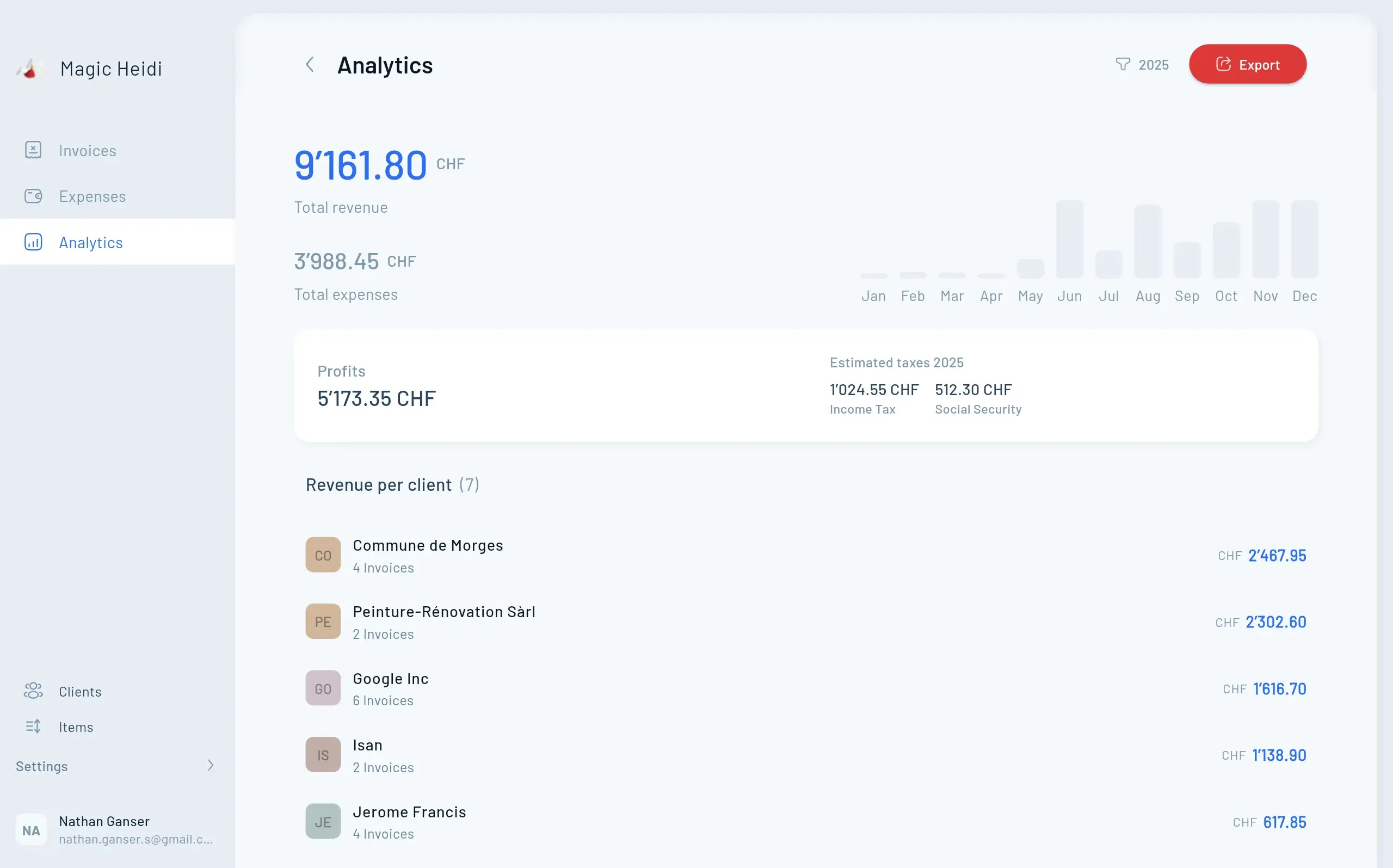
How's your business doing this month?
Revenue, expenses, profit and estimated taxes — all on one dashboard. More on Swiss freelance accounting →
Swiss software,
Swiss servers, Swiss support.
Hosted in Zurich, encrypted end-to-end. Personal support straight from co-founder Nathan, who picks up the phone and replies to emails himself.
Your data stays in Switzerland
AES-256 at rest, TLS in transit
Nathan replies to emails personally
Direct import from UBS, PostFinance, ZKB, Raiffeisen and more
Your data belongs to you
Full ZIP export anytime. No lock-in, no hostage situations. More on data security →

Magic Heidi vs. the alternatives
The others aren't bad — they're just built for someone else. Here's how Magic Heidi compares.
| What matters for freelancers | Magic Heidi | Bexio | Banana | Swiss21 |
|---|---|---|---|---|
| Built for | ✓ Swiss freelancers | SMEs with employees | Accountants, double-entry bookkeeping | Micro-businesses, generalist tool |
| Native iPhone app | ✓ Yes | ✓ Yes | ✗ No | ✗ No |
| Native Mac app | ✓ Yes | ✗ No | ⚠ Old desktop | ✗ No |
| AI receipt scanning | ✓ Included | ⚠ Pro tier | ✗ No | ✗ No |
| QR-bill | ✓ SIX-compliant | ✓ Yes | ✓ Yes | ✓ Yes |
| Automatic VAT | ✓ Both methods | ✓ Both methods | ✓ Yes | ⚠ Limited |
| Price (from) | CHF 25 / month | ~CHF 35 / month | CHF 79 / year | Free (add-ons) |
| Free plan with no time limit | ✓ Yes | ✗ 30 days | ⚠ Trial | ✓ Yes |
Support with a face
When he's not on the road, Nathan replies to emails and calls personally — usually within the hour.

What 5'000+ Swiss freelancers say
Pulled from the App Store, Google Play, Capterra and Trustpilot. Real Swiss solo operators using Magic Heidi every day.
AI receipt scanning alone saves me two hours a month. Snap, quick check, done.
4.7★ — read all reviews
I was on Bexio, then a competitor, now Magic Heidi. First time it actually clicks — because it's built for someone like me.
5.0★ — read all reviews
Finally a bookkeeping app I actually use on my iPhone. QR-bill in a minute, VAT at quarter-end with zero Excel.
4.5★ — read all reviews
VAT return, copy-paste ready
Open the VAT page and the numbers are sorted, totalled and ready to paste straight into the Swiss FTA portal. More on VAT for freelancers →

Fair pricing. No surprises.
Three invoices free, forever — no credit card, no time limit. Upgrade to Pro only when Magic Heidi has earned it.
Free
- 3 invoices
- All core features
- QR-bill and AI receipt scanning
- iPhone, Android, Mac, Windows, Web
- No credit card
Pro Annual
- Unlimited invoices
- Unlimited expenses
- AI receipt scanning included
- Bank import (all Swiss banks)
- Automatic VAT
- Priority email and phone support
- Zapier and API
Pro Monthly
- Unlimited invoices
- Unlimited expenses
- AI receipt scanning included
- Bank import (all Swiss banks)
- Automatic VAT
- Priority email and phone support
Frequent questions
Do I actually need accounting software as a Swiss freelancer?
Yes — as soon as you're invoicing clients regularly. A simple cash book in Excel is technically allowed under Swiss CO Art. 957 if your revenue is under CHF 500,000, but you'll need a proper tool for the Swiss QR-bill anyway. Once that's in place, you may as well handle bookkeeping and expenses in the same app.
Which accounting software works without bookkeeping knowledge?
Magic Heidi is built specifically for the self-employed without bookkeeping knowledge. You need no understanding of double-entry bookkeeping, debits and credits, or charts of accounts. You record invoices and receipts in plain language, the VAT rates and methods are built in, and the quarterly export is one click away. Alternatives like Banana or CashCtrl offer true double-entry accounting but require accounting know-how.
What is the simplest accounting for the self-employed in Switzerland?
For sole proprietorships and freelancers under CHF 500,000 in revenue, simplified accounting (income, expenses, asset position) under Swiss CO Art. 957 is enough. Magic Heidi maps exactly that: first QR invoice in 60 seconds, receipts by photo, VAT automatic. Setup in under five minutes, no prior knowledge needed.
Can I do my own bookkeeping as a freelancer without a fiduciary?
Yes. With Magic Heidi you handle invoices, expenses and VAT yourself, without a fiduciary and without accounting training. If you do bring in an accountant at year-end, you just give them the clean tax and VAT export instead of paying by the hour to sort receipts.
Is Magic Heidi really free?
Yes. Three invoices per account, no time limit, no credit card. You get every feature on the free plan and only decide on Pro when you go to send your fourth invoice.
How does AI receipt scanning work?
Snap a photo of any receipt with your iPhone, or forward a PDF by email. Magic Heidi pulls out the date, amount, supplier, currency and VAT automatically. You eyeball it, hit save, and you're done. Foreign currencies are converted to CHF at the SNB daily rate.
Is my data really stored in Switzerland?
Yes. Everything is hosted on Swiss servers in Zurich, encrypted in transit (TLS) and at rest (AES-256). Backups run continuously. You can export your full data as a ZIP archive whenever you want.
What happens if I want to leave later?
You can export every invoice, expense, receipt and customer record as ZIP, CSV and PDF — anytime. Pro plans also come with a 30-day money-back guarantee, no questions asked.
Does Magic Heidi work if freelancing is just a side hustle?
Yes — it's actually a great fit. Side hustlers under CHF 100,000 annual revenue aren't VAT-liable and don't need double-entry bookkeeping. Magic Heidi covers clean accounting, receipt capture and the year-end tax return. The day you cross the VAT threshold, the logic is already there.
Who is Magic Heidi NOT for?
If you run payroll, need inventory management or want an ERP integration for a bigger company, Bexio or Abacus are a better fit. Magic Heidi is purpose-built for solo freelancers and sole proprietorships in Switzerland — not for SMEs with employee teams.
Ready to send your first QR-bill in 60 seconds?
Three invoices free, no credit card, no time limit. Data in Switzerland, personal support from the founders, 30-day money-back on Pro.