Magic Heidi
 Alle Funktionen von Magic Heidi
Alle Funktionen auf einer Seite, nach Bereichen sortiert. Jede ist in jedem Plan dabei, auch im Gratis-Plan. Lieber zuerst den Überblick? Hier sind die wichtigsten Funktionen.
Rechnungen, Offerten und Zahlungen
Alles von der ersten Offerte bis zum Geld auf dem Konto. Ausführlich im Rechnungsprogramm und bei den Offerten.
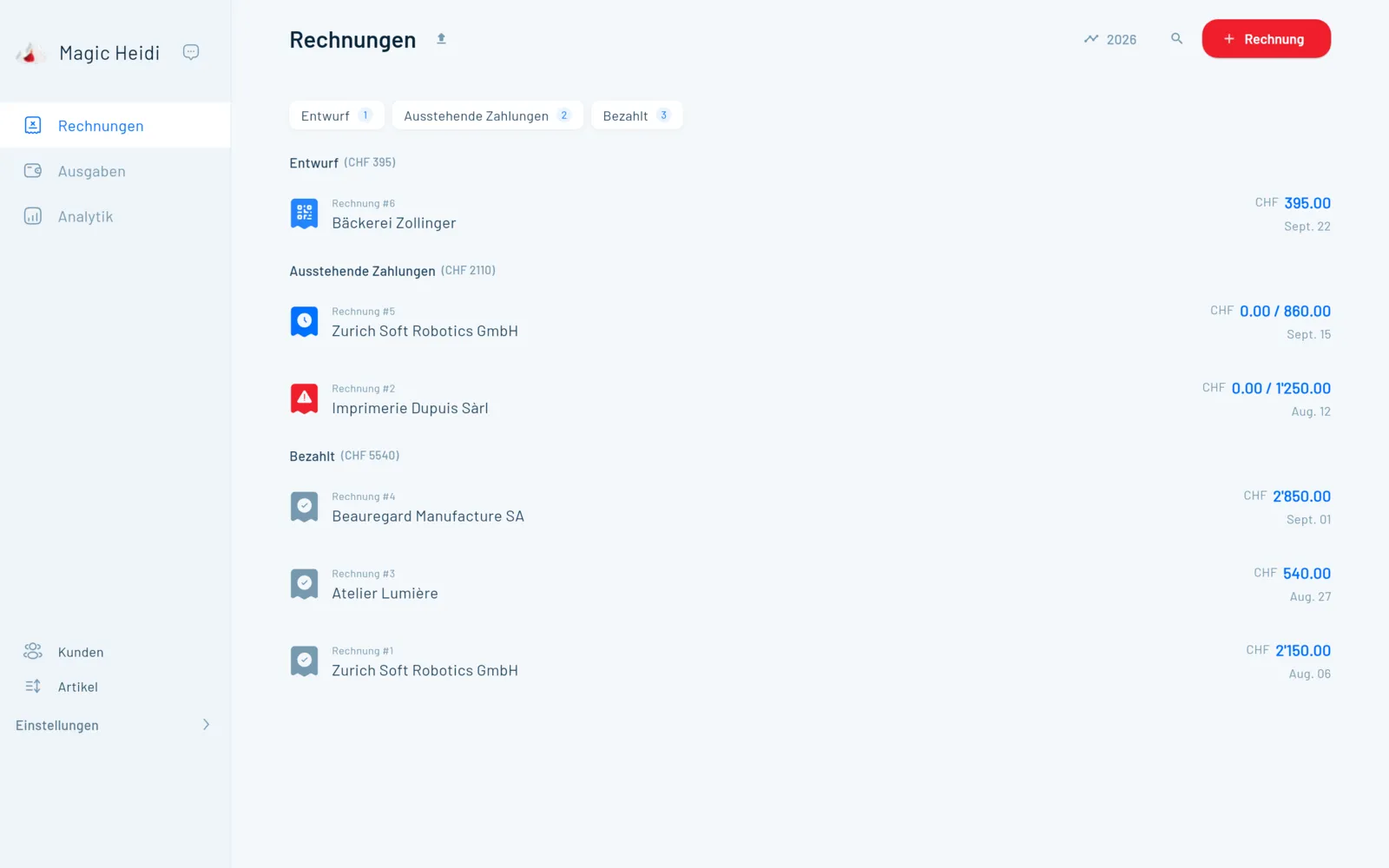
Rechnungen
| Funktion | So funktioniert's |
|---|---|
| Swiss QR-Rechnung | QR-Zahlteil nach SIX-Standard auf jeder Rechnung, mit strukturierten Adressen. Deine normale IBAN reicht, eine QR-IBAN brauchst du nicht. |
| Logo und Standardtexte | Logo hochladen, Standardtext für Rechnungen festlegen, pro Rechnung eine Kopfnotiz ergänzen. |
| Sprache und Währung | Deutsch, Französisch, Italienisch, Englisch oder Rätoromanisch, in CHF, EUR, USD, GBP und weiteren Währungen. Beides bleibt beim Kunden gespeichert. |
| Fortlaufende Nummern | Rechnungsnummern vergibt Magic Heidi automatisch und fortlaufend. |
| Stunden verrechnen | Stundensatz, Datum und Zeit von–bis erfassen: 10:00 bis 14:30 à CHF 100 ergibt automatisch CHF 450. Die Rechnung bleibt ein Entwurf, bis du sie sendest, so sammelst du den ganzen Monat Stunden. Zur Anleitung |
| Abschnitte und Titel | Die erste Zeile einer Position wird zum fetten Titel, darunter steht die Beschreibung. Überschriften und Trennzeilen gliedern lange Rechnungen. |
| Rabatte | Als Position mit negativem Betrag, zum Beispiel «Rabatt −100», oder direkt im Stückpreis. |
| Zahlungsfrist | Eine Standardfrist, zum Beispiel 30 Tage, die du pro Rechnung ändern kannst. |
| Versand aus der App | PDF mit QR-Zahlteil per E-Mail an deinen Kunden, mit deiner eigenen Antwortadresse. Oder das PDF teilen, etwa per WhatsApp, oder auf A4 drucken. |
| AGB-Anhang | Ein PDF, zum Beispiel deine AGB, geht automatisch mit jeder Rechnung mit. |
| Wiederkehrende Rechnungen | Monatlich, vierteljährlich oder jährlich, mit optionalem Enddatum. Heidi erstellt sie automatisch und verschickt sie auf Wunsch auch. Zur Anleitung |
Zahlungen und Mahnungen
| Funktion | So funktioniert's |
|---|---|
| Offene Posten | Entwürfe, ausstehende und bezahlte Rechnungen getrennt, mit der Summe pro Gruppe. Überfällige sind markiert. |
| Zahlungserinnerungen | Ist eine Rechnung überfällig, schickt Heidi automatisch eine freundliche Erinnerung per E-Mail. Mehr dazu |
| Mahnung | Mahnung mit den Rechnungsdaten und dem offenen Betrag erstellen und senden. |
| Bezahlt markieren | Mit einem Klick oder automatisch über den Bankabgleich. Bei einer Teilzahlung erfasst du den erhaltenen Betrag, den Rest rechnet Heidi aus. |
| Zweite IBAN | Zwei Konten hinterlegen und pro Rechnung wählen, auf welches bezahlt wird. |
| Bankdaten fürs Ausland | Eigene Bankdaten pro Währung, etwa von Wise oder Revolut. Bei Rechnungen in dieser Währung ersetzen sie den QR-Zahlteil. |
| Abweichender Kontoinhaber | Dein Firmenname im Rechnungskopf, dein persönlicher Name als Kontoinhaber im QR-Zahlteil. |
| Revolut Business | Rechnungen, die dein Kunde direkt auf dein Revolut-Business-Konto bezahlt. Zur Anleitung |
| Stornieren | Eine falsche Rechnung als storniert markieren und korrigiert neu ausstellen. |
Offerten und weitere Dokumente
| Funktion | So funktioniert's |
|---|---|
| Offerten | Mit Logo, Gültigkeit und Standardtext, als PDF per E-Mail. |
| Optionale Positionen | Varianten A und B anbieten, ohne dass beide in die Summe zählen. |
| Unterschriftsfeld | Datum und Unterschrift für deinen Kunden auf dem PDF. |
| Offerte wird Rechnung | Mit einem Klick. Positionen, MWST und Kunde werden übernommen, der QR-Code kommt dazu. |
| Auftragsbestätigung | Aus denselben Daten, ohne QR-Zahlteil. |
| Akonto- und Teilrechnungen | Prozentsatz eingeben, zum Beispiel 20 %, und Heidi erstellt die Anzahlungsrechnung mit QR-Zahlteil. Mehr zur Akontorechnung |
| Gutschriften | Als negative Position auf der Rechnung oder als eigene Rückerstattungsrechnung. Zur Anleitung |
| Lieferscheine | Für Teillieferungen einer bereits bezahlten Bestellung. Zur Anleitung |
Kunden und Artikel
| Funktion | So funktioniert's |
|---|---|
| Unbegrenzte Kunden | Firma und Kontaktperson, Adresse und E-Mail für den Direktversand. Bei einer Schweizer PLZ ergänzt Heidi den Ort. |
| Kunden im Ausland | Land und MWST-Nummer des Kunden erfassen. |
| Notizen und Dateien | Private Notizen, die nur du siehst, und Dateien wie Verträge, pro Kunde abgelegt. |
| Umsatz pro Kunde | Gesamtumsatz und Rechnungshistorie jedes Kunden auf einen Blick. Mehr zur Kundenverwaltung |
| Artikelliste | Leistungen und Produkte mit Preis und MWST-Satz einmal speichern, auch als Stundenartikel. Einmalige Positionen gehen auch ohne Speichern. |
Belege, Bank, MWST und Abschluss
Was rausgeht, was auf dem Konto landet und was du der ESTV schuldest. Ausführlich beim KI-Belegscan und bei der MWST-Abrechnung.
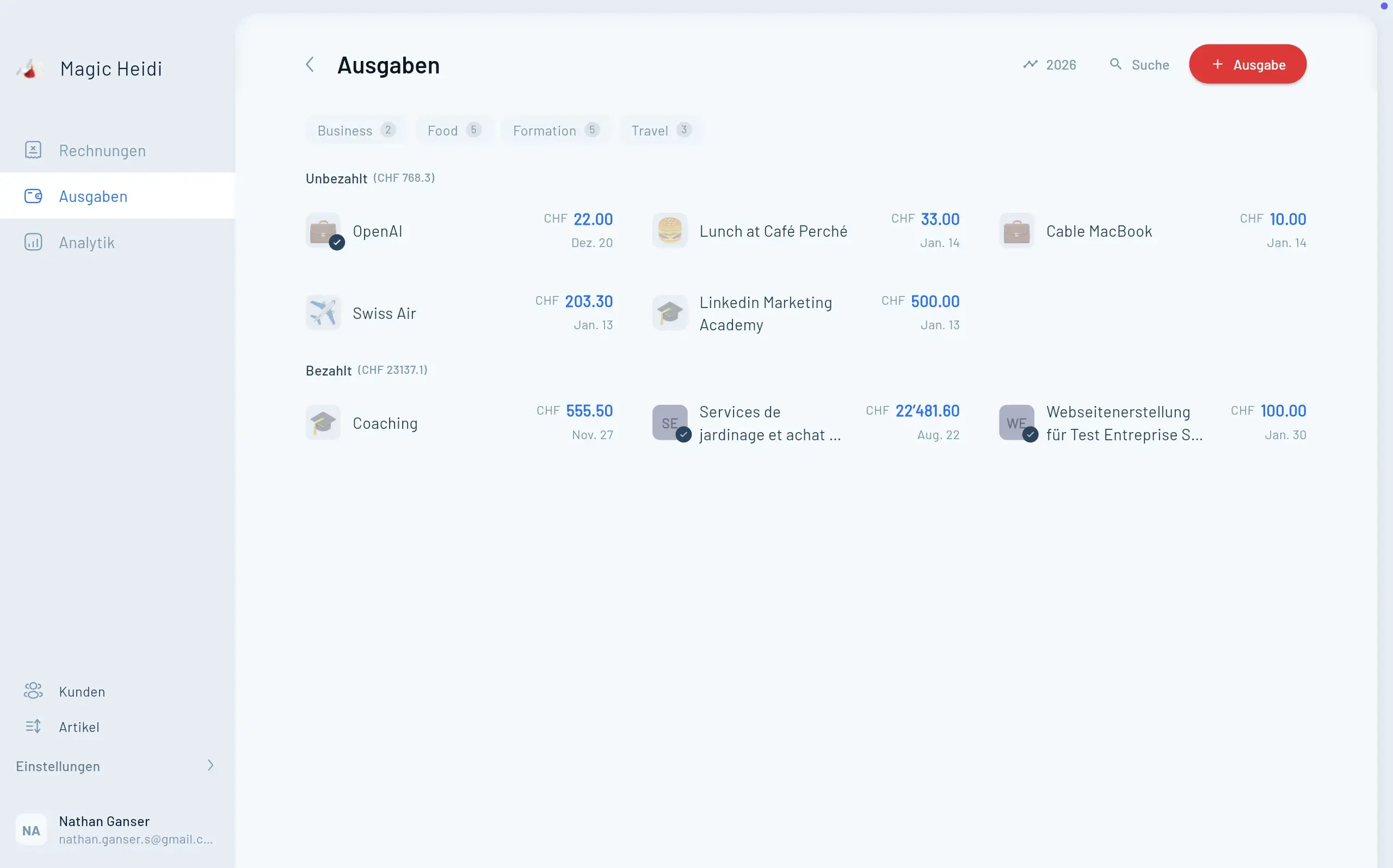
Ausgaben und Belege
| Funktion | So funktioniert's |
|---|---|
| KI-Belegscan | Die KI liest Händler, Datum, Betrag und MWST-Satz und schlägt eine Kategorie vor, die du jederzeit änderst. In Pro unbegrenzt (Fair Use). |
| Foto mit dem Handy | Beleg an der Kasse fotografieren, er ist sofort in der App erfasst. |
| Upload per Drag & Drop | PDF oder Bild in die App ziehen, die Ausgabe wird angelegt. |
| Weiterleiten per E-Mail | Leite Rechnungen weiter, du bekommst eine Bestätigung, sobald der Beleg erfasst ist. Adresse: import@scan.magicheidi.ch |
| Fremdwährungen | Belege in EUR, USD und anderen Währungen rechnet die KI in CHF um. |
| Offen oder bezahlt | Eine Ausgabe als offen speichern oder direkt als bezahlt, mit Zahlungsmethode. |
| Wiederkehrende Ausgaben | Miete, Coworking oder Abos monatlich oder jährlich automatisch anlegen. |
| Ausgaben importieren | CSV von Bank oder Karte reinziehen. Die KI erfasst Datum, Betrag und Kategorie pro Zeile und zeigt, was importiert und was übersprungen wurde. |
Bank
| Funktion | So funktioniert's |
|---|---|
| Direkte Bankverbindung | Über SIX bLink und nur lesend, für ein oder mehrere Geschäftskonten. Du meldest dich bei deiner Bank an, die Verbindung kannst du jederzeit widerrufen. |
| Kontoauszug-Import | CSV oder Excel von UBS, PostFinance, Raiffeisen, ZKB und anderen Banken per Drag & Drop. |
| Automatischer Abgleich | Zahlungen werden über Betrag und Referenz den offenen Rechnungen zugeordnet und als bezahlt markiert. Mehr zum Bankabgleich |
| Kein Doppelimport | Überlappende Zeiträume erneut importieren: Nichts wird doppelt als bezahlt markiert. |
MWST
| Funktion | So funktioniert's |
|---|---|
| Alle Schweizer Sätze | 8.1 %, 2.6 %, 3.8 % und 0 %, auch gemischt auf einer Rechnung. |
| Additiv oder inklusiv | MWST auf den Preis draufrechnen oder aus dem Preis herausrechnen, pro Rechnung umstellbar. |
| Saldosteuersatz | Effektive Methode oder Saldosteuersatz, beide gehen. Für zwei Saldosteuersätze gibt es eine Anleitung. |
| Vorsteuer auf Ausgaben | Die MWST auf deinen Belegen wird erfasst und von der geschuldeten MWST abgezogen. |
| MWST-Abrechnung | Pro Quartal (effektiv) oder pro Halbjahr (Saldosteuersatz), vereinbart oder vereinnahmt. Zeigt die Beträge, die du im ESTV-ePortal einträgst. |
| MWST-Bericht als Excel | Die ganze Aufschlüsselung für deine Unterlagen oder deinen Treuhänder. |
| Ohne MWST starten | Unter CHF 100'000 Umsatz stellst du Rechnungen ohne MWST. Später schaltest du sie mit deiner MWST-Nummer ein. |
Auswertungen und Jahresabschluss
| Funktion | So funktioniert's |
|---|---|
| Dashboard | Einnahmen und Ausgaben pro Monat, Ausgaben nach Kategorie, Umsatz pro Kunde. Nach Jahr, Quartal oder eigenem Zeitraum filterbar. |
| Gewinn und Steuerschätzung | Dein Gewinn, laufend aktuell, dazu eine Schätzung für Einkommenssteuer und AHV-Beiträge. |
| Excel-Export | Übersichtsblatt mit Einnahmen und Ausgaben nach Kategorie, MWST und Gewinn, dazu jede Rechnung mit Link zum Original. Mehr zum Jahresabschluss |
| Treuhänder-Zugang | Ein zweiter Zugang für Treuhänder oder Partnerin, ohne Aufpreis. Mehr zur digitalen Treuhand |
Apps, Integrationen und deine Daten
Wo Magic Heidi läuft, womit es sich verbindet und wie deine Daten geschützt sind. Details unter Sicherheit.
Apps und Zugang
| Funktion | So funktioniert's |
|---|---|
| Handy und Tablet | Native Apps für iPhone, iPad und Android. |
| Computer | Native Apps für Mac und Windows, dazu die Web-App ohne Installation. |
| Sofortige Synchronisation | Rechnung im Zug am Handy beginnen, am Laptop fertig machen. Ein Login für alle Geräte. |
| Sieben App-Sprachen | Deutsch, Französisch, Italienisch, Englisch, Spanisch, Portugiesisch und Rätoromanisch. |
Integrationen und Import
| Funktion | So funktioniert's |
|---|---|
| Zapier | Verbinde Magic Heidi mit Onlineshop, CRM und anderen Tools, zum Beispiel um Verkäufe automatisch zu erfassen. Mehr zu Zapier |
| API und Webhooks | Öffentliche, dokumentierte API, etwa um Rechnungen in Serie zu erstellen. Zur API |
| Shopify, Stripe, Etsy & Co. | Auszahlungen über den Bankabgleich oder den PDF-Bericht erfassen. Anleitungen für jede Plattform unter Integrationen. |
| Daten importieren | Kunden, Rechnungen, Ausgaben und Stunden als Excel, CSV oder PDF reinziehen, die KI ordnet sie zu. Zur Anleitung |
| Umzugshilfe | Schick uns deine Kunden- oder Artikelliste an hello@magicheidi.ch, wir importieren sie gratis für dich. |
| Wechsel von bexio | Schritt für Schritt vom Export bis zur Kontrolle. Zur Anleitung |
Sicherheit und Daten
| Funktion | So funktioniert's |
|---|---|
| Daten in Zürich | Rechnungen, Belege und Kundendaten liegen auf Servern in Zürich. Der KI-Belegscan nutzt Dienste, die Daten teilweise ausserhalb der Schweiz verarbeiten. |
| Verschlüsselung | TLS für jede Verbindung, AES-256 für gespeicherte Daten. |
| Zwei-Faktor-Anmeldung | Schütze dein Konto zusätzlich mit 2FA. |
| Wöchentliche Backups | Deine Daten werden jede Woche verschlüsselt gesichert. |
| Export jederzeit | Rechnungen und Berichte als PDF, Zahlen als Excel oder CSV. Alle PDFs, Fotos und Belege als Download, den Link bekommst du per E-Mail. |
| Konto löschen | Deine Daten sind innert 30 Tagen gelöscht. So geht's |
| revDSG und DSGVO | Schweizer Datenschutz, auch für Kunden in der EU. Wir verkaufen deine Daten nie. |
Support
| Funktion | So funktioniert's |
|---|---|
| E-Mail und Telefon | Auf Deutsch, Französisch, Italienisch und Englisch. Oft antwortet Gründer Nathan selbst. |
| Onboarding | Ein kostenloses 30-Min.-Gespräch, in dem ihr alles zusammen einrichtet. Termin buchen |
| Tutorials und Videos | Anleitungen für jede Funktion, von der ersten Rechnung bis zum Jahresabschluss. Zu den Tutorials |
Funktionen, im Alltag getestet
4.8 von 5 aus über 200 öffentlichen Bewertungen.
“Ich nutze Magic Heidi für meine Kunden, Adressen, Rechnungen und Offerten, aber auch für alle meine Ausgaben.”
“Die Oberfläche ist klar, intuitiv und perfekt auf die Schweizer Anforderungen zugeschnitten (MWST, Währungen, Adressen usw.). Die Funktionen zum Anpassen der Rechnungen, zur Zahlungsverfolgung und die automatischen Mahnungen sparen uns mehrere Stunden pro Woche.”
“Ein tolles Tool, das mir das Leben viel einfacher gemacht hat. Besonders die Erkennung von Belegen in verschiedenen Währungen und Sprachen und die automatische Umrechnung sind extrem nützlich und funktionieren reibungslos.”
“Ich war auf der Suche nach einer einfachen Lösung, mit welcher auch Käufe aus meinem Onlineshop automatisiert verbucht werden. Dank der Zapier-Anbindung geht das problemlos.”
“Ich nutze auch die API, um Rechnungen in Serie zu erstellen. Saubere Dokumentation und ein unkomplizierter Ablauf, klare Empfehlung.”
“Super Service! Meine Wünsche wurden direkt umgesetzt. Alles ist einfach und übersichtlich aufgebaut – es macht wirklich Spass, mit Magic Heidi zu arbeiten.”
Was Magic Heidi nicht macht
Magic Heidi ist für Selbständige gebaut, nicht für KMU mit Personal und Lager. Diese vier Dinge findest du bei uns nicht. Das ist Absicht.
Keine Lohnbuchhaltung
Lohnabrechnungen für Angestellte machst du mit einem spezialisierten Tool.
Kein Warenlager
Keine Bestandsführung. Für Teillieferungen gibt es Lieferscheine.
Keine Bilanz
Doppelte Buchhaltung für GmbH oder AG macht dein Treuhänder, du lieferst den Export.
Keine Team-Rollen
Einen Zugang für Treuhänder oder Partnerin gibt es, eine Rechteverwaltung nicht.
Alles andere passt? Probier es aus.
Alle Funktionen gratis mit 3 Rechnungen und 3 Belegen, ohne Kreditkarte und ohne Zeitlimit.
Fragen zu den Funktionen
Welche Funktionen hat Magic Heidi?
Alles, was eine Einzelfirma im Alltag braucht: QR-Rechnungen, Offerten, automatische Zahlungserinnerungen, KI-Belegscan, Bankabgleich, MWST-Abrechnung und der Export für den Jahresabschluss. Dazu kommen Kundenverwaltung, Zeiterfassung auf der Rechnung, wiederkehrende Rechnungen, Treuhänder-Zugang, Zapier und eine API. Alles läuft auf iPhone, iPad, Android, Mac, Windows und im Web.
Sind im Gratis-Plan alle Funktionen dabei?
Ja. Du testest jede Funktion dieser Liste mit 3 Rechnungen und 3 Belegen, insgesamt und ohne Zeitlimit. Du brauchst keine Kreditkarte. Danach kostet Pro CHF 24.99 pro Monat im Jahresabo (CHF 299) oder CHF 39 monatlich, jeweils inkl. MWST. Pro hat 30 Tage Geld-zurück-Garantie und ist jederzeit in der App kündbar. Details unter Preise.
Brauche ich Buchhaltungskenntnisse?
Nein. Du schreibst Rechnungen und fotografierst Belege, Heidi ordnet die Belege Kategorien zu und rechnet die MWST aus. Kontenplan und Buchungssätze brauchst du nicht. Deinem Treuhänder gibst du am Jahresende den Excel-Export.
Kann ich mit Magic Heidi Stunden erfassen?
Ja, direkt auf der Rechnung. Du wählst eine Stundenposition, gibst Stundensatz, Datum und Zeit von–bis ein, und Heidi rechnet den Betrag aus. Die Rechnung bleibt ein Entwurf, bis du sie sendest, du sammelst also den ganzen Monat Stunden. Stunden aus einem anderen Zeiterfassungs-Tool importierst du als Excel oder CSV.
Verschickt Magic Heidi Zahlungserinnerungen automatisch?
Ja. Ist eine Rechnung überfällig, geht eine freundliche Zahlungserinnerung per E-Mail an deinen Kunden. Du kannst auch selbst eine Mahnung mit dem offenen Betrag erstellen. Teilzahlungen erfasst du, und Heidi rechnet den Restbetrag aus. Mehr zu automatischen Zahlungserinnerungen.
Kann ich Kunden im Ausland Rechnungen schicken?
Ja. Du wählst Sprache (DE, FR, IT, EN oder RM) und Währung, zum Beispiel EUR, USD oder GBP. Für Kunden im Ausland hinterlegst du passende Bankdaten, etwa von Wise oder Revolut, und sie ersetzen den QR-Zahlteil. Den Hinweis zur MWST, zum Beispiel «Leistungsort im Ausland», ergänzt du in der Fusszeile. Zur Anleitung
Macht Magic Heidi auch Lohnbuchhaltung oder eine Bilanz?
Nein. Magic Heidi deckt die vereinfachte Buchhaltung ab, die für Einzelfirmen bis CHF 500'000 Umsatz genügt. Mehr unter Buchhaltungssoftware.
Kann ich meine Daten aus Excel oder bexio übernehmen?
Ja. Du ziehst Kunden, Rechnungen oder Ausgaben als Excel, CSV oder PDF in die App, und die KI ordnet die Spalten selbst zu. Oder du schickst uns deine Listen an hello@magicheidi.ch, wir importieren sie gratis. Für bexio gibt es eine Schritt-für-Schritt-Anleitung.
Wo werden meine Daten gespeichert?
Deine Rechnungen, Belege und Kundendaten liegen verschlüsselt auf Servern in Zürich. Einzelne Funktionen wie der KI-Belegscan nutzen Dienste, die Daten teilweise ausserhalb der Schweiz verarbeiten. Es gibt jede Woche ein Backup, und du kannst alle Daten jederzeit exportieren. Details unter Sicherheit.
Mir fehlt eine Funktion. Was nun?
Schreib an hello@magicheidi.ch oder ruf an, Support gibt es auf Deutsch, Französisch, Italienisch und Englisch. Oft antwortet Gründer Nathan selbst. Mehrere Nutzer schreiben in ihren Bewertungen, dass ihre Wünsche schnell umgesetzt wurden. Beim kostenlosen 30-Min.-Onboarding klärt ihr gleich, wie Magic Heidi zu deinem Ablauf passt.
Teste jede Funktion gratis
3 Rechnungen und 3 Belege inklusive, ohne Kreditkarte. Über 5'000 Schweizer Selbständige arbeiten schon mit Heidi.