 Magic Heidi
 All Magic Heidi features
Every feature on one page, sorted by area. Each one is in every plan, the free plan too. Prefer the big picture first? Here are the main features.
Invoices, quotes and payments
Everything from the first quote to the money in your account. In depth on the invoicing software and quotes pages.
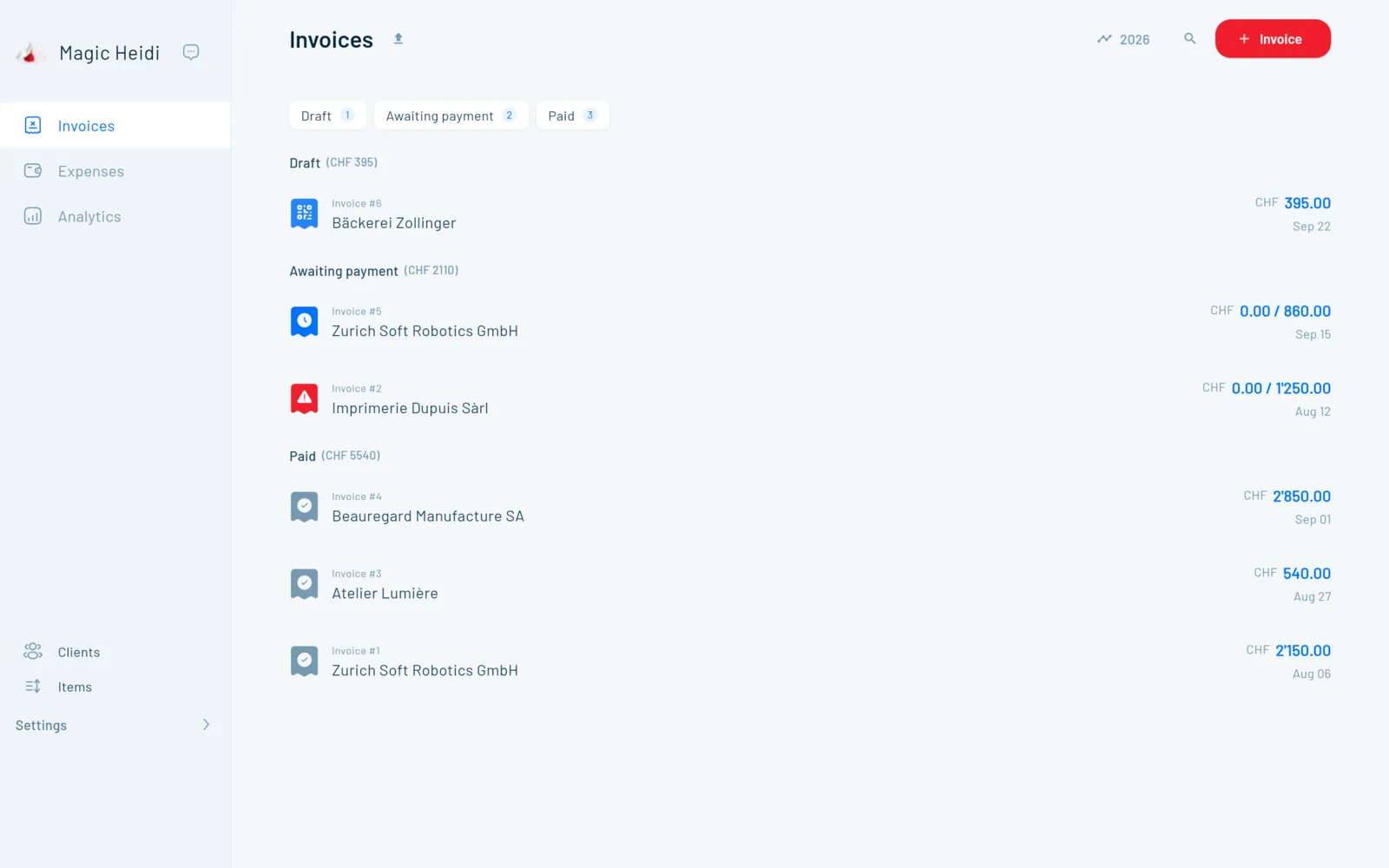
Invoices
| Feature | How it works |
|---|---|
| Swiss QR-bill | QR payment part to the SIX standard on every invoice, with structured addresses. Your normal IBAN is enough, no QR-IBAN needed. |
| Logo and default texts | Upload your logo, set a default invoice text and add a header note to any invoice. |
| Language and currency | German, French, Italian, English or Romansh, in CHF, EUR, USD, GBP and other currencies. Both are saved with the client. |
| Sequential numbers | Magic Heidi numbers your invoices automatically and in sequence. |
| Bill by the hour | Enter the hourly rate, date and time from–to: 10:00 to 14:30 at CHF 100 comes to CHF 450 automatically. The invoice stays a draft until you send it, so you can collect hours all month. See the guide |
| Sections and titles | The first line of an item becomes a bold title with the description below. Headings and spacer lines structure long invoices. |
| Discounts | As a line with a negative amount, for example «Discount −100», or directly in the unit price. |
| Payment terms | A default term, for example 30 days, that you can change per invoice. |
| Send from the app | PDF with QR payment part by e-mail to your client, with your own reply-to address. Or share the PDF, for example via WhatsApp, or print it on A4. |
| Terms attachment | A PDF, such as your terms and conditions, goes out with every invoice automatically. |
| Recurring invoices | Monthly, quarterly or yearly, with an optional end date. Heidi creates them automatically and can send them too. See the guide |
Payments and reminders
| Feature | How it works |
|---|---|
| Open items | Drafts, pending and paid invoices kept apart, with the total per group. Overdue ones are flagged. |
| Payment reminders | When an invoice is overdue, Heidi automatically sends a friendly reminder by e-mail. Learn more |
| Dunning letter | Create and send a reminder letter with the invoice details and the amount still due. |
| Mark as paid | With one click or automatically through bank matching. For a partial payment, record the amount received and Heidi works out the rest. |
| Second IBAN | Store two accounts and choose per invoice which one gets paid. |
| Bank details for abroad | Your own bank details per currency, for example from Wise or Revolut. On invoices in that currency they replace the QR payment part. |
| Different account holder | Your business name in the invoice header, your personal name as account holder in the QR payment part. |
| Revolut Business | Invoices your client pays straight into your Revolut Business account. See the guide |
| Cancel | Mark a wrong invoice as cancelled and issue a corrected one. |
Quotes and other documents
| Feature | How it works |
|---|---|
| Quotes | With logo, validity and default text, sent as a PDF by e-mail. |
| Optional items | Offer options A and B without both counting towards the total. |
| Signature field | Date and signature lines for your client on the PDF. |
| Quote becomes invoice | With one click. Items, VAT and client carry over, and the QR code is added. |
| Order confirmation | From the same data, without the QR payment part. |
| Deposit and partial invoices | Enter a percentage, for example 20 %, and Heidi creates the deposit invoice with QR payment part. More on quotes |
| Credit notes | As a negative line on the invoice or as a separate refund invoice. See the guide |
| Delivery notes | For partial deliveries of an order that has already been paid. See the guide |
Clients and items
| Feature | How it works |
|---|---|
| Unlimited clients | Company and contact person, address and e-mail for direct sending. For a Swiss postcode, Heidi fills in the town. |
| Clients abroad | Record the client's country and VAT number. |
| Notes and files | Private notes only you can see, and files such as contracts, stored per client. |
| Revenue per client | Total revenue and invoice history of each client at a glance. More on client management |
| Item list | Save services and products once with price and VAT rate, including hourly items. One-off lines work without saving. |
Receipts, bank, VAT and year-end
What goes out, what lands in your account and what you owe the FTA. In depth on AI receipt scanning and VAT returns.
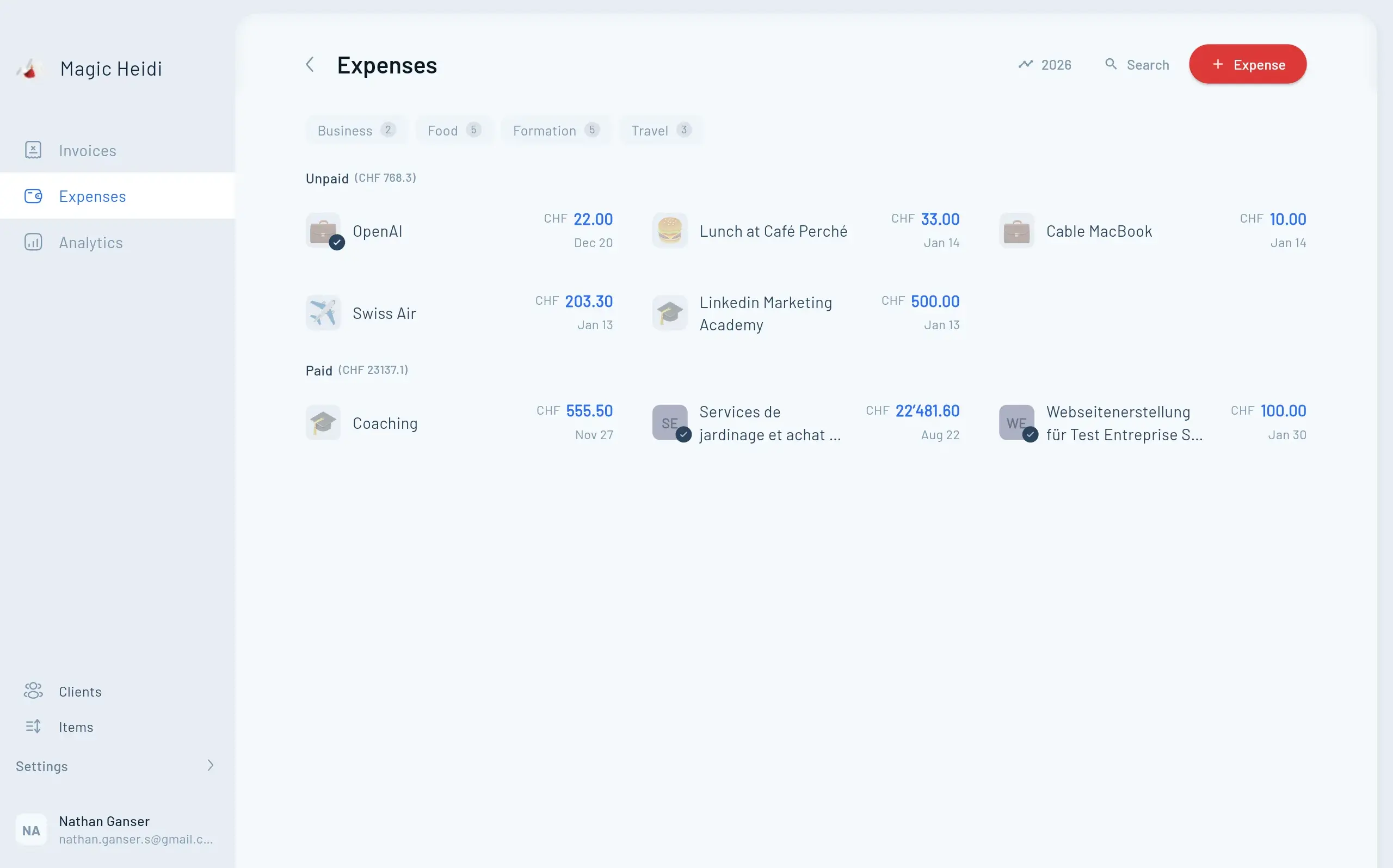
Expenses and receipts
| Feature | How it works |
|---|---|
| AI receipt scanning | The AI reads merchant, date, amount and VAT rate and suggests a category you can change any time. Unlimited in Pro (fair use). |
| Photo with your phone | Snap the receipt at the till and it's in the app right away. |
| Drag-and-drop upload | Drop a PDF or image into the app and the expense is created. |
| Forward by e-mail | Forward bills and you get a confirmation as soon as the receipt is recorded. Address: import@scan.magicheidi.ch |
| Foreign currencies | The AI converts receipts in EUR, USD and other currencies to CHF. |
| Open or paid | Save an expense as open or straight away as paid, with the payment method. |
| Recurring expenses | Create rent, coworking or subscriptions automatically every month or year. |
| Import expenses | Drop in a CSV from your bank or card. The AI records date, amount and category per line and shows what was imported and what was skipped. |
Bank
| Feature | How it works |
|---|---|
| Direct bank connection | Via SIX bLink and read-only, for one or more business accounts. You log in with your bank and can revoke the connection at any time. |
| Statement import | CSV or Excel from UBS, PostFinance, Raiffeisen, ZKB and other banks by drag and drop. |
| Automatic matching | Payments are matched to open invoices by amount and reference and marked as paid. More on bank matching |
| Safe re-imports | Import overlapping periods again: nothing gets marked as paid twice. |
VAT
| Feature | How it works |
|---|---|
| All Swiss rates | 8.1 %, 2.6 %, 3.8 % and 0 %, mixed on one invoice if needed. |
| Exclusive or inclusive | Add VAT on top of the price or include it in the price, switchable per invoice. |
| Net tax rate | Effective method or net tax rate, both work. For two net tax rates there's a guide. |
| Input tax on expenses | The VAT on your receipts is recorded and deducted from the VAT you owe. |
| VAT return | Quarterly (effective method) or half-yearly (net tax rate), on agreed or received payments. Shows the figures you enter in the ESTV ePortal. |
| VAT report in Excel | The full breakdown for your records or your accountant. |
| Start without VAT | Below CHF 100'000 in revenue you invoice without VAT. Later you switch it on with your VAT number. |
Analytics and year-end
| Feature | How it works |
|---|---|
| Dashboard | Income and expenses per month, expenses by category, revenue per client. Filter by year, quarter or a custom period. |
| Profit and tax estimate | Your profit, always up to date, plus an estimate of income tax and AHV contributions. |
| Excel export | Overview sheet with income and expenses by category, VAT and profit, plus every invoice with a link to the original. More on year-end closing |
| Accountant access | A second login for your accountant or partner, at no extra cost. More on working with a fiduciary |
Apps, integrations and your data
Where Magic Heidi runs, what it connects to and how your data is protected. Details on the security page.
Apps and access
| Feature | How it works |
|---|---|
| Phone and tablet | Native apps for iPhone, iPad and Android. |
| Computer | Native apps for Mac and Windows, plus the web app with nothing to install. |
| Instant sync | Start an invoice on your phone on the train, finish it on your laptop. One login for all devices. |
| Seven app languages | German, French, Italian, English, Spanish, Portuguese and Romansh. |
Integrations and import
| Feature | How it works |
|---|---|
| Zapier | Connect Magic Heidi to your online shop, CRM and other tools, for example to record sales automatically. More on Zapier |
| API and webhooks | A public, documented API, for example to create invoices in batches. See the API |
| Shopify, Stripe, Etsy & co. | Record payouts through bank matching or the PDF report. Guides for every platform under integrations. |
| Import data | Drop in clients, invoices, expenses and hours as Excel, CSV or PDF, and the AI sorts them. See the guide |
| Moving help | Send your client or item list to hello@magicheidi.ch and we import it for you for free. |
| Switching from bexio | What changes and how to move over. Magic Heidi vs. bexio |
Security and data
| Feature | How it works |
|---|---|
| Data in Zurich | Invoices, receipts and client data are stored on servers in Zurich. AI receipt scanning uses services that process some data outside Switzerland. |
| Encryption | TLS for every connection, AES-256 for stored data. |
| Two-factor login | Protect your account further with 2FA. |
| Weekly backups | Your data is backed up in encrypted form every week. |
| Export any time | Invoices and reports as PDF, figures as Excel or CSV. All PDFs, photos and receipts as a download, with the link sent by e-mail. |
| Delete your account | Your data is deleted within 30 days. Here's how |
| revDSG and GDPR | Swiss data protection, also for clients in the EU. We never sell your data. |
Support
| Feature | How it works |
|---|---|
| E-mail and phone | In German, French, Italian and English. Founder Nathan often answers himself. |
| Onboarding | A free 30-minute call where you set everything up together. Book a slot |
| Tutorials and videos | Guides for every feature, from the first invoice to year-end closing. Go to the tutorials |
Features, tested daily
4.8 out of 5 from over 200 public reviews.
“I use Magic Heidi to manage my clients, addresses, invoicing and quotes, but also for all my expenses.”
“The interface is clear, intuitive and perfectly suited to Swiss requirements (VAT, currencies, addresses, etc.). The features for customising invoices, tracking payments and sending automatic reminders save us several hours a week.”
“Great tool that made my life much easier. Especially the recognition of receipts in different currencies and languages and automatic FX conversion is extremely useful and works seamlessly.”
“I was looking for a simple solution that would also book purchases from my online shop automatically. Thanks to the Zapier integration, that works without a hitch.”
“I also use the API they provide to generate invoices in batches. Clean documentation and straightforward process, would recommend.”
“Great service! My requests were implemented right away. Everything is simple and clearly laid out – it's genuinely fun to work with Magic Heidi.”
What Magic Heidi doesn't do
Magic Heidi is built for the self-employed, not for SMEs with staff and stock. You won't find these four things here, and that's on purpose.
No payroll
For employee payslips, use a specialised payroll tool.
No stock management
No inventory tracking. For partial deliveries, there are delivery notes.
No balance sheet
Double-entry books for a GmbH or AG are your accountant's job. You hand over the export.
No team roles
There is access for your accountant or partner, but no permission management.
Everything else fits? Try it.
All features free with 3 invoices and 3 receipts, no credit card and no time limit.
Questions about the features
What features does Magic Heidi have?
Everything a sole proprietorship needs day to day: QR invoices, quotes, automatic payment reminders, AI receipt scanning, bank matching, VAT returns and the export for your year-end closing. On top come client management, time tracking on the invoice, recurring invoices, accountant access, Zapier and an API. It all runs on iPhone, iPad, Android, Mac, Windows and the web.
Are all features included in the free plan?
Yes. You can try every feature on this list with 3 invoices and 3 receipts, in total and with no time limit. You don't need a credit card. After that, Pro costs CHF 24.99 a month on the yearly plan (CHF 299) or CHF 39 monthly, VAT included. Pro comes with a 30-day money-back guarantee, and you can cancel any time in the app. Details on the pricing page.
Do I need accounting knowledge?
No. You write invoices and snap receipts; Heidi sorts the receipts into categories and works out the VAT. No chart of accounts, no journal entries. At year-end you give your accountant the Excel export.
Can I track hours with Magic Heidi?
Yes, right on the invoice. You pick an hourly line, enter the rate, date and time from–to, and Heidi calculates the amount. The invoice stays a draft until you send it, so you can collect hours all month. Hours from another time-tracking tool can be imported as Excel or CSV.
Does Magic Heidi send payment reminders automatically?
Yes. When an invoice is overdue, a friendly payment reminder goes to your client by e-mail. You can also create a reminder letter with the amount due yourself. You record partial payments, and Heidi works out what's left. More on automatic payment reminders.
Can I invoice clients abroad?
Yes. You choose the language (DE, FR, IT, EN or RM) and the currency, for example EUR, USD or GBP. For clients abroad you store suitable bank details, for example from Wise or Revolut, and they replace the QR payment part. You add the VAT note, for example «place of supply abroad», in the footer. See the guide
Does Magic Heidi do payroll or a balance sheet?
No. Magic Heidi covers the simplified bookkeeping that's enough for sole proprietorships up to CHF 500'000 in revenue. More on the accounting software page.
Can I bring my data over from Excel or bexio?
Yes. You drop clients, invoices or expenses into the app as Excel, CSV or PDF, and the AI maps the columns itself. Or send your lists to hello@magicheidi.ch and we import them for free. If you're coming from bexio, see Magic Heidi vs. bexio.
Where is my data stored?
Your invoices, receipts and client data are stored encrypted on servers in Zurich. Some features, such as AI receipt scanning, use services that process some data outside Switzerland. There's a backup every week, and you can export all your data at any time. Details on the security page.
A feature I need is missing. What now?
Write to hello@magicheidi.ch or give us a call; support is available in German, French, Italian and English. Founder Nathan often answers himself. Several users mention in their reviews that their requests were implemented quickly. In the free 30-minute onboarding call you can check right away how Magic Heidi fits the way you work.
Try every feature for free
3 invoices and 3 receipts included, no credit card. Over 5'000 Swiss self-employed people already work with Heidi.