 Magic Heidi
 Customer management that does the maths
For Swiss freelancers: address, contact person, notes, contracts and revenue per client in one place. Your next QR-bill invoice is ready in 30 seconds, because everything is already there.
Client data everywhere.
Just not in the right place.
The number is in your phone, the address in a Word template, the contract in your Downloads folder. And when your accountant asks how much you billed client X, the search begins.
One client, four places
Address, VAT number, contract and notes spread across different tools.Revenue per client?
You only know after an evening with Excel and your bank statement.Retyping every invoice
Copying address and contact person out of old emails, every single time.Pick the client. Invoice done.
New invoice? You pick the client, and the address and contact person are already filled in. Because everything you know about a client lives in their profile.
Client details, no typing
Company, contact person, address, email and VAT number. Entered once, on every invoice.
Notes and files
Contracts and briefs attached to the client profile. Private notes your client never sees.
Imported in seconds
Drop in an Excel or CSV list. The AI maps the columns for you.
Who brings in the most?
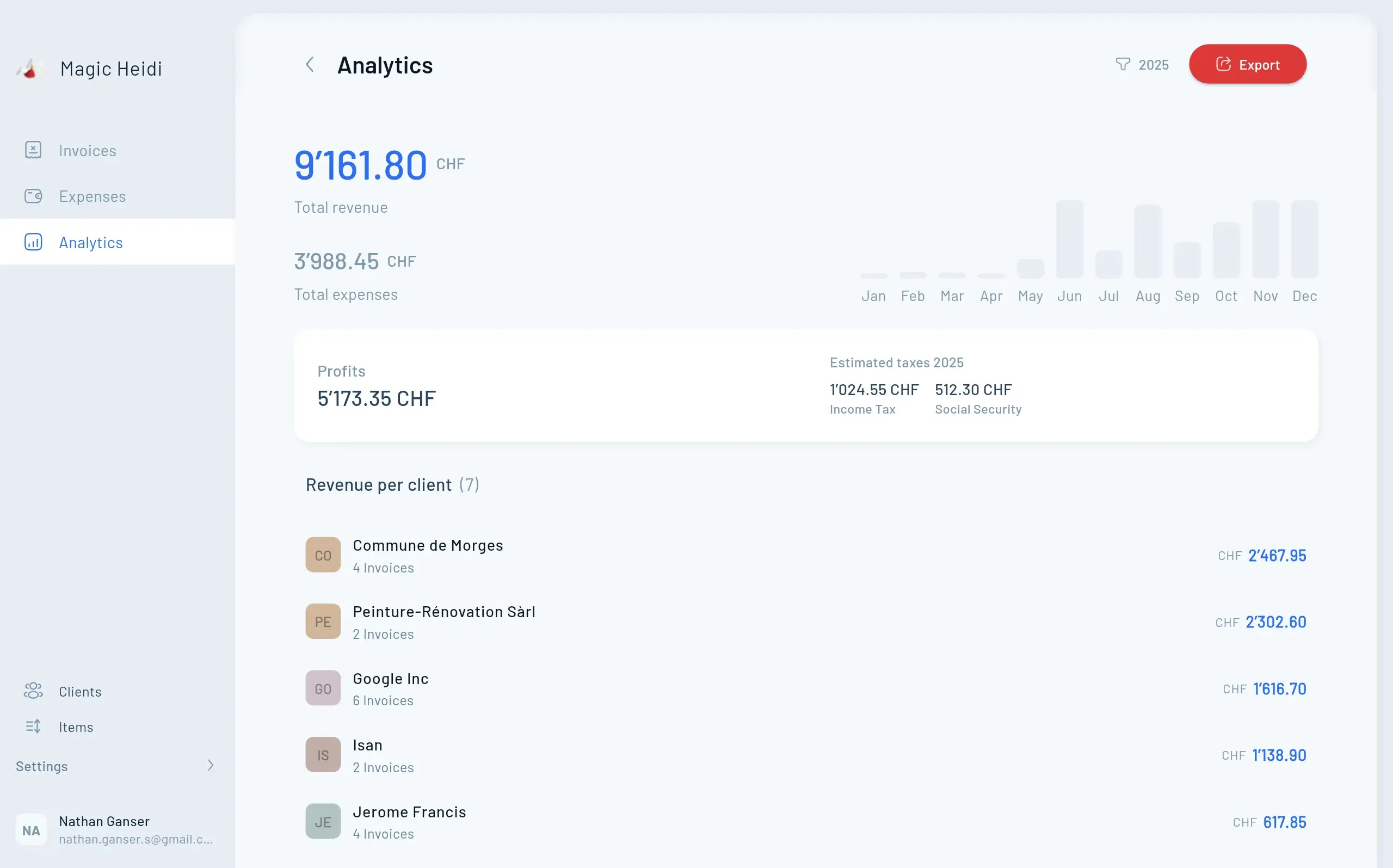
Heidi calculates revenue per client straight from your invoices. You see who your most important client is, who still has to pay and how close you are to the CHF 100'000 VAT threshold.
From client profile to payment received
Quote, invoice, reminder, payment: every step uses the same client data. Nothing gets typed twice.
Quotes
Accepted? One click turns it into the invoice.
QR-bill invoice
Emailed straight to the saved address, with a Swiss QR code.
Payment reminders
Automatic and friendly when a client misses the due date.
Bank matching
Payments are matched to the right invoice.
VAT & accounting
Every invoice goes straight into your bookkeeping and VAT return.
Excel, a CRM or Magic Heidi?
A sales CRM pays off for teams chasing leads. If your clients come through referrals, you need client data, invoices and revenue together. Head to head: Magic Heidi vs. bexio.
| Feature | Magic Heidi | Excel & Word | Sales CRM |
|---|---|---|---|
| Client data in one place | ✓ One profile | ⚠ Scattered | ✓ Yes |
| Invoice from client data | ✓ In 30 sec. | ⚠ Copy-paste | ⚠ Usually separate |
| Revenue per client | ✓ Automatic | ⚠ Do the maths | ⚠ Deals only |
| Payment reminders | ✓ Automatic | ✗ By hand | ⚠ Usually separate |
| Receipts, VAT, bank matching | ✓ Included | ✗ No | ✗ No |
| Sales pipeline & leads | ✗ Deliberately not | ✗ No | ✓ Yes |
| Price | ✓ Start free, Pro CHF 24.99/mo. incl. VAT | Office subscription plus manual work | Usually per user, excl. VAT |
| Built for | ✓ Swiss freelancers | Everyone | Sales teams |
What freelancers say about Magic Heidi
4.8 out of 5 from more than 200 public reviews.
“Ideal billing application for small businesses. Very easy to use, regarding adding clients, items, TVA… and very reasonable pricing.”
“This is a serious must for all small business owners in Switzerland. I hate invoicing and tracking what comes in but Magic Heidi makes it super easy and really quick. It allows me to spend more time keeping my clients happy and less time with the bookkeeping.”
“I use Magic Heidi to manage my clients, addresses, invoicing and quotes, but also all my expenses. Getting help from support is fast, clear and very professional.”
Questions about customer management
Do I need a CRM as a sole proprietor?
Usually not. A CRM is a sales tool with pipelines and lead tracking, built for teams that actively prospect. As a freelancer you need lean customer management software: one place for client data, notes, invoices and revenue. That is exactly what's built into Magic Heidi.
What can customer management in Magic Heidi do?
For each client you store the company, contact person, address, email and VAT number. On top of that come private notes, file attachments such as contracts, all of the client's invoices and their revenue. From the profile you write quotes and QR-bill invoices.
Can I import my clients from Excel or bexio?
Yes. Export your list as an Excel or CSV file and drop it into the Clients section. The AI works out which column is the name, email or address, so you don't need a template. It's best to test with a few clients first. Here's how: Importing data.
How many clients can I add?
As many as you like. The free plan limits invoices and receipts (3 + 3 in total), not clients. With Pro you write unlimited invoices and quotes.
Is Magic Heidi an alternative to bexio?
For freelancers without a team, usually yes. bexio is SME software with CRM, payroll and inventory. Magic Heidi focuses on what a sole proprietorship needs: clients, quotes, QR-bill invoices, receipts and VAT. That makes it quicker to set up and cheaper. See the full comparison: Magic Heidi vs. bexio.
Do I have my clients with me on the go?
Yes. Magic Heidi is available as an app for iPhone, Android, Mac and Windows, and in the browser. Your clients are the same on every device, all you need is an internet connection.
How does revenue per client help with VAT and AHV?
Magic Heidi calculates your revenue per client and in total for any period. So you see early whether you're approaching the CHF 100'000 turnover threshold at which you must register for VAT. You also see whether a single client makes up most of your revenue. That's one of the criteria the AHV compensation office uses to check whether you're really self-employed.
Where is my client data stored?
On servers in Zurich, encrypted in transit and at rest, under the Swiss Data Protection Act (revFADP). Some features, such as AI receipt scanning, use services that partly run outside Switzerland. You can export all your data at any time. More on the Security page.
Can my accountant access my data?
Yes. You can give your accountant their own login. They see invoices, receipts and clients without you having to send files back and forth.
How much does Magic Heidi cost?
You start free with 3 invoices and 3 receipts, no credit card needed. After that, Pro costs CHF 24.99 per month (CHF 299 billed yearly) or CHF 39 billed monthly, all incl. VAT. 30-day money-back guarantee, cancel anytime. Details on the Pricing page.
Your clients. Finally in one place.
Start free, no credit card. Drop in your client list, send your first QR-bill invoice. Done.