Free download

Invoice template Switzerland: Word, Excel, PDF

In English, free, no signup, no email address. All required details, a VAT line and payment details. German and French versions below.

Rather skip the template? In Magic Heidi you enter client details, number and QR code once, and your next invoice is ready in a minute. Start free with 3 invoices and 3 receipts, or try Pro for 7 days.

Preview: what the invoice template looks like

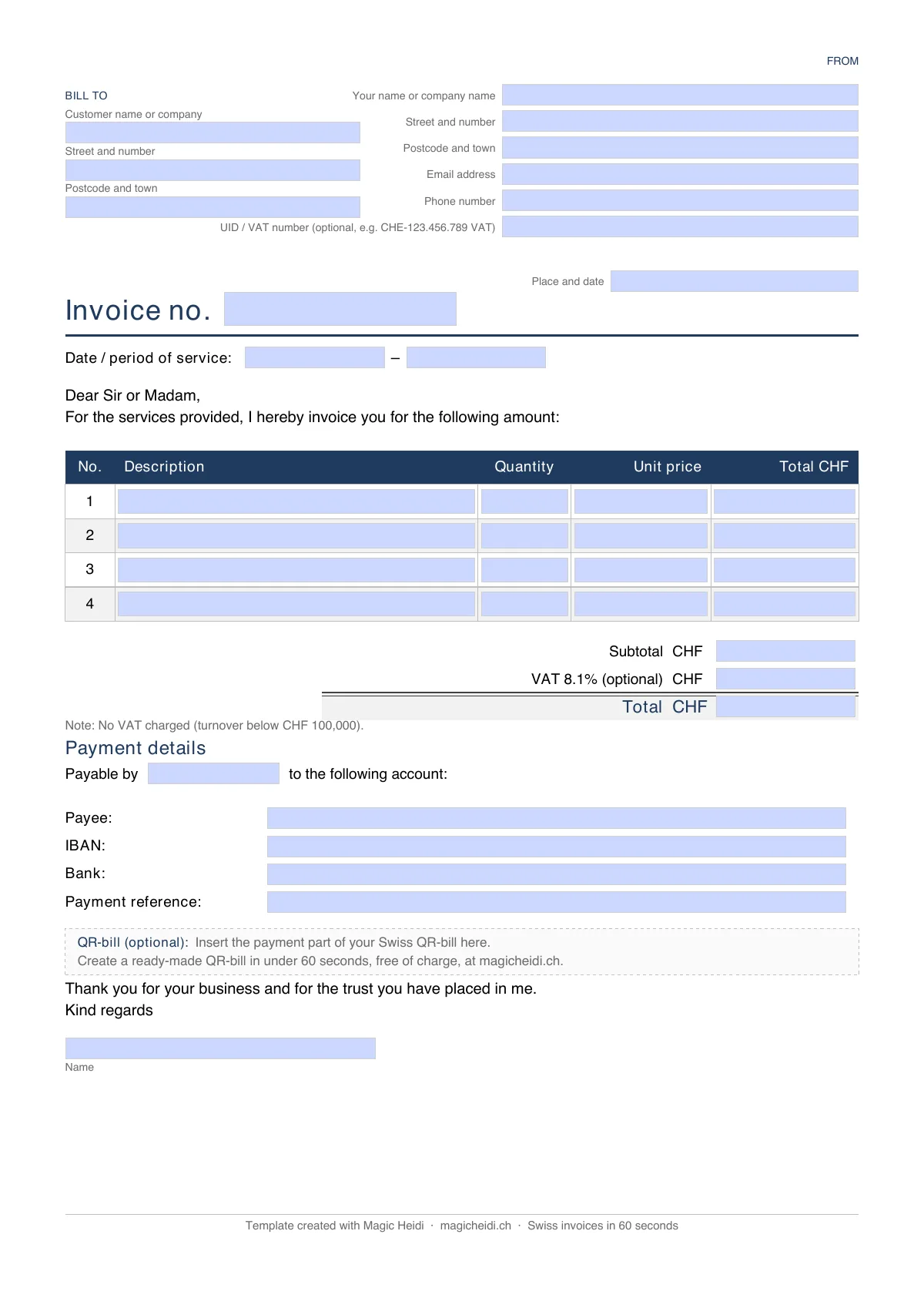
Swiss invoice template in English: A4 page with From and Bill to fields, Invoice no., a line-item table, subtotal, VAT 8.1% and total, payment details and a box for the QR-bill payment part

All three files have the same layout on one A4 page: your details and the client's at the top, invoice number and service period, a table of line items, subtotal, optional VAT 8.1% and total, then the payment details (payee, IBAN, bank, payment reference). You replace whatever is in square brackets.

Same template in other languages: German (Word, Excel, PDF) and French (Word, Excel, PDF), handy if your client is in Zurich, Geneva or Lausanne.

Which file suits you? Word if the layout matters to you. Excel if the template should do the maths. PDF if you only want to fill it in and send it.

Invoice generator

Want a QR-bill? Create the PDF here

Fill in the form and download a finished invoice with QR-bill, in English by default (German, French or Italian under "Invoice Options"). Free, no signup; the link is valid for 1 hour.

Swiss IBAN starting with CH.
Item 1

Invoice template for Word

Download the Word invoice template (.docx) · German · French

The Word template is the most flexible option. You replace the placeholders in square brackets, add your logo, change fonts and colours, and export the finished invoice as a PDF. Every word is editable, so you can adapt the wording to your business.

  • Four line items; add more as table rows
  • A line "VAT 8.1% (optional)" and a note for invoices without VAT. Delete what you don't need
  • Payment details with payee, IBAN, bank and payment reference
  • Word doesn't calculate: you enter subtotal, VAT and total yourself
  • It opens with a neutral greeting ("Dear Sir or Madam,"); replace it with your client's name if you like

Invoice template for Excel

Download the Excel invoice template (.xlsx) · German · French

The Excel template does the maths. You enter quantity and unit price per line, the formulas do the rest.

  • Eight line items: quantity × unit price gives the total per line
  • Subtotal, VAT amount and invoice total are calculated automatically
  • VAT rate from a dropdown: 0%, 2.6%, 3.8% or 8.1%
  • Fields for invoice number, invoice date, due date, service period, IBAN, BIC/SWIFT and reference

The file also opens in Numbers and Google Sheets. If you don't charge VAT, set the rate to 0%. The title "Invoice no. …" picks up the invoice number you enter at the top right.

Invoice template as a PDF

Download the fillable PDF invoice template · German · French

The PDF template has fillable form fields: open it, fill in the fields on screen, save, send. Or print it and fill it in by hand. You can't change the layout or the labels, and the PDF doesn't calculate. For a one-off invoice it's the quickest route.

None of the three files creates a QR code. Your IBAN on the invoice is enough for the payment. If you want a QR payment part anyway, create the whole invoice in the generator above, or add the QR code to your own PDF on create a QR-bill. What goes on an invoice and which rules apply to private individuals is in the guide how to write an invoice in Switzerland.

  • 7 details + a number: A Swiss invoice needs 7 details plus a sequential invoice number (strongly recommended).
  • QR-bill since 2022: The QR-bill replaced the orange payment slip on 1 October 2022. Your IBAN alone also works.
  • VAT from CHF 100'000: VAT on the invoice only once you're registered, from CHF 100'000 turnover. Rates 8.1/2.6/3.8%.
  • Works without VAT: Most freelancers below the threshold use the template without VAT: just drop the VAT line.
  • 4+ invoices a month: From about 4 invoices a month, software pays off. Magic Heidi creates QR-bills in 30 seconds.

What must a Swiss invoice contain?

Swiss law doesn't prescribe an official invoice format. A clean invoice has: your name and address, the client's name and address, an invoice number, the invoice date, the service date or period, a description of the service with quantity and price, the amount with currency, and payment details (IBAN or QR-bill). Each one explained with examples: how to write an invoice in Switzerland.

Extra details if you're VAT-registered

If you're VAT-registered (over CHF 100'000 annual turnover, or registered voluntarily), add:

  • UID number with the suffix "MWST", for example CHE-123.456.789 MWST
  • The VAT rate applied: 8.1% standard rate, 2.6% reduced rate (food, books, medicines) or 3.8% accommodation rate
  • The VAT amount as a separate line

Below CHF 100'000 and not registered, you simply leave these lines out. More in the VAT guide for freelancers.

That's it. No stamp, no signature, no special formatting needed.

Can a Word or Excel template make a real QR-bill?

No. The Swiss QR Code has to be calculated for each invoice under the SIX standard, which Word and Excel can't do. For a QR-bill you have two routes:

  1. The free generator on this page (or the QR tool for your own PDF on create a QR-bill)
  2. Invoicing software like Magic Heidi, which creates the QR code with every invoice

For occasional invoices, your IBAN on the invoice is perfectly enough. Most freelancers use their normal IBAN; a QR-IBAN is only needed for the 27-digit QR reference (QR-IBAN example).

A filled-in invoice you can copy

Here's the template filled in, in English, by a freelancer who isn't VAT-registered:

Mia Bernasconi
Seestrasse 22
8002 Zürich
mia@bernasconi.ch  |  +41 79 123 45 67

──────────────────────────────────────────────────────────────
Invoice no. 2026-007
Issue date:        7 May 2026
Service period:    1–30 April 2026

Bill to:
Müller Consulting GmbH
Hauptstrasse 10
3000 Bern

──────────────────────────────────────────────────────────────
Description                   Qty     Price        Amount
──────────────────────────────────────────────────────────────
UX consulting and concept    12 h    CHF 140.00   CHF 1'680.00
──────────────────────────────────────────────────────────────
                                       Total     CHF 1'680.00

Not subject to VAT.

Payment terms:     30 days (due by 6 June 2026)
Payable to:        Mia Bernasconi
IBAN:              CH56 0483 5012 3456 7800 9

Thank you for your business.

Common mistakes when filling it in:

  • Forgetting the invoice number: without sequential numbering your bookkeeping gets messy fast. More in invoice numbers in Switzerland.
  • No service date: the issue date alone isn't enough. When was the work actually done? That matters for tax.
  • Vague description: "April consulting" is too thin. Better: "UX consulting project XY, 12 hours at CHF 140".
  • Wrong IBAN: check it twice. One wrong character and your client's payment bounces.
  • VAT shown wrongly or forgotten: if you're VAT-registered, the rate must be on the invoice. If you're not, show no VAT at all.

Swiss invoice template without VAT (below CHF 100'000)

Most Swiss freelancers don't need VAT on their invoices. The obligation only starts once your worldwide annual turnover from taxable services exceeds CHF 100'000. Below that, an invoice without VAT is completely legal.

How to use the template without VAT:

  1. In Word: delete the "VAT 8.1% (optional)" line and the UID / VAT number from the header. The invoice total is then just the subtotal.
  2. In Excel: choose 0% in the VAT rate dropdown. The VAT line stays visible at CHF 0.00, which is actually cleaner for your own records.
  3. Optional: add a short line below the total: "No VAT under Art. 10 VAT Act (turnover below CHF 100'000)." Not required, but it answers your client's most common question before they ask.

If you're close to the threshold and thinking about registering voluntarily, read the VAT guide for freelancers first. Voluntary registration can pay off if you have a lot of purchases with VAT.

Which solution fits you?

A rule of thumb by number of invoices and how complex your bookkeeping is.

Decision helper

Template vs. software

Pick what matches your invoice volume.

SituationRecommendation
1–3 invoices a yearWord, Excel or PDF is perfectly fine
4–10 invoices a monthSoftware pays off: saves time and mistakes
VAT-registeredSoftware almost a must (automatic calculations)
Want QR-billsSoftware or the free generator
Invoices in EnglishGenerator or software (PDF in EN, DE, FR, IT)
Several clients, reminders, quotesSoftware clearly ahead
When the template isn't enough

Magic Heidi: Swiss invoices in 30 seconds

From 5–10 minutes in Word to a finished invoice with QR code, VAT and payment overview in 30 seconds.

Automatic Swiss QR-bill

Generated to the SIX standard, accepted by every Swiss bank.

30 seconds per invoice

Enter the line item and send. No reworking the same Word file every month.

Open invoices at a glance

See who has paid and who hasn't. Bank payments are matched automatically.

Limits

What the template can't do

The Word, Excel and PDF files cover the format. Everything around it you still do yourself.

Create a real QR-bill

Word and Excel can't create a Swiss QR-bill correctly. You need a generator or invoicing software.

  • SIX standard required
  • Exact QR code structure
  • Can't be built by hand

Track invoice status

Which invoice is open, which is paid? A static file can't tell you.

  • No paid/open overview
  • No due-date reminders
  • Manual spreadsheet upkeep

Mixed rates and bank matching

The Excel template uses one rate per invoice and doesn't match payments to your bank statement.

  • One VAT rate per file
  • Manual bank comparison
  • One language per file
FAQ

Questions about the Swiss invoice template

Is there an English version of the invoice template?

Yes. The Word, Excel and PDF templates are fully in English (Invoice no., VAT, Payment details). German and French versions are available too. For a finished invoice with QR-bill, use the generator on this page.

Do I need a formal invoice as a private individual?

No. As a private individual there's no legal obligation to use a specific format. But a complete document with all the relevant details protects you in a dispute and keeps your own records clean. See the section on private individuals below.

Do I have to charge VAT on my invoices?

Only if you're VAT-registered, which is required once your worldwide annual turnover from taxable services exceeds CHF 100'000. Below that you show no VAT on the invoice. If you're unsure, the Federal Tax Administration (estv.admin.ch) gives clear answers, also by phone.

Is there an Excel invoice template for Switzerland?

Yes. The Excel template (.xlsx) is a free download and calculates subtotal, VAT and invoice total automatically. You pick the rate from a dropdown (0%, 2.6%, 3.8% or 8.1%). The file also opens in Numbers and Google Sheets.

Is there a Word invoice template for Switzerland?

Yes. The Word template (.docx) is a free download. You can change logo, fonts, colours and every label, then export the invoice as a PDF. For automatic calculations use the Excel version, for quick filling in without changes the PDF.

Is the QR-bill mandatory in Switzerland?

No. The QR-bill replaced the payment slip, but there's no legal obligation to use it. You can still just put your IBAN on the invoice. The QR-bill is simply more convenient for your client and tends to speed up payment.

How long do I have to keep invoices?

Swiss law requires you to keep business records for 10 years, including the invoices you issue. Digital archiving is allowed, as long as the documents stay readable at all times.

Can I issue an invoice in English?

Yes. There's no legal requirement to invoice in German. If your client works in English, an English invoice is fine. Magic Heidi creates invoices in German, French, Italian and English. More in multilingual invoicing for Swiss freelancers.

What do I do if a client doesn't pay?

Send a friendly reminder first, referring to the original invoice and its number. If a second reminder also gets no response, you can request a payment order at the cantonal debt collection office (Betreibungsamt). Keep all invoice copies and correspondence. The steps are in the section on non-payment below.

Can I try Magic Heidi for free?

Yes, in two ways. The free version includes 3 invoices and 3 receipts in total, with no time limit and no credit card. Or try Pro for 7 days with every feature. Paid plans come with a 30-day money-back guarantee.

Adapting the template to your work

The basic structure always stays the same. What changes is the service description and sometimes the currency.

  • Freelancers and consultants: List hours with project phase and hourly rate. For foreign currencies, note the exchange rate.
  • Fee invoices: Consultants, therapists, coaches: same structure, the service is a fee, by the hour or flat.
  • Trades and crafts: Show materials and labour as separate lines. Some materials can carry a different VAT rate.
  • Sole proprietorships: You invoice under your own name. A brand name is allowed, but your own name must stay visible. See setting up a sole proprietorship.
  • Private individuals: You can invoice without being self-employed: one-off jobs, used items. Leave UID and VAT empty.

Using the template as a private individual

You don't have to be self-employed to use the template. Private individuals can issue invoices too, for one-off services, selling used items or short side jobs. Legal details, thresholds and examples are in the guide how to write an invoice in Switzerland. Three typical cases:

  • Selling a used bike to another private person
  • A one-off babysitting job or tutoring
  • Subletting your flat for two months

The template works the same way. You just leave these fields empty or delete them:

  • UID number (you don't have one as a private individual)
  • VAT line (only for VAT-registered businesses)
  • Company name (your own name is enough)

One thing to watch: if you regularly issue invoices "as a private individual", the authorities will at some point look at whether you're actually self-employed. Rule of thumb: more than two or three jobs a year for different clients, and you should look into registering as self-employed.

What to do when a client doesn't pay

The invoice is out, the deadline has passed and nothing arrives. It happens to most self-employed people sooner or later. Here's the order of steps.

First reminder

A friendly email after the payment deadline. Often it's just forgetfulness. No fee.

Second reminder

After 10 to 14 days, formally, with a new deadline. A CHF 20–50 fee is common if your terms say so.

Debt collection

Request a payment order at the cantonal debt collection office. The last resort, but often the only one.

You never have to write a payment reminder by hand. In Magic Heidi you send it with one click from the open invoice, and the home screen shows every overdue invoice, sorted by due date. More in late payment reminders for Swiss freelancers.

Download the Swiss invoice template and get started

A correct Swiss invoice is no mystery: the required details, a clear description of the service, an IBAN or QR code, and you're done. The template above covers it in Word, Excel and PDF, with or without VAT, in English, German or French. For an invoice with QR-bill, the generator on this page gives you a finished PDF.

If you invoice regularly, Magic Heidi is the fastest route. Free for up to 3 invoices, no credit card. Download the template now, or try Magic Heidi on iPhone, Mac or in the browser. More free files: Swiss templates.

Everything on this page is based on the Swiss Code of Obligations, the VAT Act and current ESTV guidance (as of November 2026). Current VAT rates and thresholds are on estv.admin.ch. An official QR-bill sample is published on kmu.admin.ch. The technical QR-bill specification is maintained by SIX. For questions about your own tax situation, ask a fiduciary or your cantonal tax office.

Written by Nathan Ganser, co-founder of Magic Heidi. Last updated 12 November 2026.

Get the template

Download the template, or switch to Magic Heidi

The Word, Excel and PDF templates are free. Magic Heidi is free for up to 3 invoices, then CHF 24.90/month on the annual plan.

Write invoices without adjusting a template

Magic Heidi numbers them, calculates the VAT and adds the QR payment part. Start free with 3 invoices and 3 receipts, or try Pro with every feature.