 Magic Heidi
 The invoice app for iPhone
Write the QR invoice while you're still at the client's, scan receipts at the till and see right away who has paid. The native iPhone app for Swiss freelancers, synced with Mac, Windows and web.

Invoicing on your phone? Usually half-done.
The job is done and the client is happy. Yet you only write the invoice on Sunday at your laptop, and the parking receipt is still in the glovebox.
Built for other markets
International invoice apps with no Swiss QR slip, VAT set by handPhone for viewing only
Lists on your phone, but the writing still happens on the laptopReceipts in your wallet
By the time you sit at your computer, the receipt has fadedWrite invoices right on your iPhone
Not a stripped-down companion app: quotes, invoices, receipts and payment status all work fully on your iPhone. All features at a glance: invoicing software.
Invoice right after the job
Pick the client, add the line items, send. The app takes care of the QR code and VAT. A quote becomes an invoice in one click.
Scan receipts at the till
Take a photo and the AI reads merchant, date, amount and VAT rate. Unlimited with Pro. More on AI receipt scanning
See who has paid
Open, overdue, paid at a glance. Bank import matches payments to your invoices, and reminders go out on their own.
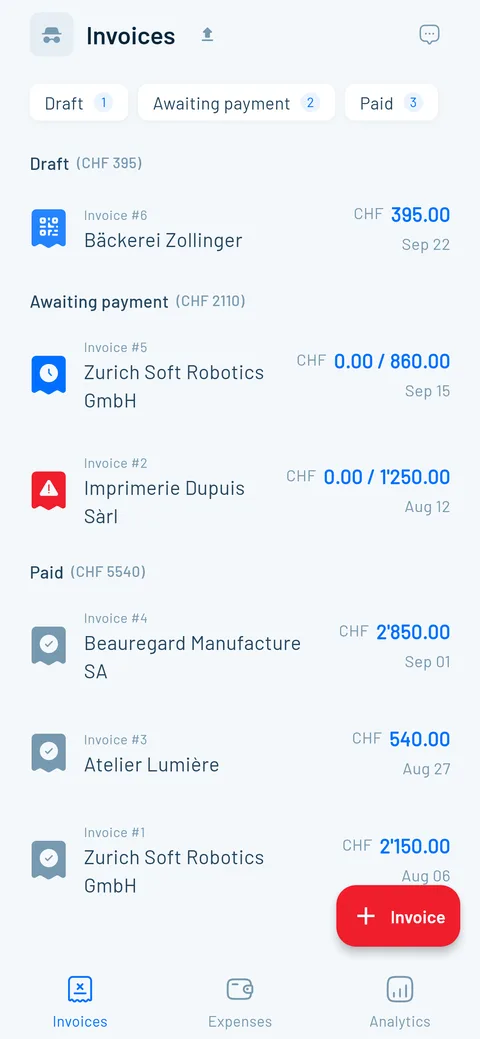
Start on your iPhone, finish on the laptop
One account, real apps on every device. Everything syncs in real time, and your data is stored encrypted on servers in Zurich.
The invoice app on the App Store: the facts
Here's what the Swiss App Store says about «Magic Heidi: Rechnung & QR», as of September 2026.
| App Store detail | Magic Heidi |
|---|---|
| Category | Finance |
| Compatible with | iPhone with iOS 15 or later, iPad with iPadOS 15 or later, Mac with macOS 12 or later, Apple Vision with visionOS 1 or later |
| Price | Free to download, 3 invoices and 3 receipts included. Pro as an in-app subscription: CHF 299 per year or CHF 39 per month |
| Privacy label | Only your email address, no data for tracking or advertising → Security |
| Provider | Nathan Ganser, founder of Magic Heidi |
What users write on the App Store
Three voices from the Swiss App Store, linked to the original. Overall 4.8 out of 5 from over 200 public reviews.
“I tested several comparable apps before taking out a subscription. In the end I clearly chose Magic Heidi. Very intuitive to use and reduced to the essentials.”
“I've never enjoyed sending an invoice this much! It's so uncomplicated! Love it! It's a whole new feeling as a small business owner to have a tool like this now! Thanks Nathan”
“The app is easy to use and very practical, whether from a smartphone or a computer. The developers are very responsive when it comes to improvements.”
Frequently asked questions
Can I create an invoice on my iPhone?
Yes, from start to finish. With Magic Heidi you write a Swiss QR invoice in about 30 seconds: pick the client, add the line items, send it as a PDF. A Word or Numbers template works in a pinch, but it has no QR payment slip and no overview of who has already paid.
Is the iPhone app free?
The download is free, and you can create 3 invoices and 3 receipts with every feature, no credit card needed. After that, Pro costs CHF 24.99 per month billed yearly (CHF 299) or CHF 39 monthly, VAT included. On top, there's a 30-day money-back guarantee, and you can cancel any time. All the details are on the pricing page.
Which invoice app for iPhone works in Switzerland?
The App Store shows you Invoice Simple, Invoice 2go or Zoho Invoice first. With those, clients usually pay by card or PayPal, there's no QR payment slip, and you set up the VAT yourself. Zoho Invoice is even free, but it has no Swiss QR invoice. Magic Heidi has the QR payment slip, the VAT rates of 8.1, 2.6 and 3.8 % and documents in German, French, Italian, English or Romansh built in. How we compare with bexio is in the comparison.
Can I also write quotes on my iPhone?
Yes. You create the quote right at your client's and send it as a PDF. Once they say yes, it becomes an invoice in one click, with all line items and the QR code. More about quotes.
Can I scan receipts with the iPhone camera?
Yes. You take a photo of the receipt, and the AI reads merchant, date, amount and VAT rate and suggests a category. On the Pro plan you scan as much as you like (fair use). More about AI receipt scanning.
Who helps me get set up?
Support is available by email and phone in German, French, Italian and English, and founder Nathan often answers personally. To get started, you can book a free 30-minute onboarding call.
Does the app work without internet?
No, Magic Heidi needs an internet connection. In return, everything is instantly up to date on all your devices: what you enter on your iPhone shows up on your laptop right away.
Where is my data stored?
On servers in Zurich, encrypted in transit and at rest. Some features, such as AI receipt scanning, use services that partly run outside Switzerland. The App Store privacy label lists only your email address. Details on the security page.
Where do I find the receipt for my iPhone purchase?
You'll find the receipt for an iPhone or an app purchase at reportaproblem.apple.com, or in Settings under your name → "Media & Purchases" → "View Account" → "Purchase History". That's also where the receipt for a Magic Heidi subscription bought through the App Store lives. This page is about the opposite: writing your own invoices on your iPhone.
Turn your iPhone into an invoicing office
Download for free and send your first QR invoice in 30 seconds. 3 invoices and 3 receipts included, no credit card needed.