 Magic Heidi
 Bank reconciliation on autopilot
Connect your business account or import your bank statement as CSV or Excel. Magic Heidi recognises which client paid and marks the invoice as paid.
Stop ticking off payments
line by line.
Open e-banking, scroll through the credits, compare amount and reference, switch back to your invoicing tool, mark as paid. For every single invoice, every month.
2 minutes per invoice
With 50 invoices a month, almost two hoursAwkward reminders
You chase a client who paid weeks agoWrong open items
You never know exactly how much money is still comingConnect your bank or import your statement
You choose how your payments reach Heidi. After that, it works the same way: every credit is automatically compared with your open invoices.
Connect your bank
Via SIX bLink, the Swiss open banking platform. New payments arrive automatically, with read-only access.
Import your statement
Export CSV or Excel from your e-banking and drag it into Magic Heidi. No CAMT export needed.
Matched automatically
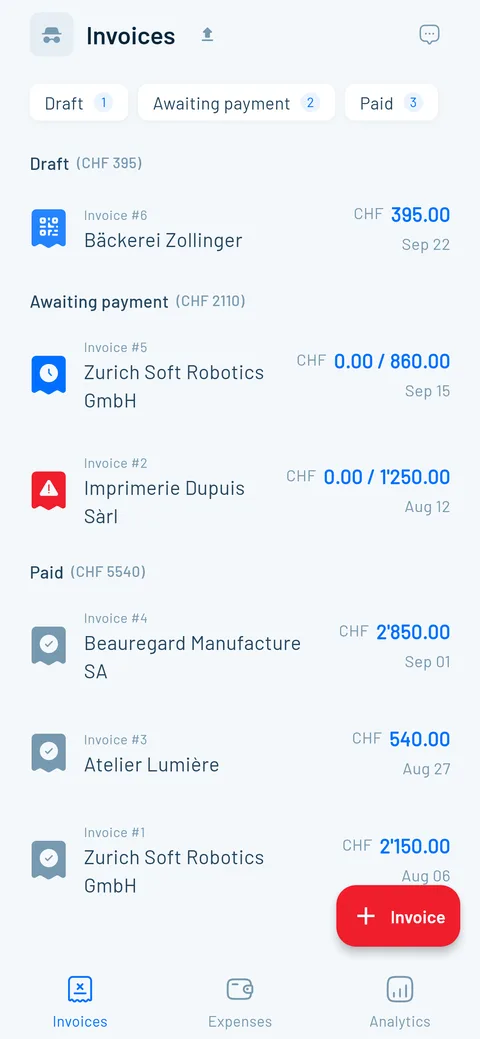
Heidi compares the amount, reference and other payment details and marks the matching invoice as paid.
Open items, always up to date
Reconciliation doesn't just save you time. It makes sure your overview, your reminders and your numbers are right.
Live overview
Paid invoices drop off the list. What's left is what's really still missing.
Smart reminders
Automatic reminders only go to clients who haven't paid yet.
QR reference
When your client pays via QR-bill, the reference matches exactly and Heidi finds the right invoice.
Partial payments
Record the amount received, Heidi works out what's still open.
Expenses too
Drop in a bank or card CSV: the AI captures date, amount and category per line.
Works with every Swiss bank
Every Swiss e-banking lets you export your statement as CSV or Excel. The direct connection runs via SIX bLink, with every bank connected to bLink.
UBS and PostFinance
ZKB, BEKB, BCV, BCGE and all the others
Migros Bank and regional banks
All accounts, one list of open items
More time for clients, less for admin
4.8 out of 5 from over 200 public reviews.
“…The interface is clear, intuitive and perfectly suited to Swiss requirements (VAT, currencies, addresses, etc.). The features for customising invoices, tracking payments and automatic reminders save us several hours a week.”
“This is a serious must for all small business owners in Switzerland. I hate invoicing and tracking what comes in but Magic Heidi makes it super easy and really quick. It allows me to spend more time keeping my clients happy and less time with the bookkeeping.”
“No more stress with slips of paper and receipts… In a very short time (something I usually love to put off for ages) I read 1.5 years of receipts and salary payments into Magic Heidi and I'm thrilled.”
Try it free, then decide
Bank reconciliation is included in every plan. All prices incl. VAT, cancel anytime.
Free
- 3 invoices & 3 receipts (in total)
- All features, bank reconciliation too
- No credit card needed
Yearly
- Bank connection & statement import
- Unlimited invoices & quotes
- Automatic payment reminders
- Unlimited AI receipt scanning
- VAT incl. net tax rate method
- Support straight from the founder
Monthly
- Same features
- Unlimited invoices & receipts
- Cancel anytime
30-day money-back guarantee. No lock-in.
Questions about bank reconciliation
How do I import my bank statement into Magic Heidi?
In your e-banking, open your account transactions, pick the period and export them as CSV or Excel. Then simply drag the file into Magic Heidi, no special import menu needed. Step-by-step guides for PostFinance and UBS, or watch the bank reconciliation video tutorial. How often you import is up to you: every week, at the end of the month or before your VAT return.
Does it work with my bank?
Yes. Every Swiss e-banking offers a CSV or Excel export, from UBS and PostFinance to Raiffeisen, ZKB, Migros Bank and the cantonal banks. You don't need a CAMT.053 export or other ISO 20022 files: CSV, .xlsx or .xls is enough. The direct connection works with every bank connected to SIX bLink.
Do I have to connect my bank?
No. The statement import works without any bank connection: you export the file yourself and drag it into Magic Heidi. You never enter your e-banking login anywhere. The SIX bLink connection is simply more convenient, because new payments arrive automatically.
How does the direct bank connection work?
You start the connection in Magic Heidi, log in directly with your bank and choose which accounts to connect. The connection runs via SIX bLink, the Swiss open banking platform. After that, Heidi fetches new transactions in the background and keeps matching them with your invoices, without you uploading anything.
Is the bank connection secure?
Yes. Access is read-only: Heidi sees your balance and transactions but can't make payments. You only enter your e-banking login at your bank, and we never see or store it. You can revoke the connection anytime in the app or at your bank. More on the Security page.
How does Magic Heidi know which payment belongs to which invoice?
During bank reconciliation, Heidi compares every credit with your open invoices: amount, reference and other details from the payment. If your client pays via the QR code on your QR-bill, these details usually match exactly. An invoice is only marked as paid when the payment clearly matches it. Credits without a matching invoice, such as private transfers, stay untouched.
What happens with partial payments or a wrong match?
If the amount differs, for example with a partial payment, the invoice stays open. You record the amount received, Heidi works out the rest and it stays in your open items. If Heidi ever matches something wrongly, you set the invoice back to unpaid with one click.
Can I import the same statement twice?
Yes. You can import the same file or overlapping periods as often as you like. Magic Heidi never marks an already matched invoice twice. So you don't need to remember which period you've already uploaded.
Can I use several bank accounts?
Yes. You can connect several Swiss bank accounts or import the statements of each account separately. Heidi matches all payments against the same list of open invoices. For TWINT payouts, which bundle many payments and fees, there is also a TWINT guide with an Excel template (currently in German only). How your bank connection and your bookkeeping fit together is explained in the bank integration guide.
How much does bank reconciliation cost?
Bank reconciliation is included in every plan. You can try it for free with 3 invoices and 3 receipts, without a credit card and with all features. After that, Magic Heidi Pro costs CHF 24.99 per month (CHF 299 yearly) or CHF 39 monthly, both incl. VAT.
Never tick off payments by hand again
Connect your bank or drag your next statement into Magic Heidi. Heidi takes care of the bank reconciliation. Start for free, no credit card.