 Magic Heidi
Year-End Closing as a Freelancer – Step-by-Step Guide
The year is over, the tax return is due – and you're wondering how to properly close your books? In three clear steps, we'll show you how to prepare your year-end closing in Magic Heidi.
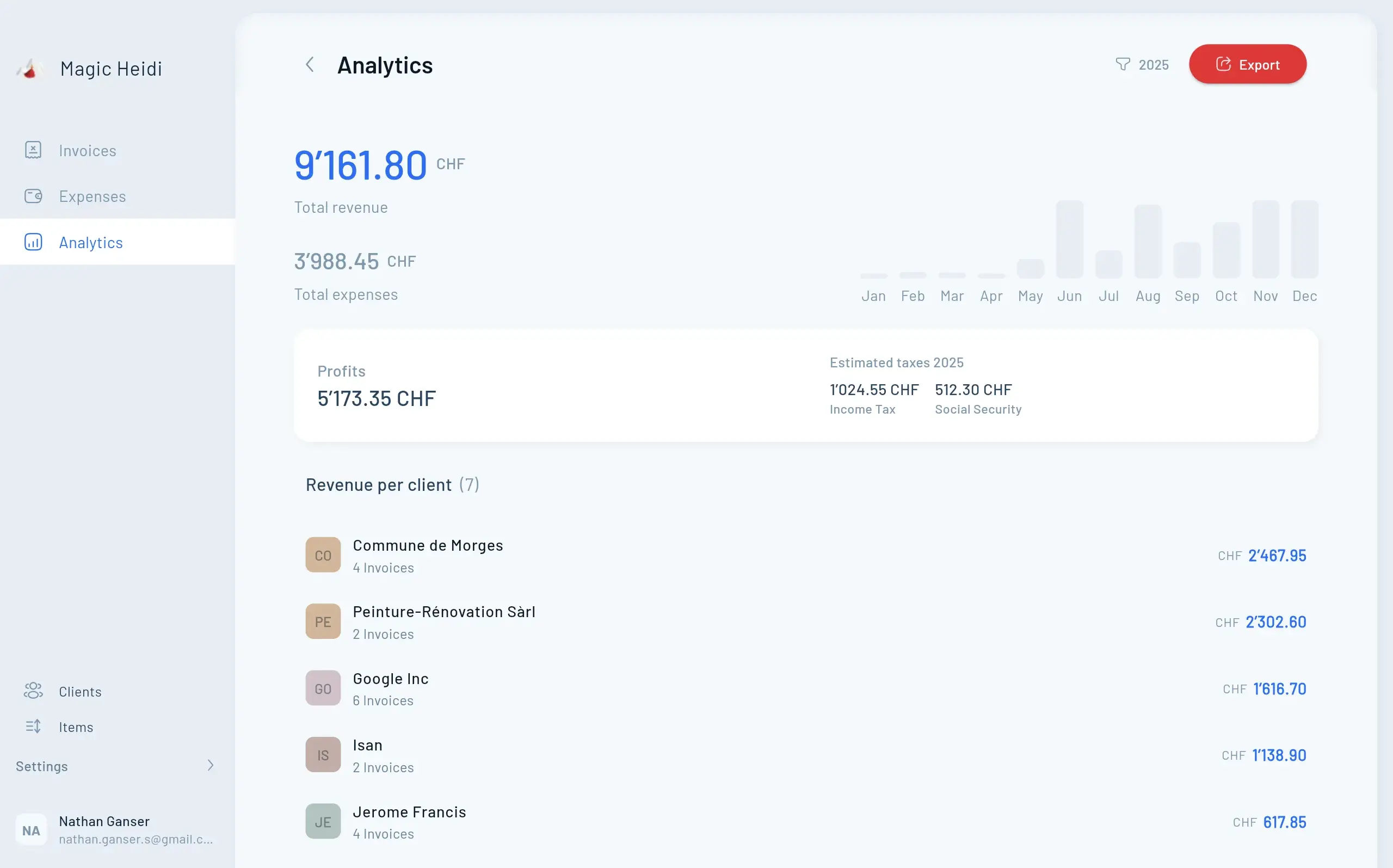
In this guide, we'll show you in three clear steps how to prepare your year-end closing in Magic Heidi – from reviewing your invoices and checking expenses to exporting data for your tax return. By the end, you'll have a complete Excel file containing all the information you need for your tax return.
Three Steps to a Completed Year-End Closing
If you've been using Magic Heidi throughout the year for your invoices and expenses, the year-end closing is simpler than you think.
- Review Invoices – Check all paid invoices and clarify the status of outstanding invoices.
- Check Expenses – Reconcile expenses with bank statements and add any missing items.
- Export Data – Create an Excel export and optionally save a complete backup of all receipts.
Step 1: Review invoices from the past year
The first step is to get an overview of all invoices from the completed fiscal year. Open the invoice overview in Magic Heidi and filter by the relevant year.
You will find your invoices in three statuses:
- Paid Invoices – All invoices that have been fully paid by your clients. These form the basis of your year-end closing.
- Open Invoices – Invoices where you're still waiting for payment. The question here is whether the payment was received in the new year.
- Unpaid Invoices – Invoices that were never paid – for example because a project was cancelled or a client didn't pay.
Accrual or Cash Basis? Choosing the Right Method
For invoices that were only paid in the new year, you need to make an important decision. For most freelancers and sole proprietorships in Switzerland, the cash basis is the common and simpler method – what counts is the moment the money actually arrives in your account.
Cash Basis (Received)
The invoice counts in the year it was paid. Recommended for most freelancers in Switzerland.
- Simpler method
- Based on actual payment receipt
- December invoice, January payment = new year
- Common for sole proprietorships
Stick with the method once you've chosen it. Invoices still open at year-end belong in the list of receivables you attach to your tax return. Your tax office or your fiduciary can tell you what your canton requires.
Accrual Basis (Invoiced)
The invoice counts in the year it was issued – regardless of when payment was received.
- Based on invoice date
- Independent of payment receipt
- More common for larger companies
- More complex bookkeeping
Unpaid Invoices
Don't simply delete invoices that are never paid: issued invoices are part of your business records. Cancel them with a credit note or leave them as unpaid.
- Under the cash basis they do not count as your income
- Cancelling with a credit note keeps the records traceable
- For larger defaults, ask your fiduciary how to treat them
Step 2: Check and complete your expenses
While the invoice side is usually well maintained, gaps tend to creep in more often with expenses. Open your business account bank statements and reconcile the listed expenses with the entries in Magic Heidi.
Reconcile expenses month by month
Go through your bank statements systematically and use Magic Heidi's practical tools to find gaps:
- Use the search function – Search specifically for "Software", "Flight", "Lunch" or "Office supplies".
- Check categories – Go through all expense categories – is an entire category missing?
- Use Analytics – Check in the Analytics section whether there are entries for every month.
- Reconcile bank statements – Compare every business expense with your Magic Heidi entries.
Review recurring income and expenses
If you have recurring income – such as monthly settlements from platforms like the App Store, Google Play, or Shopify – you can easily check completeness in the Analytics section. Select the client and verify that there's an invoice for every month.
Commonly forgotten expenses for freelancers
Certain expenses are particularly often forgotten by freelancers. Make sure you've accounted for the following items:
- Pillar 3a – Not a business expense, but deductible in your private tax return. Remember to pay in before year-end.
- Insurance – Professional liability and other business-related insurance.
- Home Office Costs – Proportional rent, electricity, and internet when working from home.
- Professional Development – Courses, professional literature, and conferences that are career-relevant.
- Software Subscriptions – Tools and services you use for your work.
- Phone & Internet – Business use of your mobile phone and internet connection.
Tip: We've written a detailed article about the most important expenses that freelancers shouldn't forget on their tax returns. It's worth using it as a checklist before you finalize your year-end closing.
Step 3: Export data for your tax return
Once all invoices and expenses have been reviewed and are complete, you can export your data from Magic Heidi. This step only takes a few minutes.
Create Excel export
Go to the export section, select the year, and export only paid invoices.
- Open the export section in Magic Heidi
- Select the desired year (e.g. 2025)
- Export only paid invoices
- Save the file (desktop or tax documents folder)
Create a complete backup (recommended)
Save all PDFs, photos, receipts, and documents from the fiscal year.
- Click the backup option in the export section
- Receive a download link via email
- Download all files
- Save to computer, external drive, or cloud
Tip: Even though the backup is optional, we recommend creating one. This way you'll have a complete, local copy of all receipts – useful for audits or if you need to look something up later. In Switzerland, there is a 10-year retention requirement for business documents.
Understanding the export file
The exported Excel file contains the figures from Magic Heidi that you need for your tax return.
Overview Sheet
All key figures at a glance – including net income and profit, which is relevant for the tax return.
- Total income, broken down by categories
- All expenses, broken down by categories
- VAT information for reference
- Net income, net expenses, and profit
Invoice Details
Detailed listing of all individual invoices with direct links to the original documents in Magic Heidi.
- Listing of all individual invoices
- Direct links to original invoice files
- View original documents at any time
- Full transparency and traceability
Filing Your Tax Return
Transfer the relevant figures from the Excel file directly into your tax return.
- Total revenue from self-employment
- Total business expenses
- Net profit
- The profit is the starting point for your income from self-employment