

SumUp for Swiss Freelancers: Is It Right for Your Business?

Mobile card payments in Switzerland: fees, open questions, and how to record card payments in your accounting.

Swiss Freelancer Payment Processing

As a Swiss freelancer, you've probably experienced this: A client wants to pay with a card, but you only have your bank details ready. Or worse—you lose a job because you can't accept payment on the spot.

Traditional payment terminals often come with monthly fees and contracts. Is there a simpler way?

Enter SumUp—the mobile payment solution that's gained popularity among small businesses and freelancers across Europe. But does it actually work well in Switzerland's unique payment landscape? And how can you integrate it with your accounting workflow?

Let's find out.

What SumUp Offers Swiss Freelancers

SumUp provides mobile card readers and payment processing for small businesses. The standard model has no monthly fee; you pay per transaction.

📱

Mobile card readers

Connect to your smartphone or work standalone
💳

All common cards

Debit and credit cards, including American Express
⚡

Fast payouts

According to SumUp, in your bank account the next business day
📊

Simple dashboard

Payments and reports at a glance

SumUp Pricing in Switzerland (as of November 2026)

The following figures come from the SumUp Switzerland pricing page. Check them there before you order: prices and promotions change.

Pay-As-You-Go (no subscription)

  • 1.5% for debit cards
  • 2.5% for credit cards, American Express, premium cards and cards from outside the EU
  • 2.5% for online payments
  • No monthly fee

Example calculation: With CHF 3,000 in card turnover per month (half debit, half credit), you pay CHF 22.50 + CHF 37.50 = CHF 60 in fees.

Payments Plus (subscription)

  • CHF 29 per month or CHF 299 per year
  • 0.99% for debit and credit cards
  • 1.99% for American Express, premium cards and cards from outside the EU

Whether the subscription pays off depends on your card turnover and your mix of cards. Run the numbers with your own figures.

Card readers

SumUp sells the devices (for example Solo Lite and Terminal); you don't rent them. The current device prices are on sumup.com.

Clarify before you buy

TWINT and PostFinance Card

SumUp's Swiss pricing page does not list TWINT or PostFinance Card (as of November 2026). If your clients want to pay that way, ask SumUp before you order.

TWINT

Very widespread in Switzerland. Find out whether your card reader accepts TWINT, or offer TWINT separately

PostFinance Card

Ask SumUp whether the PostFinance Card is accepted

Visa and Mastercard

Debit and credit cards are covered according to the pricing page

Know your clients

How do your clients prefer to pay? That's what decides it

When SumUp is a good fit:

  • You have corporate or international clients who pay by card
  • You work at events or markets and offer other payment methods alongside
  • Your turnover is too small or too irregular for a terminal with a monthly fee

The key is understanding your client base before committing.

Integration Guide

Using SumUp with Magic Heidi: The Complete Workflow

Here's the practical reality: SumUp and Magic Heidi don't have a direct API integration. But you can absolutely use them together effectively.

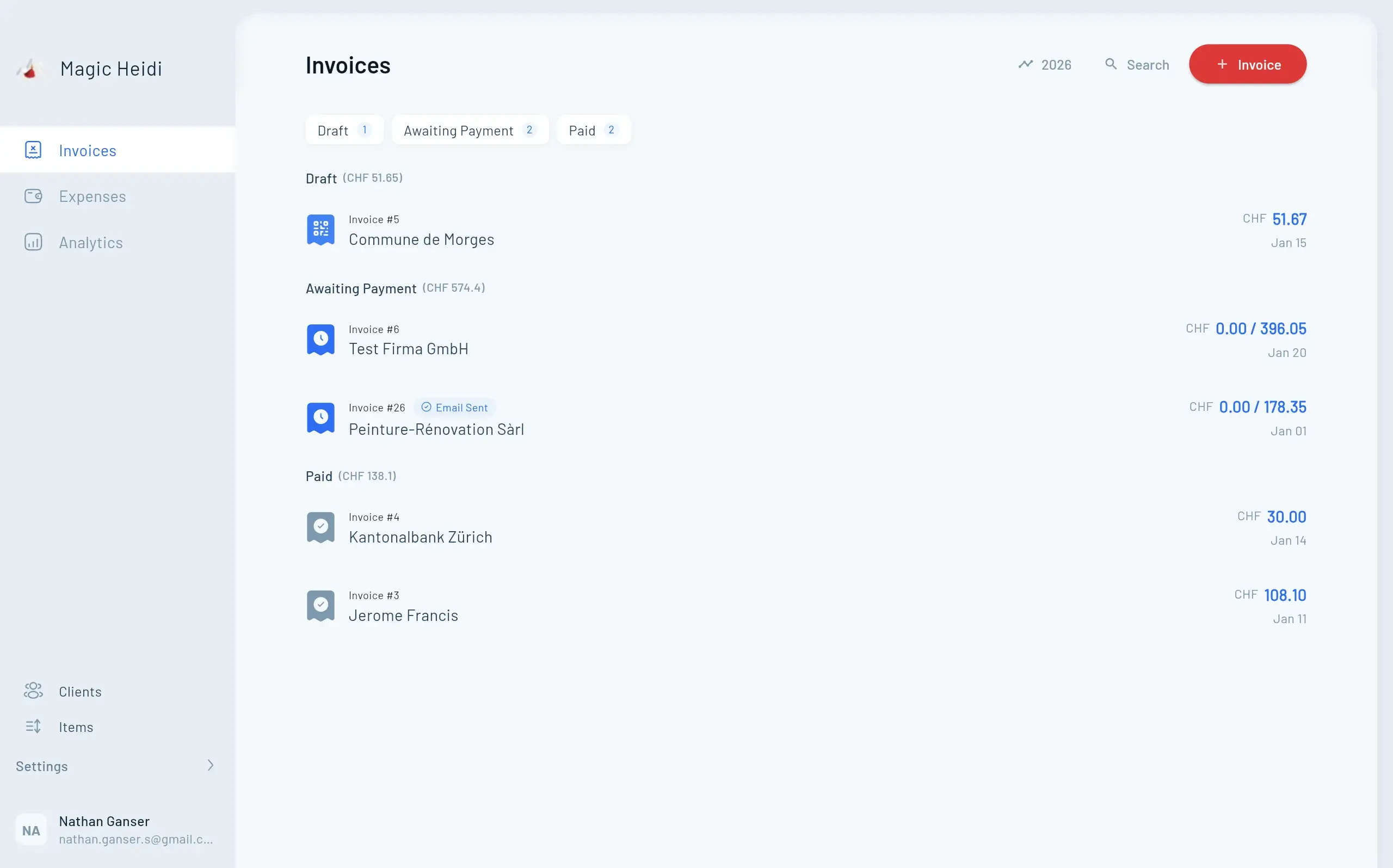
Magic Heidi Invoice Management
Workflow

Complete Payment-to-Accounting Workflow

A simple four-step process to keep your finances organized and VAT-compliant

Step 1: Process Payment with SumUp

Accept card payments on the spot or via payment link.

  • Enter the amount on your SumUp device
  • Client taps or inserts their card
  • Transaction completes instantly
  • Payout the next business day, according to SumUp

Step 2: Record in Magic Heidi

Record the payment in your accounting.

  • Create or locate the client invoice
  • Mark the invoice as paid
  • Record the SumUp fees as an expense

Step 3: Keep an Eye on VAT

Magic Heidi calculates with the Swiss VAT rates and shows you your figures.

  • All Swiss VAT rates (8.1%, 2.6%, 3.8%)
  • Tracks your annual turnover toward the CHF 100,000 threshold
  • Invoices with the required VAT details
  • Figures for your VAT return available at any time

Step 4: Overview

Income and expenses in one place.

  • Income and expenses at a glance
  • Record expenses with the AI receipt scan
  • Invoices and expenses in every currency

The workflow in practice: SumUp takes the card payment, Magic Heidi keeps your invoices, expenses and VAT figures together.

VAT Compliance

Swiss VAT Requirements for Freelancers

If you're processing payments as a Swiss freelancer, you need to understand VAT obligations.

CHF 100,000 Threshold

VAT registration is mandatory once your annual turnover passes this amount

8.1% Standard Rate

Applies to most services and products

Filing

Quarterly under the effective method, half-yearly with the net tax rate method

30-Day Deadline

Register with the Federal Tax Administration within 30 days of becoming liable

The CHF 100,000 Threshold

Key rule: You must register for VAT when your annual turnover from taxable supplies reaches CHF 100,000.

Important details:

  • Applies to turnover, not profit
  • Your worldwide turnover from taxable supplies counts
  • You register with the Federal Tax Administration within 30 days of becoming liable
  • If you don't register, expect back payments and fines

VAT Rates in Switzerland

Standard rate: 8.1% (most services and products)

Reduced rates:

  • 2.6% for essential goods (food, books, medicine)
  • 3.8% for accommodation services

As a freelancer: Most consulting, creative, and professional services fall under the 8.1% standard rate.

VAT Compliance Requirements

Once registered, you must:

  1. Show VAT on your invoices (with the required details: VAT number, rates, amounts)
  2. Submit returns to the Federal Tax Administration (quarterly, or half-yearly with the net tax rate method)
  3. Pay collected VAT minus deductible input tax
  4. Keep records of all income and expenses

What Magic Heidi takes care of:

  • Calculates VAT on invoices at the rate you choose
  • Tracks your turnover toward the CHF 100,000 threshold
  • Alerts you when you're approaching the registration requirement
  • Provides the figures for your VAT return
  • Supports both the effective method and the net tax rate method
  • Interface in German, French, Italian and English

You file the return itself in the Federal Tax Administration's ePortal.

Implementation

Getting Started: Your Implementation Checklist

Ready to try SumUp with Magic Heidi? Here's your step-by-step plan:

Week 1: Setup Phase

Order hardware and configure your accounts

  • Choose your SumUp card reader model
  • Create SumUp account and register business details
  • Sign up for Magic Heidi and try it for free
  • Add your IBAN in both services

Week 2: Integration and Testing

Test your complete workflow end-to-end

  • Create an invoice in Magic Heidi
  • Process a small test payment via SumUp
  • Wait for the payout to reach your bank account
  • Mark the invoice as paid in Magic Heidi

Week 3: Launch

Start using both tools in your daily workflow

  • Process client payments with SumUp
  • Generate invoices through Magic Heidi
  • Scan expenses immediately with AI
  • Check your income and expenses regularly

Ongoing: Monthly Maintenance

Keep your finances organized with minimal effort

  • Review all transactions at month end
  • Reconcile SumUp payments with bank statements
  • Check VAT calculations and turnover
  • Get the figures ready for your VAT return, if applicable

The key to success: Start simple and don't overcomplicate your setup.

Example Calculation: What Does SumUp Cost?

Assumption: CHF 4,000 in card turnover per month, 60% debit cards, 40% credit cards (fees according to sumup.com, as of November 2026).

Without a subscription:

  • Debit: CHF 2,400 × 1.5% = CHF 36
  • Credit: CHF 1,600 × 2.5% = CHF 40
  • Fees per month: CHF 76

With Payments Plus (if all cards are charged at the 0.99% rate):

  • CHF 4,000 × 0.99% = CHF 39.60
  • Subscription: CHF 29
  • Cost per month: CHF 68.60

In quiet months, without a subscription you only pay for actual transactions.

FAQ

Common Questions Answered

Can I use SumUp for online payments?

Yes. SumUp offers payment links: you send the link to your client, and they pay in the browser. For online payments, the pricing page states 2.5% (as of November 2026).

What happens if a client disputes a payment?

SumUp handles chargebacks according to the card networks' rules. Keep proof of the service you delivered, such as the quote and invoice from Magic Heidi.

Can I accept American Express or other cards?

Yes. The SumUp Switzerland pricing page lists American Express, at the 2.5% rate without a subscription (as of November 2026).

How quickly do I get my money?

According to SumUp, the payout reaches your bank account the next business day at no extra cost (as of November 2026).

What if I exceed the VAT threshold?

Magic Heidi tracks your annual turnover and alerts you when you're approaching CHF 100,000. Once you've registered for VAT, you enter your VAT number in Magic Heidi and enable VAT on your invoices. You'll find the figures for your return in the app.

Can I issue invoices in several languages?

Yes. Magic Heidi creates invoices in German, French, Italian, English and Romansh.

Summary

The Bottom Line: Who Should Use SumUp?

Making the right decision for your freelance business

✓ Perfect For

Mobile professionals, seasonal work, small or irregular card turnover

✓ Good For

Corporate and international clients who pay by card

✗ Clarify First

Whether TWINT and PostFinance Card are supported, if that's how your clients pay

💡 Magic Heidi Advantage

Invoices, expenses and VAT figures, whichever payment provider you use.

SumUp takes card payments, Magic Heidi looks after invoices and accounting. There is no direct interface between the two.


This article provides general information about payment processing and accounting for Swiss freelancers. Tax regulations change regularly—consult with a qualified Swiss tax advisor for your specific situation.

Ready to Simplify Your Freelance Finances?

Try Magic Heidi for free, no credit card required: QR-bills, expenses with AI receipt scanning and VAT figures. Whether SumUp suits you is a separate decision.