Magic Heidi
 Inventarverwaltung mit Magic Heidi: Einfache Lagerverwaltung für Schweizer Freelancer
Mit einer bezahlten Rechnung, einer internen Gutschriftsrechnung und einzelnen Lieferscheinen behältst du den Überblick über Teillieferungen, ohne teure Lagersoftware.
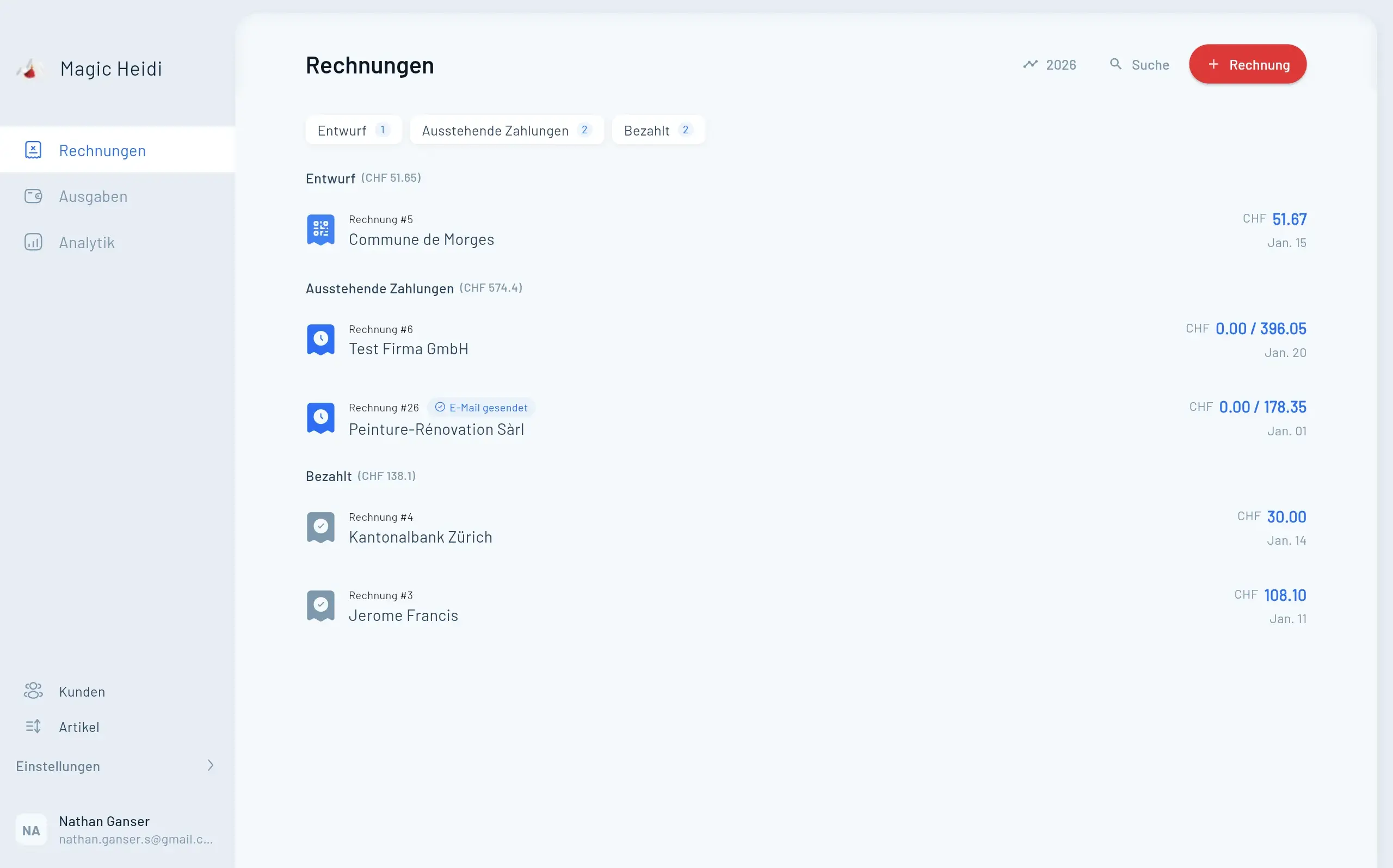
Die einfachste Inventarverwaltung mit Magic Heidi funktioniert über ein Gutschriftsystem aus einer bezahlten Rechnung und mehreren Lieferscheinen. Du erstellst eine Rechnung über die gesamte Bestellmenge, der Kunde bezahlt im Voraus, und jede Teillieferung dokumentierst du anschliessend mit einem separaten Lieferschein, bis die Bestellung vollständig ausgeliefert ist.
In diesem Artikel erfährst du:
- Wie du mit einer einzigen Rechnung und einer Reihe von Lieferscheinen den Überblick behältst
- Eine konkrete Schritt-für-Schritt-Anleitung am Beispiel einer Käseproduzentin
- Drei reale Beispiele aus dem Alltag von Schweizer Selbständigen
- Häufige Stolperfallen und wie du sie vermeidest
- Wann dieses System nicht mehr ausreicht und du eine echte Warenwirtschaft brauchst
Warum klassische Lagerverwaltung für die meisten Freelancer überdimensioniert ist
Wenn du als Freelancer in der Schweiz Wein, Käse, Kaffee, handgemachte Seifen oder andere physische Produkte verkaufst, hast du in der Regel keine 10'000 Artikel auf Lager. Du hast vielleicht eine Handvoll Kunden, die regelmässig grössere Mengen abnehmen, und du möchtest einfach wissen, was noch offen ist.
Eine vollwertige Lagerverwaltungssoftware wie SAP oder Odoo ist hier komplett überdimensioniert. Du bezahlst monatliche Lizenzgebühren, verbringst Stunden mit dem Einrichten von Artikelstämmen und brauchst trotzdem noch einen Buchhalter, der dir hilft. Das macht für einen Freelancer mit fünf bis zehn aktiven Kunden keinen Sinn.
Genau hier setzt der Trick mit Magic Heidi an: Du nutzt Werkzeuge, die du sowieso schon hast, nämlich Rechnungen und Lieferscheine, und kombinierst sie zu einem schlanken Inventarsystem. Lust auf eine schlanke Lösung für deine Buchhaltung? Schau dir an, wie Magic Heidi für Freelancer funktioniert.
Das Grundprinzip: Bezahlte Rechnung plus laufende Gutschrift
Bevor wir in die Schritt-für-Schritt-Anleitung gehen, hier die Grundidee in zwei Sätzen. Du hast immer zwei Dokumente pro Bestellung: eine bezahlte Hauptrechnung, die deine Buchhaltung sauber hält, und eine zweite Rechnung, die du als laufenden "Schuldschein" gegenüber dem Kunden nutzt. Die zweite Rechnung wird nie bezahlt, sondern dient nur zur internen Übersicht.
Warum zwei Rechnungen statt einer?
Die Trennung ist wichtig, weil deine Buchhaltung steuerlich sauber sein muss. Die bezahlte Hauptrechnung dokumentiert den tatsächlichen Geldfluss vom Kunden zu dir. Die zweite Rechnung ist nur ein Hilfsmittel, das nie verbucht wird und am Ende einfach archiviert wird.
So bleibt deine offizielle Buchhaltung schlank und korrekt, während du gleichzeitig den operativen Überblick behältst. Falls dich die Grundlagen der Schweizer Freelancer-Buchhaltung generell interessieren, findest du dazu weitere Beiträge in unseren Tutorials.
Schritt-für-Schritt-Anleitung: So richtest du die Inventarverwaltung ein
Nehmen wir das Beispiel von Lina, einer fiktiven Käseproduzentin aus dem Emmental. Sie hat einen Stammkunden, ein kleines Bioladen-Café in Bern, das jeden Monat eine bestimmte Menge ihres Bergkäses abnehmen möchte. Der Café-Besitzer möchte 10 Kilo Käse zum Preis von 500 Franken im Voraus bestellen und über die nächsten Monate verteilt geliefert bekommen.
Die fünf Schritte findest du als Übersicht direkt unter diesem Abschnitt. Hier die Details zu jedem Schritt:
Schritt 1: Hauptrechnung erstellen und als bezahlt markieren
Lina öffnet Magic Heidi und erstellt eine neue Rechnung an das Café. Sie fügt eine Position hinzu: "Käse, 10 Kilo, 500 Franken". Die Rechnung schickt sie per E-Mail an den Kunden.
Sobald die 500 Franken auf ihrem Konto eingegangen sind, markiert sie die Rechnung in Magic Heidi als "bezahlt". Dieser Schritt ist wichtig, weil damit der Umsatz korrekt in ihrer Buchhaltung erfasst ist. Aus steuerlicher Sicht ist der Vorgang damit abgeschlossen, auch wenn der Käse physisch noch im Reifekeller liegt.
Schritt 2: Zweite Rechnung als laufende Gutschrift anlegen
Jetzt kommt der Trick. Lina erstellt eine zweite Rechnung an denselben Kunden. Diese Rechnung enthält ebenfalls "Käse, 10 Kilo, 500 Franken", wird aber nicht verschickt und nicht als bezahlt markiert.
Diese zweite Rechnung ist Linas internes Inventar-Werkzeug. In ihrem Finanzdashboard sieht sie jetzt einen offenen Posten von 500 Franken, was sie daran erinnert: "Hier schulde ich dem Kunden noch Ware im Wert von 500 Franken."
Hinweis: Diese Rechnung bleibt während der gesamten Lieferzeit offen. Sie ist dein Gegenposten zum bereits eingenommenen Geld.
Schritt 3: Bei jeder Teillieferung einen Lieferschein erstellen
Wenn Lina im Mai die erste Lieferung von 2 Kilo Käse rausschickt, erstellt sie in Magic Heidi keine neue Rechnung, sondern einen Lieferschein. Der Lieferschein enthält nur die Position "Käse, 2 Kilo, 100 Franken, Lieferung vom 3. Mai".
Sie druckt den Lieferschein aus und legt ihn dem Paket bei. Anschliessend reduziert sie in ihrer offenen "Gutschriftsrechnung" die Menge um 2 Kilo, sodass dort jetzt nur noch 8 Kilo beziehungsweise 400 Franken offen sind.
So sieht sie auf einen Blick: "Ich habe schon 100 Franken Käse geliefert, es bleiben noch 400 Franken offen."
Schritt 4: Lieferungen präzise dokumentieren
Es lohnt sich, jeden Lieferschein mit einem Datum oder einer fortlaufenden Bezeichnung zu versehen. Statt einfach "Käse" zu schreiben, nimmt Lina "Käse, Lieferung vom 3. Mai" oder "Käse, Lieferung 1 von 5".
So weiss sie auch Monate später noch, welche Charge wann rausging. Falls der Kunde Fragen hat oder eine Reklamation kommt, ist die Rückverfolgung sauber dokumentiert.
Schritt 5: Bestellung abschliessen und archivieren
Nach mehreren Lieferungen über die kommenden Monate liefert Lina im Oktober die letzten 3 Kilo Käse aus. Die "Gutschriftsrechnung" steht jetzt bei 0 Franken offen. Sie markiert diese Rechnung einfach als bezahlt oder, noch besser, archiviert sie.
Was bleibt, ist die ursprüngliche bezahlte Hauptrechnung über 500 Franken in ihrer Buchhaltung. Die Hilfsrechnung verschwindet im Archiv, und der Vorgang ist sauber abgeschlossen.
Hauptrechnung erstellen
Rechnung über die gesamte Bestellmenge anlegen, an Kunde senden und nach Zahlungseingang als bezahlt markieren.
Gutschriftsrechnung anlegen
Zweite, identische Rechnung erstellen, aber nicht versenden und nicht als bezahlt markieren. Dient als interner Schuldschein.
Lieferschein pro Teillieferung
Bei jeder Lieferung einen separaten Lieferschein mit Menge und Datum erstellen, ausdrucken und beilegen.
Menge in Gutschrift reduzieren
Nach jeder Lieferung die offene Menge in der Gutschriftsrechnung anpassen, damit du den Restbestand siehst.
Vorgang abschliessen
Sobald die Gutschriftsrechnung bei 0 Franken steht, archivieren. Die bezahlte Hauptrechnung bleibt in der Buchhaltung.
Ein zweites Beispiel: Wein-Abo für Restaurants
Schauen wir uns an, wie das Ganze für einen anderen Anwendungsfall aussieht. Stell dir Marc vor, einen fiktiven Weinhändler aus dem Lavaux am Genfersee. Er hat ein kleines Restaurant in Lausanne als Kunden, das im Januar einen Jahresvorrat von 60 Flaschen Chasselas zu 1'800 Franken bestellt und im Voraus bezahlt.
Marc erstellt also seine Hauptrechnung über die gesamten 60 Flaschen, markiert sie nach Zahlungseingang als bezahlt und legt parallel die zweite Gutschriftsrechnung an. Jeden Monat liefert er etwa 5 Flaschen ans Restaurant aus und erstellt dafür einen Lieferschein mit der entsprechenden Menge und dem Lieferdatum.
Im Juli weiss Marc auf einen Blick: "Ich habe 30 Flaschen ausgeliefert, im Wert von 900 Franken. Es bleiben 30 Flaschen offen." Er muss kein Excel führen, keine separate Lagersoftware bedienen und hat trotzdem absolute Klarheit. Im Dezember liefert er die letzten Flaschen, archiviert die Gutschriftsrechnung und der Vorgang ist beendet.
Ein drittes Beispiel: Kaffeebohnen-Abo für Büros
Ein letztes Szenario zur Verdeutlichung. Nehmen wir an, Sophie betreibt eine fiktive Kleinrösterei in Zürich und beliefert mehrere Co-Working-Spaces mit ihren Kaffeebohnen. Ein grosses Büro in Zürich-West bestellt einmal pro Quartal 15 Kilo Bohnen zu 750 Franken und bezahlt im Voraus.
Sophie nutzt exakt dasselbe System: eine bezahlte Hauptrechnung, eine offene Gutschriftsrechnung über 15 Kilo, und für jede der drei monatlichen Lieferungen einen Lieferschein über 5 Kilo. Nach drei Monaten ist die Bestellung komplett ausgeliefert, die Gutschriftsrechnung wandert ins Archiv.
Sophies Vorteil: Sie kann mehrere solche Kunden gleichzeitig betreuen, ohne den Überblick zu verlieren. Jeder Kunde hat seine eigene offene Gutschriftsrechnung, und Sophie sieht in ihrem Dashboard genau, welcher Kunde noch wie viel Ware bei ihr gut hat.
Häufige Stolperfallen und wie du sie vermeidest
So einfach das System ist, es gibt ein paar typische Fehler, die du kennen solltest. Die drei wichtigsten Fallen findest du als kompakte Übersicht unter diesem Abschnitt – hier die Details:
Fehler 1: Die Gutschriftsrechnung versehentlich verschicken
Die zweite, interne Rechnung darfst du auf keinen Fall an den Kunden schicken. Sonst denkt er, er müsse nochmal bezahlen. Magic Heidi erlaubt dir, Rechnungen zu erstellen, ohne sie zu versenden, also nutze diese Möglichkeit konsequent.
Eine Best Practice: Schreibe in den internen Notizen oder im Titel der Hilfsrechnung etwas wie "INTERN – nicht versenden". So vermeidest du Verwechslungen, wenn du später nochmal reinschaust.
Fehler 2: Mengen nicht aktualisieren
Wenn du nach einer Lieferung vergisst, die offene Menge in der Gutschriftsrechnung zu reduzieren, stimmt deine Übersicht nicht mehr. Mach es dir zur Routine: Lieferschein erstellen, drucken, Ware verpacken, und Gutschriftsrechnung aktualisieren. Erst dann ist der Vorgang abgeschlossen.
Fehler 3: Steuerlich falsch buchen
Hier ist der wichtigste Punkt. Die bezahlte Hauptrechnung ist dein steuerlich relevanter Beleg. Die Gutschriftsrechnung darf nicht in deiner offiziellen Buchhaltung als Forderung erscheinen, sonst hast du eine doppelte Erfassung.
Magic Heidi ist hier hilfreich, weil archivierte Rechnungen automatisch aus den aktiven Buchhaltungsberichten verschwinden. Wenn du unsicher bist, lass dich von einem Treuhänder beraten oder schau dir die Magic Heidi Tutorials an.
Gutschrift versehentlich versenden
Die interne Rechnung niemals an den Kunden schicken. Markiere sie deutlich mit 'INTERN – nicht versenden'.
Mengen nicht aktualisieren
Nach jeder Lieferung die offene Menge in der Gutschriftsrechnung sofort reduzieren, sonst stimmt die Übersicht nicht.
Doppelte Erfassung steuerlich
Nur die bezahlte Hauptrechnung gehört in deine offizielle Buchhaltung. Die Gutschrift bleibt internes Hilfsmittel.
Pragmatische Lagerverwaltung
vs. klassische Software
Wann reicht das Magic-Heidi-System aus und wann brauchst du wirklich eine Warenwirtschaft?
Geeignet für dieses System
Typische Schweizer Freelancer-Szenarien mit überschaubarer Kundenzahl und einfachen Produkten.
- Bis zu 20 aktive Lieferpläne
- Einzelne Stammkunden mit Abos
- Wenige verschiedene Artikel
- Vorausbezahlte Bestellungen
- Lieferungen über Wochen oder Monate
Hier brauchst du echte Warenwirtschaft
Sobald die Komplexität steigt, lohnen sich SAP, Odoo oder ähnliche ERP-Systeme.
- Mehr als 30 parallele Lieferpläne
- Hunderte verschiedene Artikel
- Mehrere Lagerstandorte
- Echte Bestandsführung nötig
- Integration mit Webshop oder ERP
Wann reicht dieses System nicht mehr aus?
Ehrlich gesagt: Das beschriebene Vorgehen ist eine pragmatische Lösung für einfache Fälle. Wenn du mehr als 20 bis 30 aktive Lieferpläne gleichzeitig hast, viele unterschiedliche Artikel verwaltest oder echte Lagerbestände über mehrere Standorte hinweg führen musst, brauchst du irgendwann eine richtige Warenwirtschaft.
Für die typische Schweizer Freelancerin, die ein paar Stammkunden mit regelmässigen Lieferungen versorgt, ist das Magic-Heidi-System aber mehr als ausreichend. Du sparst dir teure Software, komplizierte Einarbeitung und behältst trotzdem die volle Kontrolle.
Fazit: Pragmatische Lagerverwaltung ohne Excel-Chaos
Inventarverwaltung muss nicht kompliziert sein. Mit der Kombination aus einer bezahlten Hauptrechnung, einer laufenden Gutschriftsrechnung und einzelnen Lieferscheinen pro Teillieferung hast du in Magic Heidi ein schlankes System, das für die meisten Freelancer-Szenarien völlig ausreicht.
Die Methode funktioniert für Käse, Wein, Kaffee, Honig, handgefertigte Produkte oder jede andere Ware, die du in Teilmengen über die Zeit ausliefern musst. Du brauchst kein Excel-Chaos, keine teure Lagersoftware und keinen Buchhalter, der dir das einrichtet. Du brauchst nur ein klares System und die Disziplin, jeden Vorgang sauber zu dokumentieren.
Probier es einfach beim nächsten Kunden aus, der dir eine grössere Bestellung über mehrere Monate gibt. Du wirst überrascht sein, wie viel Übersicht du gewinnst, ohne irgendetwas Neues lernen zu müssen.
Keine Zusatzsoftware
Du nutzt nur das, was Magic Heidi für Rechnungen sowieso bietet.
Saubere Buchhaltung
Steuerlich relevant ist nur die bezahlte Hauptrechnung, der Rest bleibt intern.
Volle Nachverfolgbarkeit
Jede Teillieferung hat einen eigenen Lieferschein mit Datum und Menge.
Beliebig skalierbar
Du kannst das System für viele Kunden parallel einsetzen, ohne den Überblick zu verlieren.
Professioneller Auftritt
Der Kunde bekommt für jede Lieferung einen offiziellen Lieferschein, das schafft Vertrauen.
Häufige Fragen zur Inventarverwaltung
Muss ich für jede Teillieferung eine neue Rechnung erstellen?
Nein, und genau das ist der Vorteil dieses Systems. Du erstellst nur eine einzige bezahlte Hauptrechnung. Für jede Teillieferung machst du stattdessen einen Lieferschein, der nicht in deiner Buchhaltung als Umsatz erscheint, sondern nur als Lieferdokument dient.
Was passiert steuerlich mit der zweiten Gutschriftsrechnung?
Nichts. Die Gutschriftsrechnung darf nicht in deiner offiziellen Buchhaltung als Forderung erscheinen. Sie ist ein reines internes Hilfsmittel zur Mengenübersicht. Am Ende archivierst du sie einfach, und sie verschwindet aus den aktiven Berichten.
Kann ich dieses System für mehrere Kunden gleichzeitig nutzen?
Ja, absolut. Jeder Kunde bekommt seine eigene Hauptrechnung und seine eigene Gutschriftsrechnung. In deinem Dashboard siehst du auf einen Blick, welcher Kunde noch wie viel Ware bei dir gut hat.
Wie viele Teillieferungen funktionieren noch mit diesem System?
Es gibt keine harte Obergrenze, aber bei mehr als 20 bis 30 parallel laufenden Lieferplänen oder vielen unterschiedlichen Artikeln wird es unübersichtlich. Dann lohnt sich der Wechsel zu einer richtigen Warenwirtschaft wie SAP oder Odoo.
Was mache ich, wenn der Kunde eine Teillieferung reklamiert?
Weil jeder Lieferschein mit Datum und Menge dokumentiert ist, kannst du die jeweilige Lieferung sauber zurückverfolgen. Du kannst dann entweder Ersatz schicken und einen neuen Lieferschein erstellen oder die Menge in der Gutschriftsrechnung entsprechend wieder erhöhen.
Brauche ich dafür einen Treuhänder?
Für das System selbst nicht. Wenn du aber generell unsicher bist, wie du deine Buchhaltung steuerlich sauber führst, lohnt sich eine einmalige Beratung. Schau dir auch unsere Buchhaltungssoftware für Freelancer an.
Probiere die Methode direkt aus
Magic Heidi ist kostenlos testbar, ohne Kreditkarte. Voller Funktionsumfang, in Minuten startklar.
Schlanke Lagerverwaltung in der Praxis
Starte deine kostenlose Testphase und teste die Methode an einem echten Kundenfall.
Bereit für entspannte Inventarverwaltung?
Keine Kreditkarte nötig. Voller Funktionsumfang. Direkt loslegen.