 Magic Heidi
 MWST-Saldosteuermethode mit zwei Saldosteuersätzen
Schritt-für-Schritt-Anleitung für Schweizer Freiberufler, die mit zwei verschiedenen Saldosteuersätzen ihre MWST-Abrechnung in Magic Heidi korrekt erstellen möchten.
Als Schweizer Freiberuflerin oder Freiberufler, der mehrwertsteuerpflichtig ist und die Saldosteuermethode nutzt, kennen Sie das Prinzip: Sie berechnen Ihren Kunden die MWST zum gesetzlichen Satz und führen anschliessend nur den tieferen Saldosteuersatz an die ESTV ab. Die Differenz dürfen Sie behalten. Einfach -- solange Sie nur einen Saldosteuersatz haben.
Doch was passiert, wenn Ihnen die ESTV zwei verschiedene Saldosteuersätze bewilligt hat? Das kommt häufiger vor, als man denkt: beispielsweise wenn Sie sowohl Dienstleistungen als auch Produkte verkaufen, die unterschiedlichen Steuersätzen unterliegen. In diesem Fall wird die Abrechnung etwas komplexer.
In dieser Anleitung zeigen wir Ihnen Schritt für Schritt, wie Sie Magic Heidi so einrichten, dass Sie auch mit zwei Saldosteuersätzen den Überblick behalten und Ihre MWST-Abrechnung sauber vorbereiten können.
Die Herausforderung: Zwei Saldosteuersätze
Manche Freiberufler erhalten von der ESTV zwei unterschiedliche Saldosteuersätze. Sie können bei der Abrechnung nicht einfach alle Einnahmen zusammenzählen und einen einzigen Satz anwenden -- Sie müssen Ihre Einnahmen nach Saldosteuersatz aufteilen und jeweils separat berechnen.
- Dienstleistungen & Produkte: Sie bieten Beratung an (z. B. 6.4 %) und verkaufen gleichzeitig physische Produkte (z. B. 2.3 %).
- Verschiedene Tätigkeitsbereiche: Ihre Geschäftstätigkeit umfasst Bereiche, die steuerlich unterschiedlich behandelt werden.
- Milchbüchlein-Methode: Magic Heidi nutzt eine vereinfachte Buchhaltung -- mit einem cleveren Workaround bilden Sie auch zwei Sätze ab.
Kurze Auffrischung: So funktioniert die Saldosteuermethode mit einem Satz
Bevor wir in die Zwei-Satz-Thematik einsteigen, kurz zur Erinnerung, wie das Standardverfahren funktioniert:
- Sie erstellen eine Rechnung, z. B. über CHF 100.00 netto.
- Darauf addieren Sie die gesetzliche MWST von 8.1 %, was einen Rechnungsbetrag von CHF 108.10 ergibt.
- Der Kunde bezahlt die CHF 108.10.
- Bei der MWST-Abrechnung nehmen Sie Ihr gesamtes Einkommen (brutto, also inkl. MWST) und multiplizieren es mit Ihrem Netto-Saldosteuersatz -- zum Beispiel 6.1 % oder 5.3 %.
- Das Ergebnis ist der Betrag, den Sie der ESTV schulden.
In Magic Heidi lässt sich das bei einem einzelnen Saldosteuersatz direkt über die integrierte MWST-Funktion abwickeln. Unkompliziert und schnell.
4 Schritte zur korrekten MWST-Abrechnung mit zwei Sätzen
Mit diesem Workaround bilden Sie auch zwei Saldosteuersätze in Magic Heidi sauber ab.
Schritt 1: Zahlungsmethoden einrichten
Nutzen Sie die Zahlungsmethoden in Magic Heidi als Unterscheidungsmerkmal für Ihre zwei Saldosteuersätze.
- Öffnen Sie Einstellungen -> Kategorien -> Zahlungsmethoden
- Erstellen Sie z. B. «Banküberweisung -- Saldosteuersatz 6.4 %»
- Erstellen Sie z. B. «Banküberweisung -- Saldosteuersatz 2.3 %»
- Wählen Sie aussagekräftige Namen, die den Satz klar erkennen lassen
Der Trick besteht darin, die Zahlungsmethoden in Magic Heidi als Unterscheidungsmerkmal für Ihre zwei Saldosteuersätze zu nutzen. Falls Sie mehrere Zahlungswege nutzen, können Sie für jeden Zahlungsweg und jeden Steuersatz eine separate Zahlungsmethode erstellen.
Schritt 2: Zahlungen zuordnen
Bei jeder Zahlung, die Sie erfassen, wählen Sie die richtige Zahlungsmethode aus.
- Dienstleistung -> Zahlungsmethode mit höherem Satz wählen
- Produkt -> Zahlungsmethode mit tieferem Satz wählen
- Bestehende Rechnungen können Sie nachträglich anpassen, indem Sie die Zahlung entfernen und mit der korrekten Zahlungsmethode neu erfassen
Schritt 3: Daten exportieren
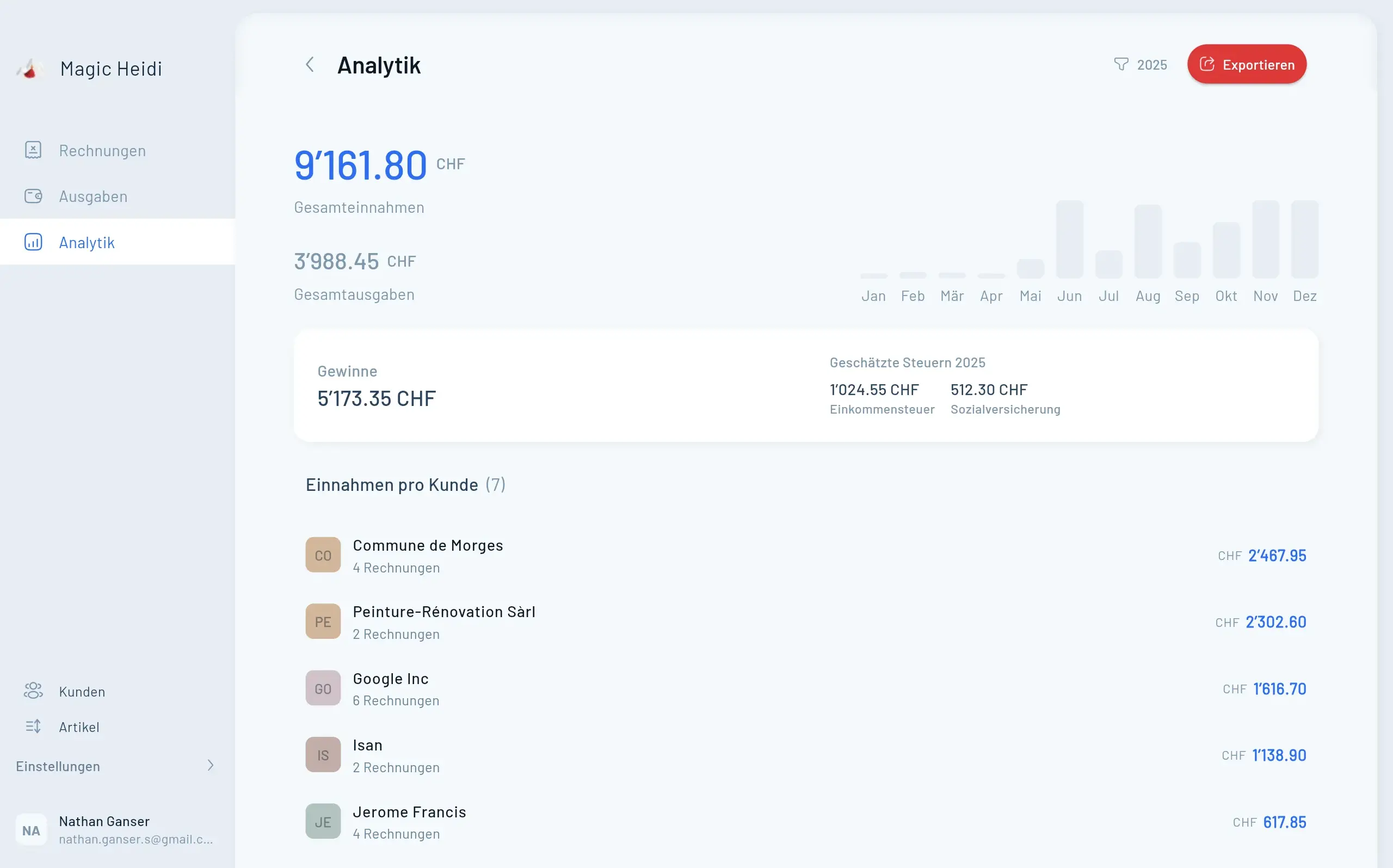
Exportieren Sie Ihre Einnahmen über die Analytik-Funktion als Excel-Datei.
- Navigieren Sie zum Bereich Analytik
- Gewünschten Zeitraum auswählen (Quartal/Halbjahr/Jahr)
- Daten als Excel-Datei (.xlsx) exportieren
- Einnahmen sind nach Zahlungsmethoden aufgeschlüsselt
Schritt 4: MWST manuell berechnen
Berechnen Sie die geschuldete MWST pro Saldosteuersatz in einer Tabellenkalkulation.
- Einnahmen pro Zahlungsmethode filtern und summieren
- Bruttobeträge x Saldosteuersatz = geschuldete MWST
- Beide Beträge addieren = Gesamt-MWST
- Vorlage erstellen für wiederkehrende Abrechnungen
Berechnungsbeispiel
| Kategorie | Bruttoeinnahmen | Saldosteuersatz | Geschuldete MWST |
|---|---|---|---|
| Dienstleistungen | CHF 50'000.00 | 6.4 % | CHF 3'200.00 |
| Produkte | CHF 20'000.00 | 2.3 % | CHF 460.00 |
| Total | CHF 70'000.00 | -- | CHF 3'660.00 |
So berechnen Sie die geschuldete MWST
- Einnahmen für den ersten Saldosteuersatz: Filtern Sie alle Zeilen mit «Saldosteuersatz 6.4 %» -> CHF 50'000.00 x 0.064 = CHF 3'200.00
- Einnahmen für den zweiten Saldosteuersatz: Filtern Sie alle Zeilen mit «Saldosteuersatz 2.3 %» -> CHF 20'000.00 x 0.023 = CHF 460.00
- Gesamt: CHF 3'200.00 + CHF 460.00 = CHF 3'660.00
Tipp: Erstellen Sie sich eine kleine Vorlage in Google Sheets oder Excel, die Sie jedes Quartal oder Halbjahr wiederverwenden können. So sparen Sie bei jeder Abrechnung Zeit.
Häufige Fehler vermeiden
Damit Ihre MWST-Abrechnung mit zwei Saldosteuersätzen reibungslos klappt, beachten Sie folgende Punkte:
- Konsequente Zuordnung: Ordnen Sie jede einzelne Zahlung der richtigen Zahlungsmethode zu.
- Bruttobeträge verwenden: Rechnen Sie immer mit Beträgen inkl. MWST, nicht mit Nettobeträgen.
- Regelmässige Kontrolle: Prüfen Sie monatlich, ob alle Zahlungen korrekt kategorisiert sind.
- Saldosteuersätze prüfen: Die ESTV passt die Sätze gelegentlich an -- prüfen Sie jährlich die aktuellen Sätze.
Zusammenfassung
Auch wenn Magic Heidi primär für die einfache Milchbüchlein-Buchhaltung konzipiert ist, können Sie mit einem cleveren Workaround auch die Saldosteuermethode mit zwei verschiedenen Saldosteuersätzen sauber abwickeln:
- Zahlungsmethoden einrichten -- eine pro Saldosteuersatz.
- Zahlungen konsequent zuordnen -- bei jeder Rechnung die richtige Zahlungsmethode wählen.
- Daten exportieren -- über die Analytik-Funktion als Excel-Datei.
- MWST manuell berechnen -- Einnahmen pro Saldosteuersatz summieren und den jeweiligen Satz anwenden.
Der zusätzliche Aufwand ist überschaubar und lässt sich mit einer einfachen Tabellenvorlage noch weiter reduzieren.