Invoice Template Sole Proprietorship: 10 Swiss Solutions
Looking for an invoice template for a sole proprietorship? 10 Swiss templates and tools with QR-bill, download links, and notes on mandatory fields and VAT.
Founder of Magic Heidi
The most popular recommendation is still: download a Word or Excel template, insert your logo, add an invoice number, and send a PDF. For Switzerland, that falls short. A visually clean invoice is not yet a functioning invoicing process if the QR payment part, the payment reference, the VAT statement, and later the reconciliation with the bank account are missing.
The Swiss QR-bill has been the official standard format for written invoicing in Switzerland and Liechtenstein since 1 October 2022. It has completely replaced the orange ESR and red payment slips. The SIX specifications for the QR-bill are also continuously updated. For sole proprietorships, an invoice template must therefore not only look good, but also bring together payment capability, adaptability, and rule-compliant data.
These ten Swiss solutions range from a free generator for a single invoice to integrated invoicing with accounting, receipt management, and automation. As a rule of thumb: for a one-off case, a generator or an existing template with a QR payment part is sufficient. For regular sending, invoicing software is worthwhile. Those who want to continuously reconcile payments, expenses, and VAT need a complete workflow. This supports sustainable business success, because less time is lost between service, invoice, and payment.
1. Magic Heidi
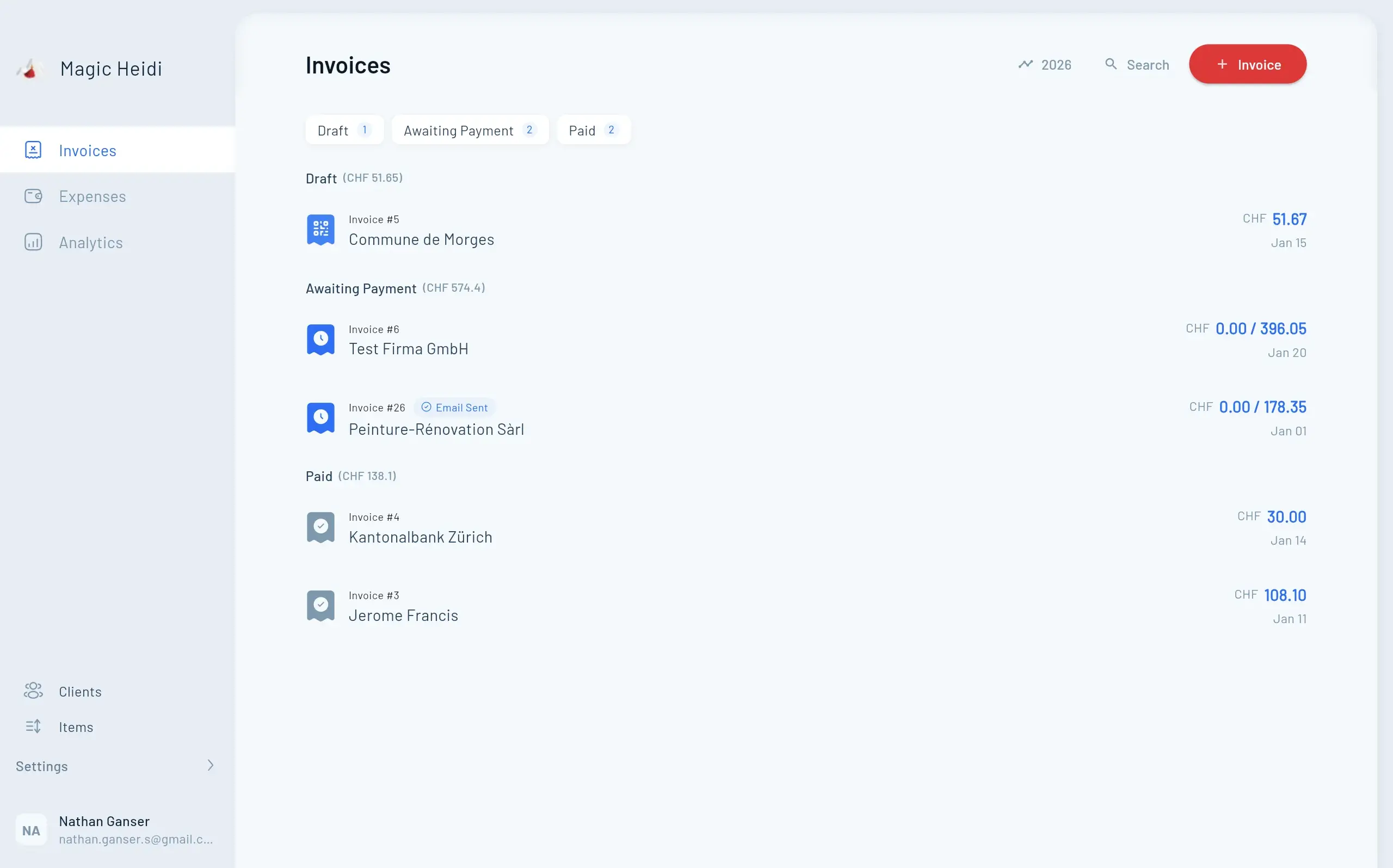
A simple invoice template is sufficient as long as only an occasional single invoice is created. As soon as quotes, expenses, bank payments, and recurring orders are added, the subsequent reconciliation becomes the actual time expenditure. Magic Heidi is aimed at freelancers, self-employed individuals, and sole proprietorships and connects these steps in a lean workflow. The application runs as a web app as well as natively on iPhone, Android, macOS, and Windows.

For sole proprietorships with more than one invoice
Every invoice automatically generates a SIX-compliant QR code and a payment reference. This reduces manual effort for the customer and facilitates later bank reconciliation. Quotes can be converted into invoices. Recurring invoices, partial payments, and credit notes are also provided.
Multiple currencies are supported. The application converts foreign currency receipts into CHF using historical exchange rates. For mixed turnovers, this is more practical than an Excel template where conversion, VAT statement, and booking must be maintained separately.
- VAT logic: The Swiss rates 8.1%, 2.6%, and 3.8% are supported, using the effective method as well as the net tax rate method.
- Receipt capture: Photos and PDFs are read by AI, including supplier, date, amount, VAT, currency, and category.
- Reconciliation: CSV imports from Swiss banks can link payments, invoices, and expenses.
- Handover: Tax-ready exports and a complete data export facilitate collaboration with trustees.
Practical rule: An invoice template only saves time in the long run if it continues to work after sending.
Magic Heidi hosts customer data in Zurich and aligns its practice with the Swiss DPA and GDPR. The free version includes three invoices and three expenses, without a credit card. The Pro plan costs CHF 39 per month or CHF 24.99 per month with annual billing. A 30-day money-back guarantee and cancellation at any time are also included. Current information is available on the Magic Heidi website.
The limits become apparent with complex organizations. Larger companies with deep ERP, role, or team requirements usually need a different solution. A formal annual financial statement may also still require a trustee depending on the legal form. For solo GmbHs and sole proprietorships with daily invoicing and receipt capture, the smaller range of functions remains manageable. A practical guide describes creating invoices with Magic Heidi.
2. bexio
bexio is a Swiss all-in-one tool for quotes, invoices, and simple accounting. For sole proprietorships, the decisive advantage is that the QR payment part is not treated as a retroactive addition. Invoices, customers, debtors, and incoming payments are in one connected system.
When individual orders become an ongoing process
Custom layouts and multilingual templates help to cleanly reflect your own branding. Recurring invoices and automated processes are useful for maintenance contracts, subscriptions, or regular consulting services. A mobile app and integrations facilitate access on the go.
The solution is particularly suitable when you do not want to switch between Word, PDF, and e-banking for every invoice. Payment reconciliation is more integrated than with a pure generator, and quotes can transition into the further invoicing process.
The disadvantage is the scope. Those who only occasionally need an invoice with a QR payment part may pay for functions that are not used in everyday life. The interface can also initially require more training for a very small sole proprietorship than a simple template. For growing businesses with recurring orders and simple accounting requirements, this depth is a real advantage.
3. smallinvoice
smallinvoice focuses on Swiss invoicing and remains lighter than a comprehensive ERP solution. Sole proprietorships create quotes, invoices, and subscription invoices with customizable templates and can represent Swiss QR-bills with or without a reference.
Strong with recurring invoices and interfaces
The tool is suitable for service providers who regularly bill similar services but do not need an extensive accounting environment. Branding, shipping options, and multiple QR variants cover typical everyday requirements. For eBill or shipping via post, Pingen, or SMTP, different paths are available depending on the setup.
The API is the most important difference from a simple invoice template. Those who want to transfer customer data, services, or invoices from another system can technically extend the process. This is interesting for a sole proprietorship as soon as manual transfers between form, PDF, and accounting unnecessarily cost time.
The trade-off lies in transparency and depth. Pricing information is sometimes only visible in the support or account area, and more complex accounting cases require additional effort. A guide to Swiss invoice templates shows why the transition from a static file to an invoicing workflow becomes relevant for many self-employed individuals.
4. KLARA Rechnungsprogramm
The KLARA Rechnungsprogramm is aimed at small companies that want to create quotes and invoices in the cloud and deliver them digitally. The connection to the PostFinance Group makes shipping via the PostFinance ecosystem particularly interesting.
For direct delivery by email or ePost
QR-bills can be created and sent with Smart Shipping. Depending on your needs, email and ePost are available as delivery methods. Recurring invoices and additional payment functions can simplify the process for regular customer relationships.
KLARA is suitable for sole proprietorships with a manageable invoice volume that prefer a bank-related solution. Those who already organize their invoices via PostFinance benefit from a convenient integration and have to coordinate fewer different providers.
The cost structure requires a close look. Individual widgets or services are chargeable, and fees may apply for certain payment methods. For a single invoice per quarter, a free template is probably simpler. For recurring invoicing and digital delivery, KLARA can be the better choice, provided the additional functions are actually used.
5. AbaNinja
AbaNinja offers a free entry into Swiss invoicing and accounting and can be expanded later. When creating a customer invoice, the QR payment part is automatically generated according to the Swiss standard.
Lean start with expansion option
The process from quote to invoice is practical for sole proprietorships that do not want to enter their offers twice. Dunning, optional extensions, and the connection to the ABACUS ecosystem make AbaNinja also interesting for companies that later need more than a pure invoice template.
The free entry is particularly attractive with a tight budget. You can start with a limited range of functions and only expand when customer management, POS, ERP connection, or further automation become relevant.
The downside is the learning curve. A feature-rich interface seems unnecessarily complex for a single invoice. Advanced functions and integrations can also be chargeable. AbaNinja works best when you are consciously looking for an expansion path, not when you just want to create a PDF with a QR payment part.
6. Banana Buchhaltung Plus
Banana Buchhaltung Plus combines invoicing and accounting in an established Swiss solution. Specific Swiss layouts such as CH10, support for QR-bills, and multilingual templates speak for an application that does not end with PDF output.
For sole proprietorships with offline needs
The software is suitable if you keep your own accounting and want to create invoices directly from the booking data. Serial creation from Excel can help with many similar items. Offline usability is another difference from pure cloud services.
Banana is less the quick online invoice template than a tool for users who understand and want to control accounting logic themselves. This can be an advantage if you want to work independently of a browser or manage your data locally.
For pure template needs, however, the solution is rather technical. Depending on the plan, certain QR extensions or layouts may have additional requirements. Before switching, you should therefore check whether you actually want to combine accounting and invoicing or just need a compliant payment part. The cheaper entry does not automatically make a more complex setup unnecessary.
7. PostFinance QR-Generator
The PostFinance QR-Generator is a pragmatic option for sole proprietorships with few invoices. It generates a QR payment part according to the Swiss standard and outputs it as a PDF with payment part and receipt.
The right building block for Word and Excel
You can continue to use an existing invoice from Word, Excel, or a design program and add the QR payment part. This makes sense when layout and texts already work but the payment information has been transferred manually so far.
The generator scores with a short, understandable process and an official provider from the Swiss financial center. Notes on correct paper and print output help to avoid errors in physical shipping. A guide to creating a QR-bill shows the complementary workflow for the self-employed.
The limits are clear: there is no CRM, no customer or article management, and no automatic payment tracking. Each invoice remains a separate process. Those who invoice regularly must continue to maintain number ranges, open items, and incoming payments in a separate solution.
8. Raiffeisen QR-Rechnungs-Generator
The Raiffeisen QR-Rechnungs-Generator is a bank-related self-service tool for the quick creation of a QR payment part in A4 format. The bank-related information is confirmed in the process, after which a PDF can be output.
For individual invoices without additional software
The tool is suitable for sole proprietorships that already work with their own Word or Excel invoice and only need a suitable payment part. The process is manageable and does not require the installation of accounting software.
Particularly practical is the combination of your own document template and bank-related QR generation. You keep your existing appearance and add the payment information only at the end.
You should not expect more from the generator. It does not manage customers, articles, invoice numbers, or open receivables. Recurring invoices and automated payment control are not part of the core of the tool. As soon as several invoices are open in parallel, you therefore additionally need a clean filing system or a separate invoicing program.
9. QR-Bill Generator Pro
QR-Bill Generator Pro is aimed at solo service providers who are looking for a specialized QR-bill workflow but do not want a complete ERP suite. In addition to creating compliant QR-bills, shipping and status tracking are the focus.
When tracking becomes more important than a complex system
The practical difference from a simple generator lies in the tracking. You can send invoices and keep an eye on their status without immediately introducing customer management, warehouse, or extensive company modules. For a sole proprietorship with manageable processes, this specialization can be exactly right.
Swiss data storage is another plus for users who do not want to distribute their invoice data arbitrarily. The service also offers freemium plans, with registration and tariff selection being relevant for the full range of functions.
The tool does not replace full accounting or a CRM. Expenses, VAT settlement, and bank reconciliation remain outside the application depending on the process. Therefore, check in advance whether you only want to improve shipping and tracking or whether you already need a solution for the entire financial administration.
10. Clienta Swiss-QR-Bill-Generator
The Clienta Swiss-QR-Bill-Generator is suitable for freelancers and sole proprietorships who continue to design their invoices in Word or Canva but need a Swiss QR payment part. A Swiss QR-bill is created via a form; alternatively, the service adds the payment section to an existing PDF.
The quick addition for existing PDFs
The PDF upload saves the rebuild of your own template. This is practical for individual orders or occasional invoices. Variable or empty amounts, such as for donations, can also be represented.
Clienta remains an additional tool and does not replace invoicing software. Customer and article management are missing, layout and branding options are limited. Invoice numbers, VAT logic, open items, and incoming payments must therefore be correctly maintained in the previous system.
For a single order, the process is short. With recurring invoicing, the manual effort increases because creation, control, and filing remain separate. Those who want to keep their own template and only add QR compatibility get a suitable solution. For sustainable business success, formal and accounting control continues to belong in your own process.
Top 10 Comparison: Invoice Templates for Sole Proprietorships
| Product | Core Functions | UX & Quality β | Price / π° | Target Group π₯ | USP / β¨ |
|---|---|---|---|---|---|
| π Magic Heidi | QR-bills, AI receipt capture, VAT, bank import, native apps | β β β β β (4.9β ), very intuitive | Free + Pro CHF 24.99/month (annually) π° | π₯ Freelancers, sole proprietorships, solo GmbH | β¨ Unlimited AI scans, SIX QR, CH hosting, quick setup |
| bexio | Quotes, QR-bill, debtor/creditor, integrations | β β β β , widely used | Subscription models, medium level π° | π₯ Self-employed & SMEs | β¨ Many integrations, templates & scalability |
| smallinvoice | QR-bills, customizable templates, subscription invoices, API | β β β β , focused & lean | Various plans / info partly via support π° | π₯ Sole proprietorships, developers (API) | β¨ API-first, flexible invoicing module |
| KLARA Rechnungsprogramm | QR-bill, ePost/email shipping, payment functions | β β β β , good shipping workflow | Basic + paid widgets π° | π₯ Sole proprietorships, PostFinance customers | β¨ ePost integration & payment options |
| AbaNinja (ABACUS) | QR-bill, quotesβinvoice, dunning, add-ons | β β β β , easy entry | Free entry + add-ons π° | π₯ Budget-conscious sole proprietorships | β¨ Free start + upgrade path to ABACUS |
| Banana Buchhaltung Plus | Accounting + invoicing, CH layouts, offline capable | β β β β, technical, stable | Very cheap annual price π° | π₯ Sole proprietorships, DIY accountants | β¨ Offline use, cheap license |
| PostFinance QR-Generator | Online generation QR-bill, PDF download | β β β β , fast & simple | Free π° | π₯ Occasional invoices, Word/Excel users | β¨ Free & official provider |
| Raiffeisen QR-Generator | Create QR payment part, PDF output | β β β β , bank-related & simple | Free π° | π₯ Raiffeisen customers, individual invoices | β¨ Fast, bank-related confirmation |
| QR-Bill Generator Pro | Create QR-bills, shipping & tracking, CH hosting | β β β β, specialized | Freemium / paid plans π° | π₯ Solo service providers without accounting | β¨ Shipping + tracking, CH hosting |
| Clienta (Swiss QR-Bill) | Swiss QR generator, PDF uploader for attaching | β β β β , very fast | Free π° | π₯ Freelancers with their own templates | β¨ PDF attachment, fast workflow |
How the Template Becomes a Clean Invoicing Process
The choice depends less on the most beautiful layout than on the actual workflow. For a single invoice, a generator like PostFinance, Raiffeisen, or Clienta may be sufficient. These tools generate a QR payment part or attach it to an existing PDF, but they do not manage open receivables and do not replace accounting.
A Word or Excel template with an integrated QR payment part makes sense if you want to keep your own design and only standardize the payment information. It solves the document problem, but not automatically the reconciliation with the bank account. Invoice numbers, incoming payments, and receipts must continue to be consistently maintained separately.
For recurring invoicing, bexio, smallinvoice, KLARA, or AbaNinja are stronger. They connect customers, quotes, invoices, and partially dunning. Magic Heidi goes one step further when expenses, bank imports, VAT, and tax-ready exports should also be in one workflow. Banana Buchhaltung Plus is a good alternative for sole proprietorships that want to handle accounting and invoicing offline and more self-controlled.
Before sending, every invoice should cover at least these points:
- Sender information: Name or company, address, and contact details must be clear.
- Recipient information: The customer must be recorded with the correct invoice data.
- Invoice date: The date of issue belongs clearly on the document.
- Service description: The billed work, products, or periods should be described comprehensibly.
- Amount: Subtotals, any discounts, and the final amount must match.
- Payment deadline: The desired deadline should be clearly stated in the document.
- IBAN and QR payment part: The payment data must be correct and match the QR format used.
- UID and VAT statement: UID and VAT must be included if they are relevant for the specific invoice.
- Payment reference: The reference must match the invoice so that the incoming payment can be assigned later.
The VAT question deserves special attention. The threshold of CHF 100,000 turnover for VAT liability is often misinterpreted in everyday life, especially with international customers, mixed services, and invoices in EUR or USD. The notes on Swiss invoice templates and VAT practice make it clear that a selection "with or without VAT" alone does not explain every situation. In case of uncertainty, a trustee should assess the specific tax liability, method, and currency conversion.
Technical currency is also crucial. Version IG QR-bill 2.3 came into force on 21 November 2025. From 30 September 2026, invoices with the old address format will no longer be processed by banks, and from 14 November 2026, structured addresses will also apply to payment orders, as SIX states in the current implementation guidelines. A template that works today should therefore not be archived unchanged.
An invoice template replaces neither the formal examination nor the tax responsibility of the sole proprietorship. It is only a good solution if the entire path is correct, from service recording via the QR payment part to the booked payment and the orderly handover to the trustee.
If you want to combine an invoice template for your sole proprietorship with QR-bill, VAT management, receipt capture, and bank reconciliation, Magic Heidi is tailored to this Swiss workflow. Start with the free version and check directly on your own invoices whether the digital process works better than Word or Excel.