Writing Invoices Template: 10 Tools for QR Invoices | Magic Heidi
Find the best writing invoices template for Swiss freelancers. A comparison of 10 tools for QR invoices, multilingual & with automatic VAT.
Founder of Magic Heidi
The right invoice template is more than just a layout. As a freelancer in Switzerland, you notice this at the latest when your first client asks for a QR invoice and your old Word template suddenly no longer fits properly. Since the introduction of the Swiss QR standard, invoicing is no longer just about looks — it's also about payment logic, reference structure and data quality. For the self-employed and sole proprietors, what matters most is choosing a template or tool that brings together QR invoice, VAT and clean mandatory details without making everyday life unnecessarily complicated. Someone who only invoices occasionally needs something different from someone who has to manage several invoices, expenses and payments every month. That's exactly what this article is about — clear, practical and aligned with Swiss standards.
Table of Contents
- 1. Magic Heidi
- When Magic Heidi is worth it
- 2. UBS QR-Portal
- Who the portal makes sense for
- 3. PostFinance QR-Generator
- What the tool does well and what it doesn't
- 4. Raiffeisen QR-Rechnungs-Generator
- Where Raiffeisen shines
- 5. TKB QR-Generator
- Which working style it suits
- 6. qr-generator.ch
- Everyday strengths
- 7. QR-Bill Generator Pro
- When it's worth it
- 8. Pfeffersack Free QR Invoice Generator + Excel Template
- 9. SwissQRLink
- A good fit for existing templates
- 10. CH-Rechnungen.ch
- Who this makes sense for
- Quick comparison: 10 templates & QR generators for invoices
- Conclusion: Which invoice template suits you?
1. Magic Heidi

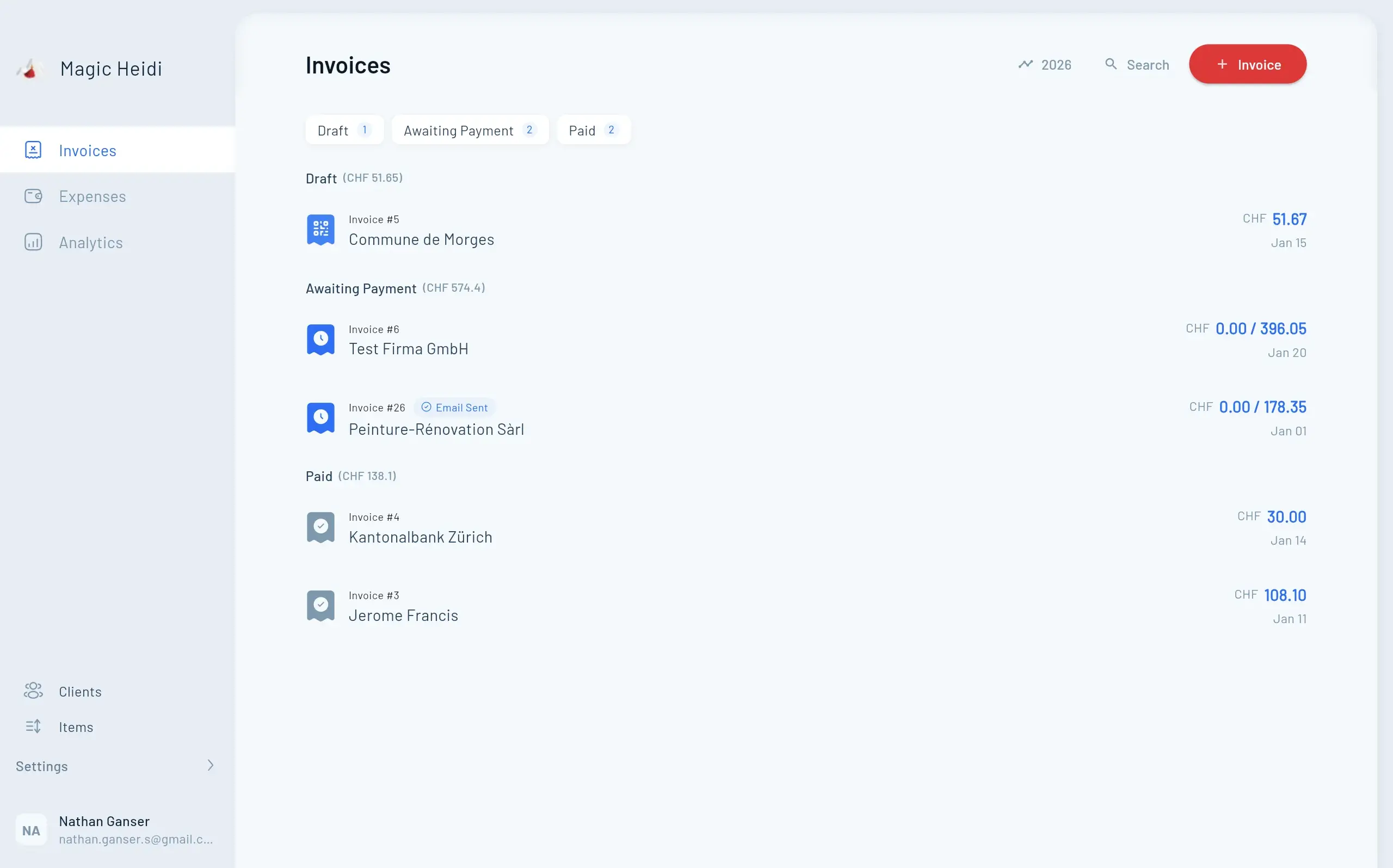
Magic Heidi is the obvious choice when you don't just want to write an invoice, but want to set up your entire invoicing flow properly. The app is consistently built for Swiss self-employed people, sole proprietors and solo GmbHs, with data hosting in Zurich, SIX-compliant QR invoices and a way of working aligned with Swiss data protection practice. In everyday life this means you can manage invoices, receipts, VAT and bank reconciliation in one system, instead of jumping back and forth between template, scanner, bank login and trustee.
The solution is particularly strong where classic writing invoices template files reach their limits. Magic Heidi automatically creates Swiss QR invoices, reads receipts with AI, manages the Swiss VAT rates, supports both the effective and net tax rate methods, and can automatically reconcile payments via bank import. If you invoice internationally, you additionally benefit from invoices in over 50 currencies with historical conversion into CHF. The app runs as a native solution on iPhone, Android, macOS and Windows, as well as in the browser with real-time synchronisation.
Practical rule: If your invoice doesn't end at creation but flows directly into accounting, VAT and the year-end closing, an integrated tool is the cleaner solution than any individual template.
For freelancers, support is also crucial when something doesn't fit. Magic Heidi positions itself clearly as a Swiss solution with simple setup and without unnecessary complexity or SME overkill. The free version is suitable for getting started; the Pro plan unlocks the full feature set. If you're looking for concrete instructions on how a Swiss QR invoice is structured in practice, you'll find them in this tutorial on creating a Swiss QR invoice with Magic Heidi.
When Magic Heidi is worth it
Magic Heidi fits best when you don't just want to send invoices, but also capture receipts, prepare VAT and reconcile payments. Especially for solo businesses, this saves manual intermediate steps that quickly cost time with Word or Excel templates.
If you process several receipts and invoices every month, the question is no longer whether a template is enough, but how much friction you want to save yourself.
The free version is good as a test, but limited. Anyone who works regularly quickly notices that the added value lies in the combination of QR invoice, receipt capture and accounting.
2. UBS QR-Portal
The UBS QR-Portal is a strong option for anyone who wants to work as close to the banking standard as possible. It is free to use for holders of UBS or Credit Suisse accounts and works without a login, which is pleasantly direct in everyday life. For the pure QR invoice, the tool is built to the point, with support for templates, Excel batch uploads, QR-IBAN validation and structured addresses according to SIX specifications.
The big advantage lies in its proximity to the payment process. You create complete QR invoices with logo and letterhead, can prepare batches via Excel and convert account numbers into QR-IBAN. Especially if you already have an existing invoice structure and just want to cleanly add the payment part, this is very efficient. The portal also validates structured addresses, which is becoming increasingly important for Swiss invoices.
The limit becomes clear quickly. The design above the payment part is less flexible than with specialised solutions, and the full benefit is primarily aimed at UBS and Credit Suisse customers. For freelancers with few invoices per month, this can still be exactly enough, because it works directly, close to the bank and without additional effort.
Who the portal makes sense for
- For occasional invoices: If you only invoice now and then and don't need large invoice archiving, the portal is fast enough.
- For existing templates: If your layout is already set, the QR part can be added cleanly.
- For batch invoices: The Excel upload is practical when several invoices are to be created in one run.
Anyone looking for a simple, bank-close solution gets a solid tool here. But anyone who wants to bring together quotes, receipts, VAT and reports will hit limits more quickly.
Website: UBS QR-Portal
3. PostFinance QR-Generator
The PostFinance QR-Generator feels like a solution for people who put clarity before design. The official tool guides you step by step through the creation of a QR-compliant invoice and also explains the surrounding aspects — paper, perforation and shipping. For many small businesses, that's exactly what's helpful, because a QR invoice must not only look correct, but also be printed and sent correctly.
The strength lies in reliability. You work with an official provider and get instructions that make the process understandable. Anyone who prefers to set up invoices cleanly from within the Post ecosystem will find a pragmatic path here. In addition, PostFinance points to suitable QR papers and optionally offers support in branches with print packages.
For Swiss standard cases, an official generator is often better than a pretty tool with unclear logic. With invoices, what counts is that the payment part is read cleanly.
The downside is the limited design freedom. Branding options remain limited, and anyone who wants to strongly adapt their invoice design to their own corporate design will quickly feel restricted. For sole proprietors who primarily need a secure and understandable QR invoice, however, that's not a disadvantage but rather a relief.
What the tool does well and what it doesn't
Good: Step-by-step instructions, official provider, clear guidance on paper and shipping.
Less good: Little room for fancy layouts or deeper process integration.
If you want to keep your invoice template simple and don't expect complex accounting in the generator, PostFinance is a good banking solution. For more automation, you need a different system.
Website: PostFinance QR-Generator
4. Raiffeisen QR-Rechnungs-Generator
Raiffeisen relies on an online tool for QR invoices that works without major detours. You can create single or multiple invoices, download them as PDF or send them directly by email. The interface is multilingual — available in German, French and Italian — which is very practical for Swiss freelancers with different customer groups.
The solution is particularly suitable for SMEs, associations and private individuals looking for a lean, bank-close interface. It does exactly what you expect from a generator, no more and no less. In everyday life that's often an advantage, because you don't have to fight your way through overloaded menus.
The clear trade-off is the limitation to the QR invoice part. The tool does not replace complete accounting software, and anyone who also wants to cover filing, number ranges, expenses and VAT logic needs a more comprehensive solution. For occasional invoices and simple processes, however, it's perfectly adequate.
Where Raiffeisen shines
Multilingualism is more than a comfort feature. Especially in Switzerland, it's helpful when an invoice template remains linguistically flexible, because many freelancers work with clients in several parts of the country. The tool remains uncomplicated and fast.
Website: Raiffeisen QR-Rechnungs-Generator
5. TKB QR-Generator

The TKB QR-Generator is interesting because it thinks digital and physical processes together. It is provided via Lerchmüller AG and allows the creation of single or multiple QR invoices as PDF. On request, printing and delivery are offered, which is useful for anyone who doesn't want to print or envelope themselves.
For TKB customers there is additionally an annual free print quota for the first 100 printed QR invoices. That's a concrete advantage if you not only invoice digitally but also still put paper into circulation. Digitally, the generator is free, and up to 2,000 consecutively numbered QR invoices can be created.
The catch lies in the tie to the customer relationship and the separate terms of the service provider. Anyone who works with TKB gets a fairly convenient overall package. Anyone who wants to remain bank-independent is better off looking at a more neutral solution.
Which working style it suits
TKB makes sense if you're looking for a pragmatic banking solution and don't want to print all invoices yourself. The generator covers the QR part cleanly, but the surrounding service only takes work off your hands where you actually send physical invoices.
Website: TKB QR-Generator
6. qr-generator.ch
qr-generator.ch is almost an industry standard in the Swiss banking environment. The platform is used by several banks and is just as usable for single invoices as for larger volumes. It supports variants with and without reference — QRR, SCOR and NON — as well as QR-IBAN, and additionally offers paper and printing services.
What's convincing here is the stability. If you need a template that isn't playful but solid and standards-compliant, you're in the right place. The solution scales from a few invoices to mass invoicing and is therefore also interesting for freelancers who start small but want to grow cleanly.
The limits lie in branding and interface. Anyone who expects a lot of design freedom won't be happy. But anyone looking primarily for a reliable QR invoice editor gets a tool that is very well anchored in everyday Swiss payments.
Everyday strengths
Compliance: The structure is designed for the Swiss payment standard.
Scaling: Single invoice or larger batches — both are possible.
Practicality: QR paper and printing services are directly included.
Website: qr-generator.ch
7. QR-Bill Generator Pro
QR-Bill Generator Pro is aimed at users who need more than just a single PDF. The tool is multilingual in German, French, Italian and English, works with CHF and EUR, and supports QRR, SCOR and NON as well as QR-IBAN and IBAN. On top of that come automatic VAT calculation, batch and recurring invoices, batch import, email sending and CSV export.
For freelancers with international clients this is strong, because language and currency don't become stumbling blocks. Structured addresses according to the new SIX standard are also already provided for, which makes the tool future-oriented. Anyone who invoices recurrently saves noticeable manual work with templates, history and automation.
The free entry is usable, but limited. The focus is clearly on invoicing, not on complete accounting. That is precisely where the strength and at the same time the limit of the product lies.
When it's worth it
If you regularly send invoices, need several languages and want to standardise your templates, the tool is worth a look. But as soon as receipts, expenses and trustee exports come into play, an integrated solution is usually more efficient.
Website: QR-Bill Generator Pro
8. Pfeffersack Free QR Invoice Generator + Excel Template

Pfeffersack is a useful intermediate step for anyone looking for a writing invoices template with clear practical relevance. The free tool runs without an account, supports CHF and EUR as well as IBAN and QR-IBAN, and in free mode it doesn't store any data permanently. On top of that comes a free Excel invoice template with automatic VAT calculation.
The combination makes sense because it covers two ways of working. Anyone who quickly needs a single QR invoice uses the online generator. Anyone who prefers working with spreadsheets uses the Excel template. For solo businesses and sole proprietors, exactly this freedom of choice is often more practical than a large platform.
The limit is equally clear. The free generator offers no archive and no number range, and the Excel template doesn't automatically integrate the QR payment part. Anyone who invoices regularly and needs clean process logic quickly notices that an integrated solution offers more comfort in everyday life.
From practice: A good Excel template helps at the start, but it remains a template. As soon as you have to keep track of number ranges, archives and incoming payments, it quickly becomes an administrative problem.
For a quick start, Pfeffersack is usable. Anyone who grows later should lift their own invoicing logic onto a system with more structure in good time. For the next step — cleanly adding a QR code to an existing invoice — this guide to QR code integration into invoices helps. You'll also find the right companion in this free invoice template Switzerland from Magic Heidi.
Website: Pfeffersack QR Invoice Generator
9. SwissQRLink
SwissQRLink is the lean solution for anyone who wants to integrate the QR payment part separately. Instead of building a complete invoice, the tool generates a hosted, shareable link for the payment part. That's especially practical if you already have your own invoice design, a CRM or an existing document template and just want to cleanly add the Swiss payment standard.
The lightness is the big advantage. You can create the payment part manually or integrate it via API, and according to the FAQ, entries are not stored permanently. For developers, agencies or freelancers with their own template logic this is interesting, because the QR part doesn't have to determine the entire invoice.
The flip side is obvious. Archive, number range and comprehensive invoicing functions are missing, and the tool deliberately remains focused on the payment part. Anyone who wants to cover the complete invoicing process needs something broader.
A good fit for existing templates
SwissQRLink is strong when your invoice template is already set and you want to cleanly retrofit the Swiss QR part. That's exactly what it's built for — not for accounting, not for quotes, not for reports.
Anyone who only needs the QR part as a building block will find a pragmatic solution here. Anyone looking for a complete invoicing world will be happier faster with an integrated app.
Website: SwissQRLink
10. CH-Rechnungen.ch

CH-Rechnungen.ch is the clear choice for anyone who wants to quickly create a complete Swiss QR invoice or quote without registration. The web app works with a live PDF preview, an integrated QR payment part according to SIX specifications and multilingual documents in German, French, Italian and English. VAT display is also provided for, which is central for Swiss invoices.
The big advantage is speed. You open the tool, fill in the details and immediately have a usable document. For single invoices or spontaneous quotes that's very pleasant, especially if you don't want to create an account and don't want personal data stored in the free tool.
The Pro version adds a customer database, logo and archive. This turns the pure quick tool into a usable small system for recurring invoices. Still, it remains an invoicing platform and not deep accounting software.
Who this makes sense for
CH-Rechnungen.ch fits freelancers well who want to start lean and don't like long setups. Anyone who simply needs a clean, multilingual invoice with a QR payment part gets a swift solution here.
Website: CH-Rechnungen.ch
Quick comparison: 10 templates & QR generators for invoices
| Product | Core features ✨ | Quality & UX ★ | Target audience 👥 | Price/Value 💰 | USP / Special feature 🏆 |
|---|---|---|---|---|---|
| 🏆 Magic Heidi | ✨ QR invoice, AI receipt capture, VAT, bank import, multi-currency, native apps, hosting CH | 4.9★ · native apps, real-time sync | 👥 Freelancers, sole proprietors, solo GmbHs | 💰 Free + one Pro plan (all features) | 🏆 All-in-one accounting, GDPR-compliant, unlimited AI scans |
| UBS QR-Portal | ✨ Swiss QR creation, Excel batch, reference validation | ★★★★ · bank-stable, validating | 👥 UBS/CS customers, invoice issuers | 💰 Free for UBS/CS customers | Bank tool without login (for eligible users) |
| PostFinance QR-Generator | ✨ Online generator, paper/perforation guides, branch service | ★★★★ · clear step-by-step guide | 👥 SMEs, private customers with printing needs | 💰 Generator free; print packages paid | Official provider + branch print support |
| Raiffeisen QR-Generator | ✨ PDF download, email sending, multi creation, multilingual | ★★★–★★★★ · fast & simple | 👥 SMEs, associations, private individuals | 💰 Free generator | Multilingual (DE/FR/IT), bank-close solution |
| TKB QR-Generator | ✨ Batches/PDF, print & delivery service, QR-IBAN support | ★★★★ · incl. free print quota (TKB) | 👥 TKB customers, SMEs | 💰 Free for TKB customers; printing extra | Attractive print quotas (first 100 free) |
| qr-generator.ch (Lerchmüller) | ✨ Editor for single & mass, QRR/SCOR/NON, print options | ★★★★ · industry standard, scalable | 👥 Banks, SMEs, mass senders | 💰 Free start / price varies | Bank-tested, scalable solution |
| QR-Bill Generator Pro | ✨ Multilingual, batches/subscriptions, auto VAT, CSV export | ★★★★ · pro features for batches | 👥 Companies with batch invoices, multilingual users | 💰 Freemium (limited) + Pro plan | Focus on automation & CH hosting |
| Pfeffersack | ✨ Free QR generator, Excel template with VAT | ★★★ · instant start, no account | 👥 Sole traders, Excel users | 💰 Free tool; full product from CHF 5/month | Combination of Excel template + generator |
| SwissQRLink | ✨ QR payment part as shareable link, API option | ★★★ · lightweight, no archive | 👥 Developers, CRM integrations | 💰 Mostly free / no permanent storage | Ideal for retrofitting QR payment parts (link/API) |
| CH-Rechnungen.ch | ✨ Live PDF, multilingual, VAT-capable, no login needed | ★★★–★★★★ · fast live preview | 👥 Users without account, single invoices | 💰 Free; Pro with archive/logo paid | No-signup creation, instant export |
Conclusion: Which invoice template suits you?
The best choice doesn't depend on the prettiest interface, but on how you actually work. If you only write an invoice occasionally, a free bank generator or a lean online tool is often completely sufficient. But as soon as you work multilingually, need batch invoices or want to handle recurring clients cleanly, a specialised solution with more structure is worth it.
For Swiss freelancers, the biggest decision factor today is the QR invoice. Since 30 June 2020, it has been the central standard for machine-readable payments in Switzerland, and modern templates must therefore cleanly map the payment part, references and structured payment data. On top of that comes the VAT logic with the current rates of 8.1%, 2.6% and 3.8%, which must sit correctly in every well-built Swiss invoice template. Anyone working below or above the turnover threshold of CHF 100,000 also needs clarity about whether an invoice must be issued with or without VAT.
This is exactly where the difference between a simple template and a real working solution shows. A Word or Excel file helps at the start, but it stops where number ranges, receipt management, payment reconciliation and export for the trustee begin. Tools like Magic Heidi are therefore particularly interesting for the self-employed who don't want to manage invoices, receipts and VAT separately, but want to keep everything in one Swiss system.
If you want to set up your writing invoices template not just as a file, but as a clean Swiss process, take a look at Magic Heidi. The platform combines QR invoice, VAT management, receipt capture and bank reconciliation in one tool made for freelancers and sole proprietors. If you want to do less manual typing today and lose less time to corrections tomorrow, that's a very sensible next step.