scan receipts

Scanning receipts: a guide for freelancers

Scanning receipts - how to scan receipts correctly: tips on apps, legal compliance and digital bookkeeping for freelancers in Switzerland

Scanning receipts: a guide for freelancers

Scanning receipts: a guide for freelancers

Scanning receipts - how to scan receipts correctly: tips on apps, legal compliance and digital bookkeeping for freelancers in Switzerland

Nathan Ganser avatar
Nathan Ganser

Founder of Magic Heidi

When the same stress returns at the end of March or just before year-end closing, every self-employed person knows the picture: a pile of receipts lying somewhere in a drawer, one voucher missing, and that one business purchase can no longer be properly documented. In practice, it is not the scan itself that costs time and money, but the searching, chasing and fixing when the proof is almost gone. Scanning receipts is therefore not desktop housekeeping, but a simple way to turn paper into immediately usable bookkeeping data.

Scanning receipts – why every freelancer should know about it

The classic scenario is always the same. A freelancer needs the voucher for an expense report, rummages through a folder, finds three similar receipts and realizes that the one critical voucher has already faded or been thrown away. That is exactly the point where a small piece of paper turns into a real bookkeeping error.

A stressed small business owner sits in front of messy paperwork and tries to scan her tax receipts with her phone.

Scanning receipts is therefore far more than archiving. In Switzerland, much business has long been digital, from the QR-bill to mobile banking, and that is exactly where the scanned receipt fits: into a workflow between payment, proof and bookkeeping. Official practice in Germany now even shows that photo and OCR capture is becoming standard in survey processes, because receipts can be captured directly as images instead of being laboriously typed out later, as described by the Federal Statistical Office.

For Swiss freelancers the benefit is very concrete. Those who digitize receipts directly reduce the risk of missing deductions and save themselves follow-up questions from the trustee because the merchant, date and amount are no longer legible later. A suitable receipt scanner is not a luxury, but a routine that makes year-end closing calmer. If you are looking for a practical overview of Swiss receipt scanners, the receipt scanner comparison for Switzerland is a useful starting point.

Practical rule: as soon as a receipt reaches your desk, it belongs in the same digital workflow as the payment or the expense booking.

What is often underestimated is the effect on the entire workday. When receipts no longer end up in a box, bookkeeping becomes not only tidier but also more robust. You notice this at the latest when a business partner, a trustee or a tax audit wants to see not just a photo, but a traceable proof.

Scanning receipts – the right workflow from capture to archiving

Most scanning errors do not happen in the program, but before the first click. A creased receipt on a dark table, lamp shadow at the edge or a half-covered amount are enough for OCR to guess instead of read later. Anyone who wants to do scanning receipts properly therefore starts with the capture, not the app.

How a usable scan is created

The receipt should be flat, well lit and clearly separated. Technically, capturing with at least 600 dpi makes sense, because small print, thin till receipts and weak contrasts remain much more legible, as described in the guide to scanning receipts at AMAGNO. For small receipts, a very pragmatic trick helps, one I only learned to appreciate myself: the receipt is fixed onto an A4 sheet with transparent tape. This way a sheet-fed scanner detects the edges more cleanly, and the receipt remains more archivable after the scan.

Shadows, folds and a busy background are the typical time-wasters. Anyone who wants to use the receipt digitally later should scan it so that no edge is missing and no line item is cut off. For weak or yellowed receipts, a black-and-white scan can improve legibility, because the contrast becomes clearer for text recognition.

What a usable output must contain

A scan only becomes useful once it turns into booking data.

The usual technical process consists of capture, OCR reading, structured extraction and validation. In this process, receipts typically have merchant, date, amount, VAT, currency and category read out and prepared for further processing, often as JSON, CSV or XLSX, as summarized in the OCR practice at Konfuzio. This is exactly the difference between a pretty receipt photo and a genuine bookkeeping input.

A quick quality check before filing saves trouble later. You should above all check:

  • Completeness of the receipt, no cut-off edges, no missing amount.
  • Legible key data, above all merchant, date and total.
  • Plausible tax data, so that an incorrect VAT assignment does not go unnoticed.
  • Clean file name and storage location, so that searching later does not turn into detective work.

The hard truth is simple. A bad scan quickly leads to wrong bookings or to a receipt you would rather not present in an audit. Anyone who gets the workflow right at the beginning saves double work at the end.

AI receipt capture and OCR – how scanners really work today

Many call every scan app "smart", but in practice there is a clear difference between a photo with PDF export and real AI receipt capture. A proper system does not just read text, it builds structured data from the receipt. That is exactly why it is not the camera function alone that matters, but above all what happens afterwards.

The four stages behind a good receipt scanner

The process is usually simply built, even if the interface feels deceptively convenient. First comes the capture, i.e. the image or PDF. Then comes the OCR reading, in which characters are recognized. After that comes the structured extraction, i.e. assigning merchant, date, amount and other fields. At the end comes the validation, and that is exactly where usable software separates itself from an app that merely takes pretty photos.

This validation is the blind spot of many free tools. If an amount is misread or a merchant name is cut off, the system often does not notice without rule checks or manual review. For Switzerland this is especially important, because receipts frequently appear in CHF, EUR or USD and the bookkeeping still has to fit together cleanly.

Why the Swiss setup demands more than a PDF

Swiss practice is demanding because VAT and foreign currencies must not only be read out nicely, but correctly classified. The current Swiss rates have been 8.1%, 2.6% and 3.8% since January 1, 2024, and exactly these values must remain consistent in post-processing so the bookkeeping does not go wrong. A system that only stores an image helps with archiving. A system that outputs data in JSON, CSV or XLSX helps with working.

Important point: when validation is missing, OCR quickly becomes an error amplifier instead of a relief.

Anyone who wants to know how a receipt image, extraction and review become a genuine automation step can also follow the principle well in a general introduction to marketing automation, which shows how processes become more seamless when one step flows cleanly into the next. The same applies to receipts, only with more tax consequences.

In the end, what counts is not whether an app says "PDF", but whether it turns the scan into reliable booking data. Anyone who processes receipts daily or regularly quickly notices that this difference saves time, follow-up questions and corrections.

Magic Heidi as an automation solution for Swiss freelancers

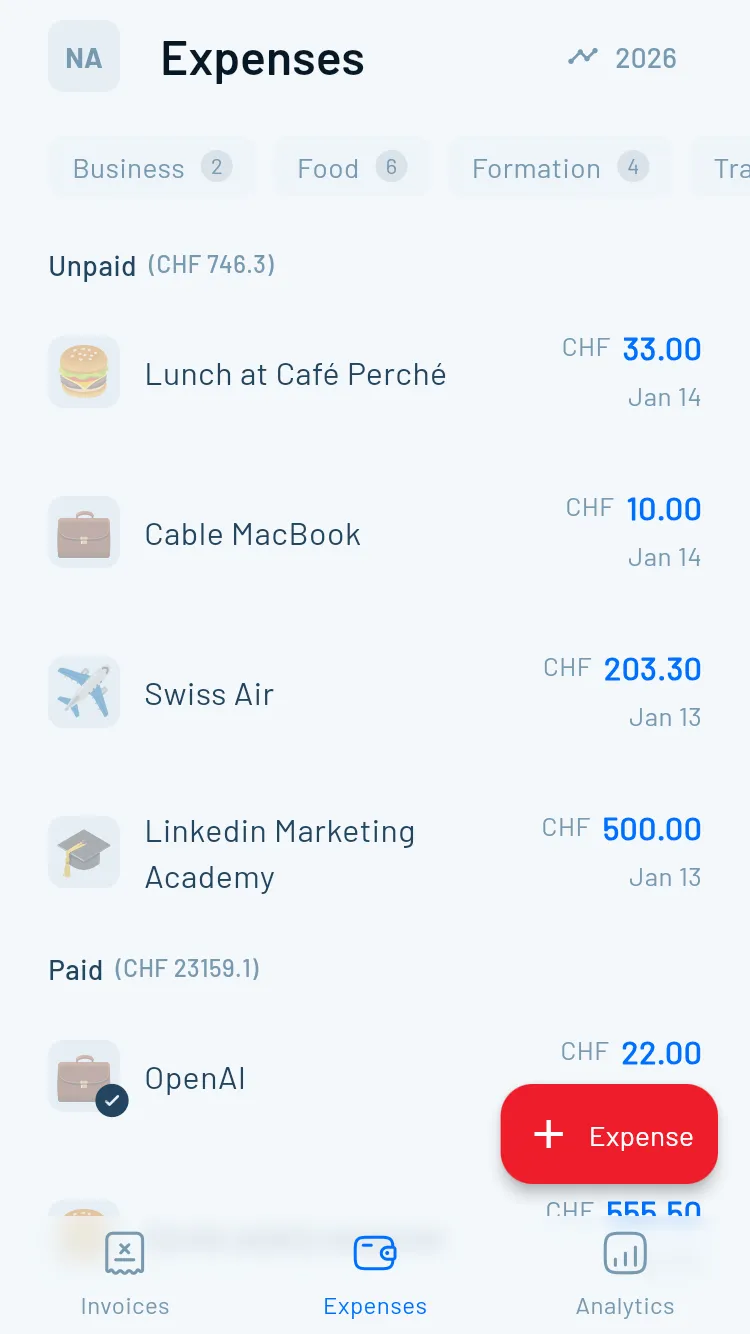
Anyone in Switzerland who wants not just to scan but to keep working directly needs more than a camera app. A solution like Magic Heidi connects receipt capture with invoices, VAT and bank reconciliation in one workflow. This is especially relevant when receipts should not disappear separately into some folder, but flow directly into the bookkeeping.

Screenshot from https://magicheidi.ch

What makes the difference in practice

In daily work, what counts is whether a tool automatically reads out supplier, date, amount, VAT, currency and category and hands this data directly into the rest of the workflow. That is exactly where the advantage of an integrated solution lies compared to a pure scanner app. The receipt does not remain a pretty picture, but becomes part of invoicing, VAT settlement and year-end closing.

For Swiss freelancers, the technical environment is also relevant. Magic Heidi operates the service as a Swiss company with data hosted in Zurich, and the platform is aimed at the everyday life of freelancers, sole proprietors and solo entrepreneurs. Anyone working with multiple currencies or who does not want to handle bank reconciliation manually benefits especially from an environment that processes receipts and statements together. More about the positioning and setup can be found at Why Magic Heidi.

The pricing logic is also part of the decision. When receipt capture runs without extra cost per scan, the psychological resistance to capturing every receipt immediately disappears. That is exactly where everyday life tips from "later" to "right now".

After the factual part, a look at the bigger picture of automation often helps. Anyone who wants to understand how processes work together without constant maintenance can think of the logic behind receipt import, evaluation and reconciliation in terms of the general idea of automation, rather than individual clicks. That is exactly why a tool is worthwhile when you process receipts not just occasionally, but regularly.

Such a system makes the most sense when foreign currencies, VAT accuracy and bank reconciliation often require manual work. Anyone who only scans two receipts a month may need less. But anyone who continuously collects receipts saves not only time with automation, but also input errors.

Legally compliant archiving – retention obligations and format requirements in Switzerland

The real stumbling block comes after the scan. Many believe a photo on the phone or a JPEG in the cloud is already enough as a voucher. For an audit that is too little, because what matters is not only legibility, but also legally compliant, audit-proof archiving.

Infographic on legally compliant archiving of documents and tax-relevant business records in Switzerland according to legal requirements.

What must apply after the scan

For receipts subject to retention obligations, the paper original may only go once the digital version is genuinely reliably archived. The source explicitly names PDF/A as a permissible format, and simply storing it as a file or a backup alone is not sufficient, as described at Beer Sortierservice. That is exactly the difference between "having" and "being able to prove".

The deadlines are clearly tiered. Private individuals should generally keep receipts for 3 years, for craftsman services and household help a 2-year obligation applies, and for companies, self-employed persons and freelancers a 10-year retention obligation applies under § 147 AO, beginning at the end of the calendar year in which the receipt was issued, as summarized by Quittungsgenerator24. In practice, this means that clean digital filing should not only be convenient, but viable for the long term.

The simple checklist for your own filing

If the receipt only looks nice but is not findable, unchangeable and complete, it is not good enough for bookkeeping.

Before final filing, these points should be right:

  • PDF/A instead of a loose image format, so the receipt can be archived in an audit-ready way.
  • Full visibility, i.e. no cut-off amount and no missing edge.
  • Traceable filing, so a receipt can be found again quickly later.
  • Destroy the paper original only after a clean digital process, not earlier.

Especially for Swiss freelancers, the mistake is often not the scanning, but throwing away too early. Anyone who does not set up the digital proof properly risks losing more than just a piece of paper. The right process therefore protects not only against chaos, but also against expensive follow-up questions in VAT matters and audits.


Anyone in Switzerland who wants not just to photograph receipts but to bring them cleanly into the bookkeeping should think of the scanning process together with archiving from the start. Magic Heidi connects receipt capture, VAT management and bank reconciliation so that a receipt becomes a usable bookkeeping record. If you want to capture your receipts in the future without searching, media breaks and unnecessary rework, take a look at the solution directly.